%20png%20copy.avif)

Most advice on website support services tells you to buy uptime, updates, and backups and then relax. That's the wrong purchase for a growth-stage SaaS company. Your site isn't a brochure that occasionally breaks. It's the place where buyers form a shortlist, sales gets checked for consistency, and paid traffic either becomes pipeline or waste.
If your demo form fails without warning, if tracking drops for a week, or if a new claim on the homepage contradicts what an AE said on a call, your uptime report can still look green. You've paid for reassurance, not protection. Website support services should be judged on one question. Does this arrangement keep the revenue system fast, consistent, measurable, and recoverable when something goes wrong at the worst moment?
Buy that. Stop buying a monthly list of completed updates.
A growth-stage SaaS site is a buying surface, not a leftover from the redesign. Support is therefore an operating cost. The five common models differ less in hourly price than in what they promise when the site matters most, during a launch, a campaign spike, or a board-driven push for pipeline.
| Model | Response posture | Fits when |
|---|---|---|
| Hourly specialist | Best effort, often next day | Rare fixes on a stable, low-traffic site |
| Ticket bank | Queued, prepaid hours | Predictable small edits, no launch risk |
| Light maintenance retainer | Named window, often 4–8 business hours | Updates, backups, and a few live bugs |
| Managed platform retainer | Severity-based, includes change budget | Webflow or CMS site tied to pipeline |
| Fractional web owner | Priority plus governance with marketing | Series A–C site that sales and campaigns share |
Hourly specialist work at $125–250 per hour buys skill without a commitment. That's fine for a one-off redirect or template fix. It fails in launch week, when a broken demo form needs an owner in an hour and you have a person who owes you nothing until they reply.
A prepaid ticket bank at $800–2,500 a month burns down on small fixes. A light retainer at $2,000–5,000 adds updates, backups, and a named response window. A managed platform retainer at $5,000–12,000 should add staging, component changes, performance work, and a defined change budget. A fractional web owner at $8,000–18,000 also governs messaging, forms, and analytics with marketing, which is a different job from closing tickets.
None of these models include copy strategy, net-new page systems, paid media, or CRM rebuilds. If a vendor implies they do, ask where those hours sit in writing. Vague inclusion is how retainers become resentment.
A cheap arrangement with no owner is expensive. A large retainer with no backlog owner is also expensive. Price doesn't fix missing accountability.
Pre-PMF, with few templates and no paid program depending on the site, start on tickets with a documented host and clear access. Don't buy governance you can't feed with decisions. Once paid traffic, demo forms, and a sales team depend on the same pages, move to a managed retainer with a named owner.
At Series B to C, where product marketing and sales publish together, you need a fractional owner sitting under the leader who owns positioning. Otherwise the site drifts from the deck one small edit at a time. If you're weighing platform choices as part of that decision, review how a structured Webflow website design approach affects who can publish, test, and roll back safely.
For a broader operational checklist before you sign anything, DesignStack's practical website support advice for 2026 is a useful counterpoint on routine maintenance basics. Use it to cover the hygiene layer, then add the revenue layer most checklists skip.
Pick the row that matches your current dependency on the site, not the row that matches last year's redesign budget.
Stop defining support as a plugin update list. A B2B site now has to let a buyer understand the problem, offer, proof, and fit without a rep in the room, while sales uses the same words in a live conversation. Gartner's survey of 632 B2B buyers conducted in August and September 2024 found that 61% preferred an overall rep-free buying experience and 69% encountered inconsistencies between information on a supplier's website and information provided by sellers. That inconsistency is a support failure, not a copywriting inconvenience.
Think of the site as the showroom that stays open when the sales team is in another meeting. A burned-out light in the entrance isn't a design ticket. It's a lost first impression for every buyer who arrives while nobody's watching.
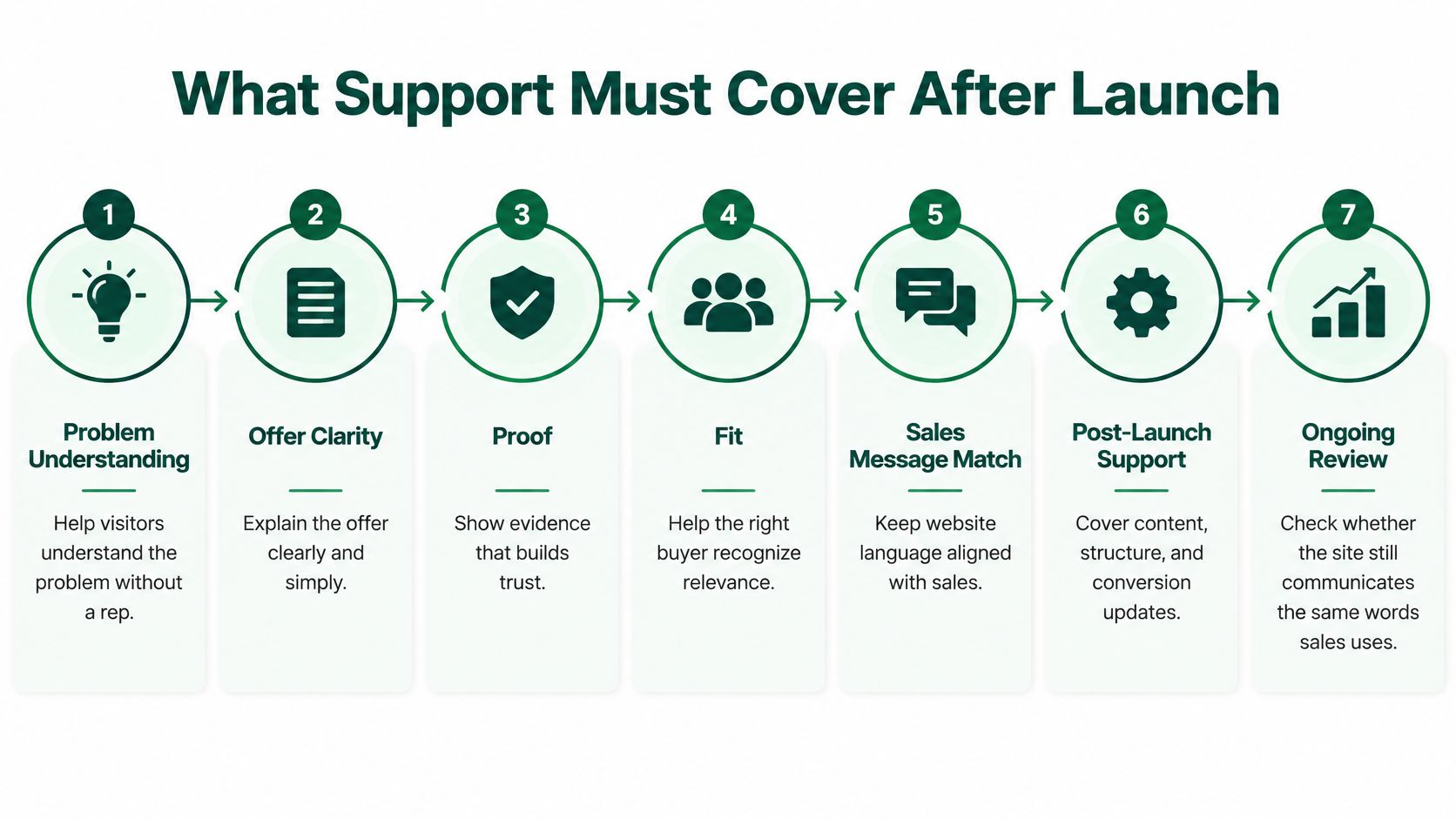
Platform and hosting covers Webflow plan limits, domains, SSL, redirects, and backups. Someone must know when a plan limit, an expired certificate, or a careless redirect will break a campaign URL. If nobody can answer who owns the domain registrar login, you don't have support, you have hope.
Release safety means staging, controlled component changes, and a rollback path. Publishing straight to production is acceptable only when the page doesn't matter. The moment a template feeds paid search or outbound landing pages, unreviewed publishes become unpriced risk.
Security and access includes editor roles, form spam controls, and dependency updates. Give editors the least access they need, remove former contractors promptly, and treat form spam as a data quality problem, because junk submissions pollute routing and reporting.
Content operations deserve more respect than they usually get. A new comparison page with a stale claim, a broken internal link, or terminology sales has already abandoned will cost you credibility in evaluation. A disciplined content strategy for websites gives support a governed system to protect, instead of a pile of pages nobody can audit quickly.
Support keeps the published system true and working. It does not invent positioning or run campaigns.
Work that masquerades as support should be scoped separately. A new narrative, a full redesign, and a CRM migration each need their own owner, budget, and success criteria. Folding them into a retainer guarantees slow delivery and unclear blame when timelines slip.
That boundary protects both sides. Your support partner can say no to strategy work disguised as a ticket, and your marketing leader can't hide a positioning problem behind a request for another page section.
Take the seven scopes above and mark each one in-house, vendor, or unowned. Every unowned row is a future incident with a date you haven't met yet. Fix ownership before you negotiate price, because a discount on an unowned scope is still a gap.
Performance support isn't a launch audit you file and forget. It's an operating loop that runs every month, on real users, on the templates that carry revenue. Google's Core Web Vitals guidance recommends a Largest Contentful Paint of 2.5 seconds or less, an Interaction to Next Paint below 200 milliseconds, and a Cumulative Layout Shift below 0.1. Read those numbers at the 75th percentile of real-user experience, not from a single lab run on office Wi-Fi.
Those thresholds aren't vague advice to make the site faster. LCP tells you how quickly the main content renders. INP tells you how quickly the page responds after a buyer taps, clicks, or types. CLS tells you whether visible content jumps while someone is trying to read or submit a form.
Heavy hero media, render-blocking CSS or JavaScript, third-party tags, and slow server responses inflate LCP. Long main-thread tasks and inefficient event handlers inflate INP, so a form or menu feels stuck after the click. Missing image dimensions, injected banners, and late-loading fonts inflate CLS, which is why a buyer taps the wrong link on mobile.
Segment by device, geography, template, and connection type before you prioritize. A homepage that passes on desktop can still fail on the mobile template your paid campaigns use. Baseline in Search Console or a real-user monitoring tool, isolate the dominant bottleneck on high-intent templates, ship one fix, then recheck after the next data window.
Passing the gate doesn't prove rankings or conversions. Pair every performance change with business events, qualified form submissions, demo requests, and opportunity creation. Practical conversion optimization work belongs in the same review, because a faster page with a confusing offer still won't convert.
Accessibility isn't a scan badge or a widget you install once. Support should protect semantic labels, visible focus states, sufficient contrast, captions and transcripts, and zoom-safe layouts every time a component changes. Automated checks catch missing labels, duplicate IDs, and contrast failures. They can't tell you whether link text makes sense, whether focus order is logical, or whether alt text conveys the intended meaning.
Run automated checks in the publish path, then add a human pass on the demo journey with keyboard navigation and a screen reader whenever a form, navigation pattern, or campaign template changes. Track defects by severity and affected template, so one broken component doesn't replicate across forty pages.
Reporting should connect to pipeline, not ticket volume. Use consistent campaign names, source fields, and CRM stage definitions so a tracking break is visible within days, not at quarter end when finance asks why a channel went dark.
Say a SaaS team launches a campaign page in Webflow. Design review passes, but on mobile a chat widget and two tag containers push INP past the threshold, and demo starts drop. Without field data by template, the team blames ad quality and cuts a working campaign. In another release, a new proof section uses a customer outcome claim sales no longer makes. The page looks polished, and the first AE call starts with the buyer correcting your own website.
Both failures are support failures. A month without a performance note, an access note, and a conversion note is an incomplete month, no matter how many tickets were closed.
A green monthly report can hide a site that has stopped producing pipeline. Plugins are updated, uptime is high, and backups are complete, yet the demo form misfires, attribution disappears, or the hero claim contradicts the sales deck. That is activity reporting, not revenue-system stewardship.

For a smaller company, a single outage can cost far more than a month of support. Patching reduces risk, but it cannot protect pipeline if forms, tracking, sales claims, and recovery procedures go unchecked.
Rank failures by pipeline damage, not technical drama.
A dead or misfiring demo form on a paid landing page comes first. You pay for clicks that reach a path that cannot produce a meeting. Until someone tests the form and confirms leads are routed correctly, the site can look healthy while paid demand goes nowhere.
A tracking outage comes next. The page still converts, but source data stops flowing. A working channel can then look unproductive in the next budget review, leading the team to cut spend that creates pipeline and preserve spend that only reports well.
A claim that contradicts the sales deck creates avoidable friction. Buyers arrive with one expectation, and sellers spend the first call correcting the website instead of discussing fit. A slow or shifting mobile template can also reduce form completions without triggering an uptime alert. And a backup that has never been restored offers no proof that the site can be recovered when a release or incident breaks it.
The video below illustrates the difference between reporting maintenance activity and checking whether the site is ready to support the business.
Uptime is necessary, but it does not prove that the site can sell. Measure how quickly the team can restore a qualified conversion path and its attribution. Ask how long it takes to get the demo form accepting, routing, and tracking correctly again, not only how long the homepage stayed reachable.
The failure's business impact depends on your sales motion. In a product-led signup flow, a broken signup or verification step interrupts activation. In a sales-led demo flow, a broken form or calendar link reduces meetings booked and wastes AE capacity. A generic status page cannot show which outcome is affected.
Require every monthly report to name the last restore test and its duration, the last form check on each primary conversion path, and the person who approves a claim change before publication. These checks turn a maintenance summary into evidence that the site is recoverable, measurable, and aligned with sales. If your vendor cannot answer those questions in one email, the retainer is not protecting the revenue system.
You don't need a lawyer to make a support agreement useful. You need severity definitions tied to revenue, response and restore targets in the order form, and clauses that survive a bad week. Write them in plain language a founder, a marketer, and a developer can all interpret the same way at 9 p.m. during a launch.
| Severity | Example | Response | Restore target | Owner |
|---|---|---|---|---|
| P1 | Site or primary login path down | 15–30 minutes in covered hours | 4 hours | Support with hosting |
| P2 | Demo form, signup, or primary CTA broken | 1 hour | Same business day | Support |
| P3 | Tracking or attribution outage on revenue pages | 4 hours | 1 business day | Support with marketing |
| P4 | Template, content, or CMS defect, conversion still works | Next business day | 2–3 business days | Marketing, support reviews |
| P5 | Enhancement or new section | Next planned cycle | Inside the change budget | Agreed owner |
A P1 means the marketing site or the app-login path from it is unreachable. Response in 15–30 minutes during covered hours and a 4-hour restore target only work if support can act jointly with the host, so name that escalation path before you need it.
A P2 is where most retainers fail. The site is up, the demo form is broken, and a vendor treating it as a normal ticket burns a day of paid traffic. One hour to respond and same-business-day restore is the minimum serious posture for a pipeline page.
A P3 tracking failure needs marketing in the loop, because only marketing can confirm the event, source, and CRM record look right after the fix. A P4 defect that doesn't block conversion can wait for the next business day. A P5 enhancement is not an incident at all, and disguising it as one destroys prioritization for real failures. If search visibility is part of why a template matters commercially, align severity with your view on whether Webflow supports strong SEO execution, so a template defect on an organic landing page isn't under-ranked.
First, define covered hours versus a paid on-call window. A promise of fast response with no stated hours is a promise to argue later. If launches happen on weekends, either buy that window or accept the risk in writing.
Second, require a backup restore test at least quarterly, with the date and duration reported. Third, require a rollback path before production publishes, including who can approve a rollback and how long it takes. A publish process without a reversal process is gambling, not speed.
Fourth, state the change budget and what happens when it's exceeded, including rates, approval thresholds, and whether unused hours roll over. Fifth, write exit terms while the relationship is friendly, covering CMS access, domain and Webflow ownership, repository or backup export, and a 30-day knowledge transfer. If exit feels awkward to discuss, that's exactly why it belongs in the agreement.
The clause that sounds protective and isn't is a high uptime guarantee with small service credits. It can pay you a trivial credit while a broken form costs you a week of meetings. Credits don't restore pipeline.
Watch one edge case. If a product app sits behind the marketing site, don't let a marketing retainer manage application incidents without clear responsibility. Login path failures may be shared, but product uptime, data issues, and in-app defects need product engineering ownership and separate targets.
Attach the severity table to the order form. Response times that live only in a sales slide aren't commitments, and you will discover that at the worst possible moment.
Packages are useful only when the exclusions are as clear as the inclusions. Read the table below for the practical buying range, then read what each tier deliberately leaves out. That's where disappointment is manufactured.
| Package | Includes | Typical monthly price |
|---|---|---|
| Starter ticket bank | Prepaid hours, documented host, form spot checks, quarterly restore test | $800–2,500 |
| Growth light retainer | Updates, backups, 4–8 business hour window, monthly form and landing page checks | $2,000–5,000 |
| Pipeline managed retainer | Staging, component changes, performance gates, change budget, severity targets | $5,000–12,000 |
| Fractional owner | Governance with marketing, claim approval, measurement review, priority response | $8,000–18,000 |
The starter ticket bank suits a stable site with predictable small edits. It excludes launches, new page systems, and any severity commitment beyond best effort. If a campaign launch depends on it, you've underbought, regardless of how competent the freelancer is.
The growth light retainer adds a named 4–8 business hour response window for live bugs and a monthly check of forms and key landing pages. It still excludes copy strategy and net-new pages. Teams often mistake this tier for a web team, then blame the vendor when a new product page takes three weeks.
The pipeline managed retainer is the first tier that can credibly protect revenue pages, because it combines staging, component changes, performance gates, a monthly change budget, and severity targets. It excludes paid media and CRM rebuilds, which should stay excluded so accountability stays clean.
The fractional owner adds priority response, governance of messaging and forms with marketing, claim approval, and a monthly measurement review. It still excludes CRM migrations and paid campaigns. You're paying for judgment and coordination across site, message, and measurement, not for an unlimited production bench.
Every package should state included hours and the change budget in writing. A number that isn't on the order form isn't a commitment, and verbal generosity disappears under workload. Price the package against your stage and your dependency on the site, not against the redesign budget that created it. The redesign was a capital expense. Keeping the buying surface true, fast, and recoverable is the operating cost of having one.
Hiring support shouldn't be a personality test. Run a working evaluation, ask for proof in a fixed order, and treat weak answers as pass or fail. A vendor who is excellent at launches can still be the wrong party to watch a live buying site.
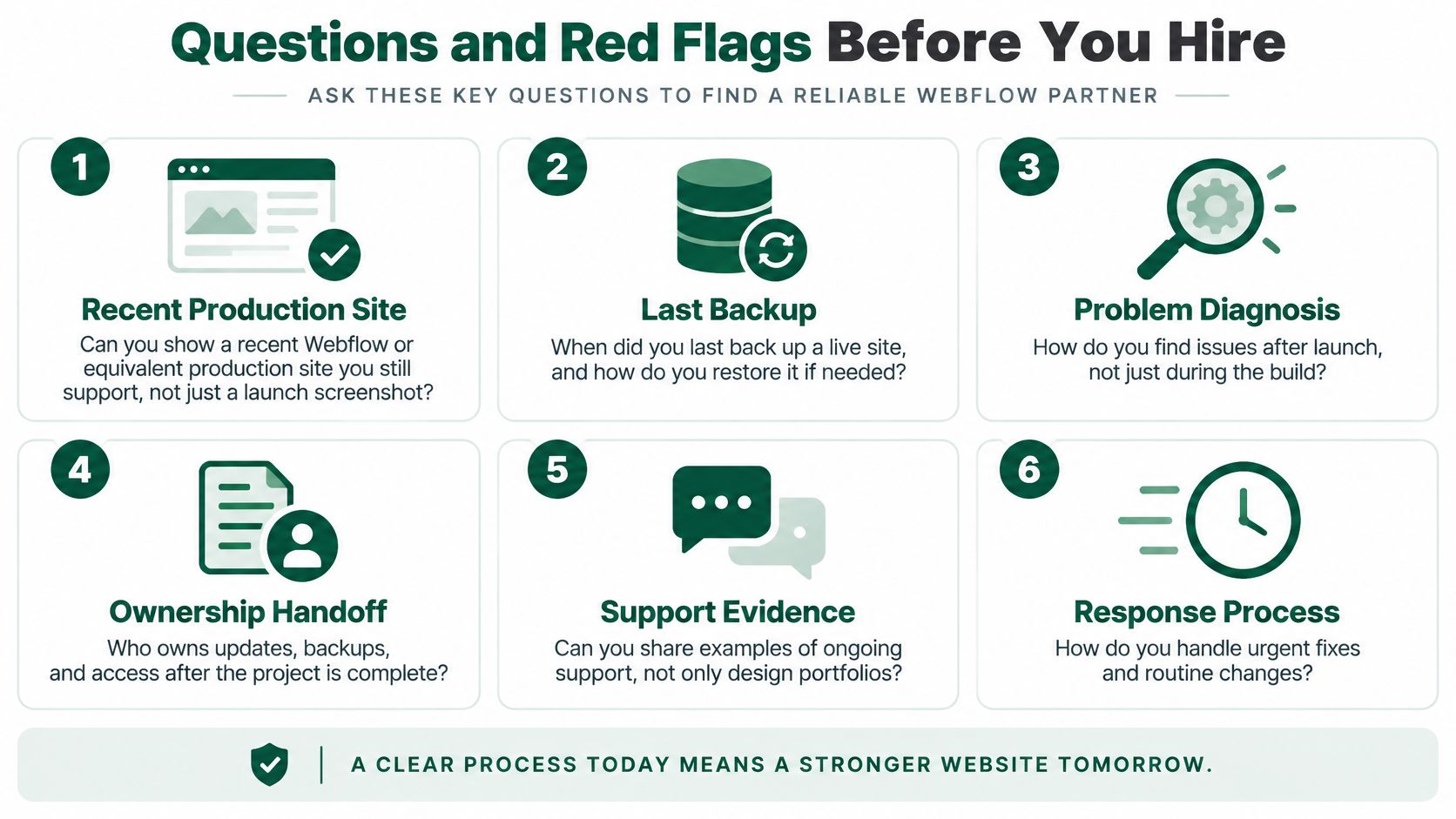
Listen for specifics. A credible answer names the tool, the person, the cadence, and the last time the process caught a real problem. A weak answer describes intentions. Intentions don't restore sites.
Also ask how they diagnose issues after launch, when analytics, a form provider, and a template change interact. Build skill and incident skill are related, they aren't identical, and your evaluation should separate them.
A single shared login is a failed control on day one. No staging means your revenue pages are the test environment. Accessibility described as a widget tells you regression testing won't happen. Performance described as a one-time score tells you field data will be ignored after launch.
A retainer that can't name included hours can't be managed. A vendor who won't say what they refuse to own will eventually own nothing clearly, which means you own every gap. If you're comparing partner types, a grounded view of what a B2B web design agency should and shouldn't do helps separate a build shop from a support owner.
A development shop is right for a build. It's wrong as the only party watching a live buying site if nobody sits with marketing to govern claims, forms, and measurement. That's the gap a strategic partner such as Big Moves Marketing is built to close, by owning positioning, Webflow page systems, and measurement together so support isn't split from the story the site is supposed to tell.
Use one decision rule. If the vendor can't show you a restore, a staging publish, and a form monitor, don't sign for the relationship skills. Charm is not a control, and your pipeline shouldn't subsidize the difference.
If your site carries positioning, demo flow, and measurement, treat support as revenue stewardship and get the ownership, severity targets, and restore proof written down before the next launch. Big Moves Marketing helps B2B SaaS teams keep site, message, and measurement governed as one system, so the pages sales depends on stay true and working. Start that conversation at Big Moves Marketing.





%20-%20white.svg)