%20png%20copy.avif)

Webflow doesn't improve SEO by itself. It gives your team tools to build and maintain a technically sound site. Whether that site earns search visibility depends on what you publish, how you organize it, and whether your operating model still fits the platform as the site grows.
That's why “Is Webflow good for SEO?” is the wrong question for a founder or CMO. The useful question is whether Webflow fits the size and structure of the site you intend to run, and whether your team can govern the work that the platform can't do for you.
The popular answer is that Webflow is good for SEO because it has metadata fields, redirects, and a sitemap. That answer confuses having controls with producing results. A CMS can make it easier to publish a page correctly. It can't decide whether that page serves a valuable search intent or gives a buyer a reason to trust your company.
For a focused B2B marketing site, Webflow is often a sound foundation. It gives marketers access to important technical settings without making every content change dependent on a developer or a collection of plug-ins. That can reduce friction for a team updating product pages, publishing thought leadership, or restructuring a blog after a change in positioning.
But platform fit changes as the publishing model gets more demanding. A site with a clear product story and a manageable content library presents a different problem from a multilingual site with deep taxonomies, faceted navigation, and thousands of generated pages. The second is not a larger version of the first. It's an operational SEO system, with more complicated rules for URLs, indexation, and content relationships.
The operator's test: Don't ask whether Webflow has SEO features. Ask whether your planned information architecture and publishing workflow can operate cleanly within it.
Webflow's job is to provide technical controls and a publishing environment. Your team's job is to choose a market, define page intent, build useful content, connect related pages, and maintain performance. If those responsibilities are unclear, changing CMS platforms won't solve the underlying problem.
The right verdict is conditional, but not evasive: Webflow is a strong default for a focused B2B site. It's a deliberate choice for a large, multilingual, or programmatic one.
Webflow covers much of the technical housekeeping a B2B marketing team needs to manage. Its automatically generated XML sitemap updates when the site is published, and the platform provides an editable robots.txt file for crawler directives. For a launch or redesign, those controls help your team keep the submitted URL set current and manage access to staging areas or pages that shouldn't be crawled.
Redirects matter most when a company changes URLs, consolidates a blog, or reorganizes product content after a repositioning. Webflow's 301 redirect manager supports manual entries and bulk CSV imports, giving the team a way to direct users and crawlers from old addresses to their replacements. Plan that mapping before launch. A redirect tool is useful, but it can't identify which legacy pages still matter to buyers or deserve a direct replacement.
The platform also supports editable page titles, meta descriptions, canonical settings, Open Graph metadata, custom code, and CMS-driven content fields. Those fields help a team build repeatable publishing workflows. For example, a product marketing template can draw page-specific metadata from CMS fields, while a site-wide canonical setup can establish the preferred domain and URL structure. Webflow's native SEO controls are described in its site-level SEO documentation.
| Control | Native behavior | B2B use case |
|---|---|---|
| XML sitemap | Updates when the site is published | Keep new and removed pages reflected in the submitted URL set |
robots.txt | Generated automatically and editable | Control crawler access to staging areas or low-value pages |
| 301 redirects | Supports manual entries and bulk CSV imports | Map legacy blog or product URLs during a migration |
| Metadata and CMS fields | Page titles and descriptions can be edited; CMS fields can support repeatable templates | Give product, solution, and editorial pages distinct metadata |
| Canonical settings | Available globally and at page level | Declare the preferred URL for duplicate or near-duplicate content |
| Custom code and Open Graph | Supports custom implementation and social-sharing metadata | Add implementation-specific markup and control how pages appear when shared |
Teams planning a B2B site should also think about how page structure and content support the buyer journey. Fypion Marketing's B2B lead generation website guide is a useful companion for that broader website question. The technical foundations are also relevant to a more complete SEO approach for technology companies.
These controls are implementation tools, not ranking guarantees. Your team still needs to submit and monitor the sitemap in Google Search Console, keep staging domains out of search, audit internal links, and make sure crawler directives don't block important pages or resources. Webflow can support professional technical SEO without a separate plug-in. It can't make the decisions for you.
Webflow's hosted infrastructure and visual development model can simplify deployment. They don't guarantee that your actual pages will perform well. A template can look polished in a design review and still make buyers wait for the main content or delay interaction with a form.
Google's recommended thresholds for a good page experience are Largest Contentful Paint (LCP) of 2.5 seconds or less, Interaction to Next Paint (INP) below 200 milliseconds, and Cumulative Layout Shift (CLS) below 0.1. These are the targets to check against, not a promise that any CMS or template will meet them. Google explains the metrics and thresholds in its Core Web Vitals guidance.
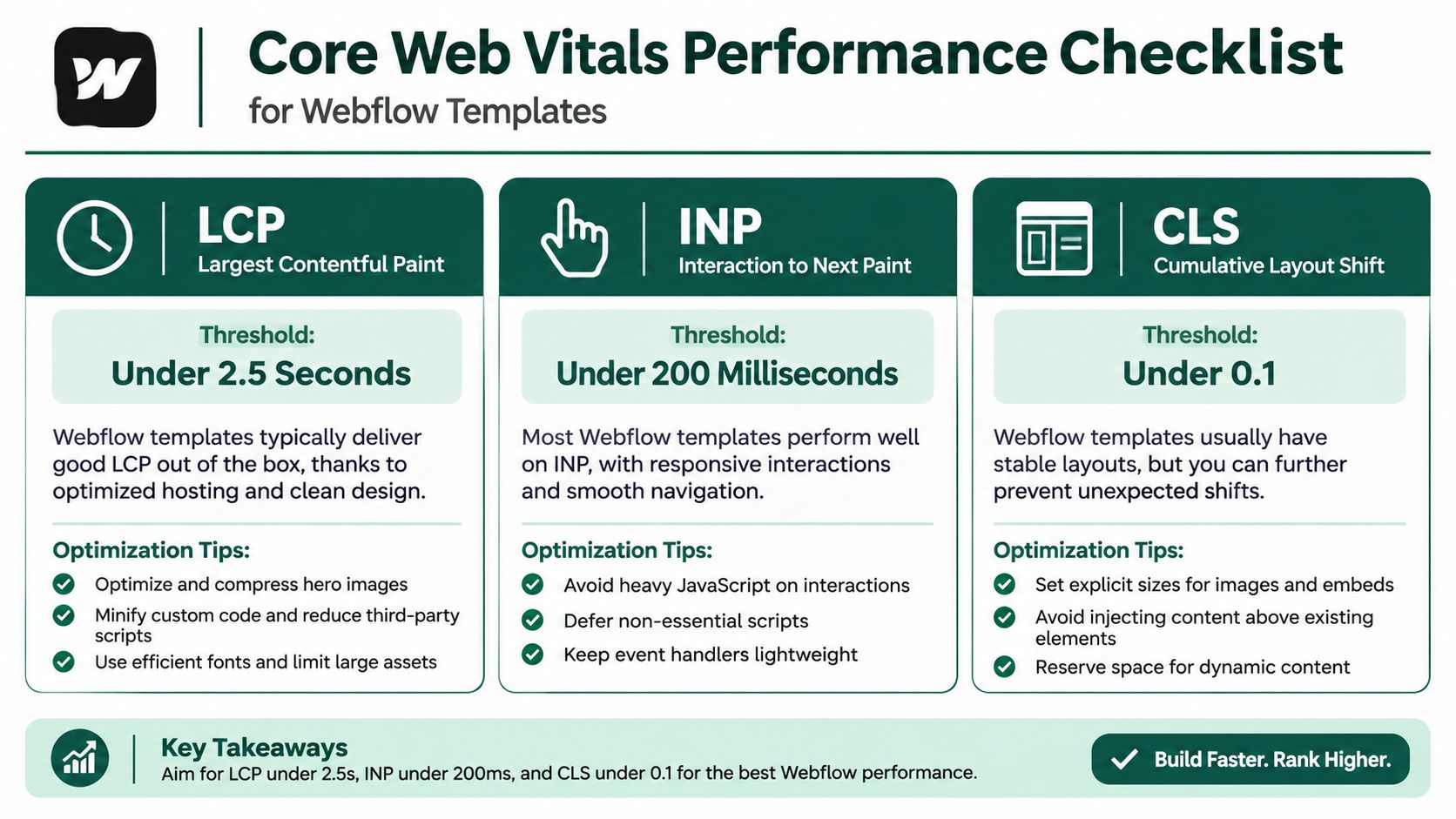
Each metric points to a different operational problem. An oversized hero image or an embedded demo video can delay the main content and hurt LCP. Custom fonts and animation libraries can add loading work. Third-party scripts, marketing automation tags, and other tracking code can compete for resources and slow interactions, affecting INP. Elements that shift as fonts, images, or embeds load can worsen CLS.
Don't judge performance from the designer's preview or a single homepage test. Check important page types, especially high-intent product and landing pages, and compare field data with diagnostic results. Google Search Console and PageSpeed Insights can help identify where to investigate; use real-user data where available, then revisit the same templates after optimizing assets and scripts.
A useful operational rule is to treat every added script, animation, font, or embedded asset as a decision with a performance cost. If a visual flourish doesn't help a buyer understand the offer or take the next step, it's a poor trade.
For guidance on the conversion choices that shape a landing page, see these B2B landing page best practices. The point isn't to make every page bare. It's to ensure that the design earns its cost in clarity and response.
Webflow can help a team configure SEO plumbing. It won't select commercially valuable topics, produce differentiated content, or build internal-link authority. It also won't stop a team from publishing several pages that target the same buyer need, using vague headings, or allowing a resource library to grow without a coherent structure.
Those are marketing decisions. A SaaS company selling to both technical evaluators and finance leaders, for example, needs to decide whether those audiences require different pages, different proof, or different product explanations. A CMS can publish the pages. It can't resolve unclear positioning or make one page meaningfully distinct from another.
Structured data is another area where teams can assume too much. Webflow allows custom code and CMS templates, but schema shouldn't be treated as complete just because the site is built on Webflow. If your structured data depends on relationships among authors, categories, and breadcrumbs, someone needs to define and maintain the relevant markup, then validate it.

A CMS can help you publish a page. It can't give the page a reason to exist.
Webflow has also reported that AI sources generated 8% of its new signups in June 2025, compared with 2% in October 2024, as described in this analysis of Webflow and SEO. That is a company-reported result for Webflow, not evidence that the platform causes visibility in AI answers. For a B2B team, the more practical response is to make the company, product, category, and supporting evidence clear across the site, then measure discovery rather than assuming it.
Authority also depends on how buyers and relevant sources encounter your company beyond its own website. For early-stage teams considering directory presence, this SaaS founder directory submission guide offers a practical reference. Directory work isn't a substitute for strong positioning, useful content, or credible links.
A coherent SaaS SEO strategy connects those responsibilities. The platform can support that strategy, but the marketing team has to own it.
Webflow's constraints tend to matter less for a focused B2B site than for a site with complicated structure and publishing demands. Independent technical analysis identifies potential friction around CMS item caps, deep taxonomies, faceted navigation, pagination, hreflang quality, and the absence of server-log access. An audit of 104 Webflow sites concluded that platform constraints appear primarily with size, structure, and multiple-country implementations, rather than with typical B2B sites. The analysis is available in this technical review of Webflow SEO.

The shift happens when your publishing model becomes more complex than “create a page, give it a clear URL, and keep it connected to the site.” Faceted navigation can create many URL variations. Deep taxonomies make it harder to keep categories and relationships understandable. Pagination affects how content is divided and discovered. Multiple-country sites need reliable language and regional signals. If your team can't govern those systems cleanly, native page-level SEO controls won't make the underlying structure manageable.
The practical dividing line isn't a universal page count. It's the way you plan to publish. A focused site serving one primary market with a clear product structure is a natural fit. A company planning thousands of localized pages, programmatic landing pages, or complex content relationships should test its model against Webflow's CMS limits, pagination behavior, redirect governance, and hreflang implementation before committing to a migration.
Ask the team responsible for the site to model the structure using real content relationships, not a simplified demo. Test how editors will create, update, and retire pages. Confirm that URL changes can be tracked and redirects governed without creating a cleanup problem.
The SEO content strategy discussion should be part of that design decision, not a separate plan bolted on after launch. And for a visual overview of Webflow's SEO considerations, see the video below.
A launch plan should settle the decisions that become expensive when left until after the site is live. Before migration, choose one canonical domain, map legacy URLs to their intended replacements, and decide what should happen to pages that no longer have a useful equivalent. Build metadata fields into CMS templates so editors can provide page-specific titles and descriptions instead of relying on generic defaults.
Also define staging indexation rules and validate schema on the templates where structured data matters. If key product and solution pages depend on structured information, make that implementation part of the build rather than a future cleanup task.
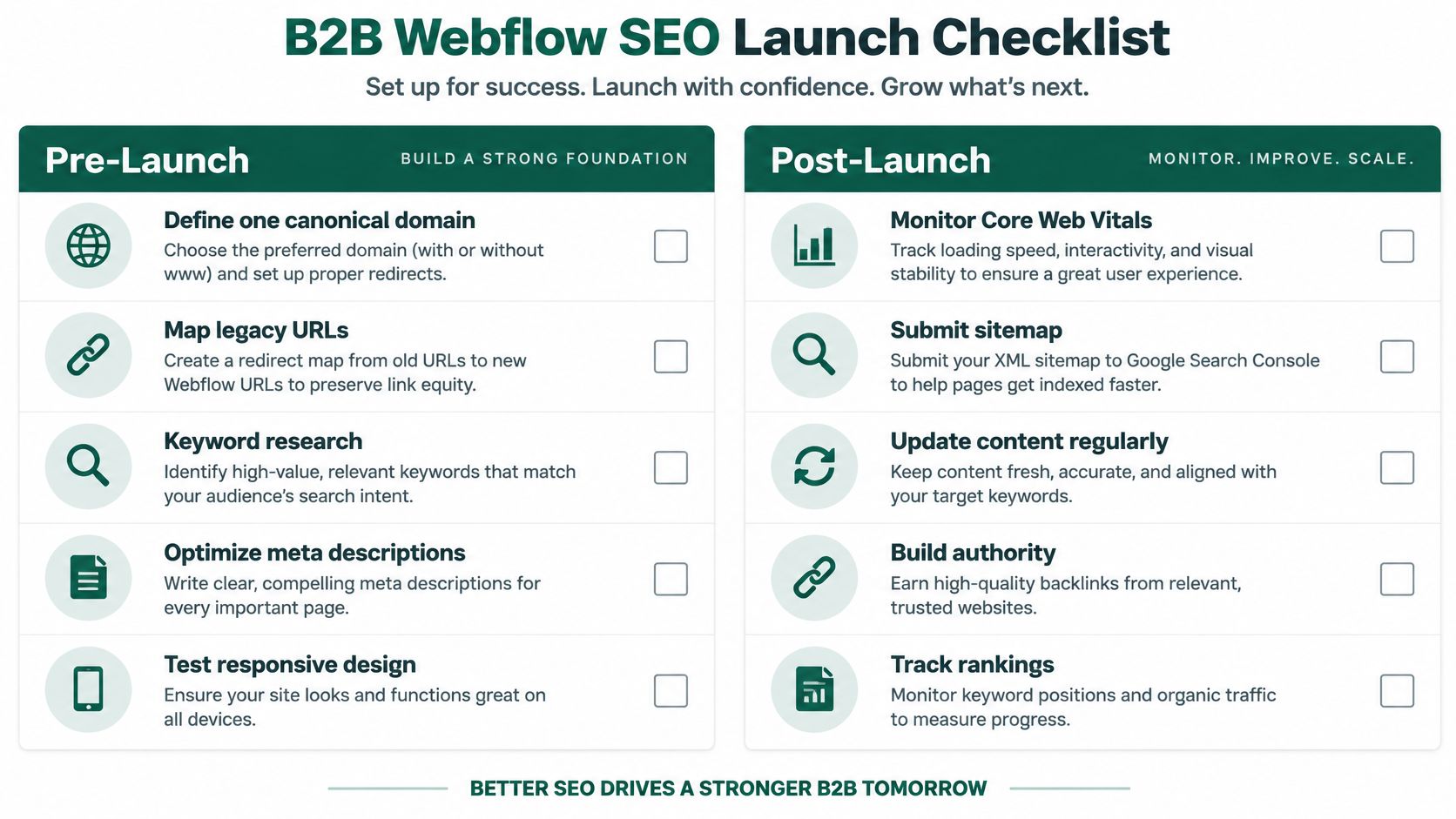
| Phase | Action | Why it matters |
|---|---|---|
| Pre-launch | Define one canonical domain and configure canonical settings | Gives search engines a consistent preferred URL |
| Pre-launch | Map legacy URLs and prepare 301 redirects | Sends visitors and crawlers to relevant replacements |
| Pre-launch | Add metadata fields to CMS templates | Helps editors maintain page-specific metadata |
| Pre-launch | Set staging indexation rules | Reduces the risk of staging pages appearing in search |
| Pre-launch | Validate schema on key templates | Checks that custom structured data reflects the intended page content |
| Post-launch | Submit and monitor the sitemap in Search Console | Helps the team track submitted URLs and indexation |
| Post-launch | Test indexability after major migrations | Catches accidental blocking or missing pages |
| Post-launch | Review Core Web Vitals using real-user data and diagnostic tools | Identifies performance issues on live templates |
| Post-launch | Audit internal links and pagination behavior | Checks whether important content remains discoverable |
For a broader audit process that teams can adapt to their own site, use this SEO audit checklist. Then make ownership explicit: name who checks indexability, who approves redirects, and who reviews performance after significant template changes. A checklist without an owner is just documentation.
B2B teams can also review how their Webflow landing pages fit into the broader site structure. The goal is not to launch without obvious technical mistakes. It's to make the site maintainable as products, positioning, and content priorities change.
For a focused B2B marketing site with one primary market, a clear information architecture, and a team that can govern performance and structured data, Webflow is a strong default. Its native controls cover essential technical work without requiring a separate SEO plug-in, and its visual publishing environment can make routine updates more accessible to marketers.
That recommendation changes when the site depends on complex localization, a large programmatic footprint, deep content relationships, or demanding URL rules. At that point, assess the CMS against the actual publishing system you're building. Don't assume that a platform that works well for the core marketing site will also be the right home for every future SEO operation.
Decision rule: Choose Webflow when your team can keep the site's structure, content, and technical governance coherent inside it. Test other approaches when your publishing model depends on capabilities the platform makes difficult to control.
The deeper lesson is that a CMS decision is also a positioning and operating decision. If the product story is unsettled, the site architecture will reflect that confusion. If no one owns redirects, metadata, and performance, a different platform won't supply the missing discipline. A senior growth partner should help leadership connect those choices to positioning, messaging, and the way the company expects to create demand, not treat the CMS as an isolated technical purchase.
Webflow is neither a ranking strategy nor an SEO liability by default. It's plumbing. Choose it for the site you intend to run, not for the search results you hope a platform will produce.
Big Moves Marketing helps B2B technology leaders clarify positioning, make website and SEO decisions, and connect growth programs to pipeline priorities. If you're weighing a Webflow launch or migration, Big Moves Marketing can help you assess whether the platform fits the site and operating model you're building.






%20-%20white.svg)