%20png%20copy.avif)

A founder opens a private browser window, searches the App Store for the one keyword that matters most, and finds their app on page three. They search again and land at the top of page one, because this time their Search Ad wins the slot. The conclusion feels obvious: spend more on ads and stay visible.
That conclusion treats the symptom. On the Shopify App Store, paid placement and organic rank draw on the same underlying signal: what merchants do after they find your app. An established app with 2,000 or more active merchants that has watched its rank slide for a year or two rarely has an ad budget problem. It has a merchant-behaviour problem that shows up in the ads, the listing, the product, and the reviews at the same time.
This guide is written for that founder. It explains what Shopify has actually documented about ranking, why incumbents lose ground to younger competitors, and how to diagnose which of four factors is leaking rank before spending another dollar on bids.
Search Ads buy a position in a separate auction; they do not lift the organic ranking beneath it. And the auction itself rewards the same merchant behaviour that drives organic rank, so a weak app pays more for less.
Shopify's own documentation describes the mechanics. Every search triggers an auction, and the winning ads are ordered by a combination of bid and relevance, not bid alone. Shopify's worked example shows an app with high relevance taking position one while paying less than a rival with a higher bid, and a top bidder losing the slot because its bid-and-relevance combination fell short.
Relevance is where the two systems meet. Shopify states that when a merchant searches a term and clicks through to your app, your relevance score for that term increases. It also states that if your relevance score is too low, your app cannot compete in the auction at all, and the missing bid suggestion is the tell. An app that merchants skip in organic results therefore enters the ad auction at a disadvantage and pays a premium to overcome it.
Raising a bid can move an ad up immediately. Shopify says so plainly. But every click that lands on a listing which fails to convert, or an install that churns in week one, feeds the same behavioural record that organic search reads. More ad spend into a leaky funnel can widen the gap it was meant to close.
The reframe: the useful question is not "how do we stay on page one?" It is "why do merchants who find us choose someone else?"

Shopify App Store rankings respond to four groups of signals: merchant behaviour after search, reviews and rating, Built for Shopify status, and listing relevance. Shopify does not publish a formula or the weight of each factor, so any ordering is a practitioner judgement rather than a documented rule.
The order below reflects where the evidence is strongest and where established apps most often leak. Treat it as a working hierarchy for prioritising effort. For a deeper walkthrough of each signal, see the Shopify App Store ranking algorithm overview.
Merchant behaviour became the centre of gravity in 2023. On February 27, 2023, Shopify announced that its search algorithm would fold in more data on how merchants interact with results after they search. A second changelog entry extended this on April 26, 2023, adding even more behavioural data. Both entries say term matching still informs results, while keyword stuffing loses its impact.
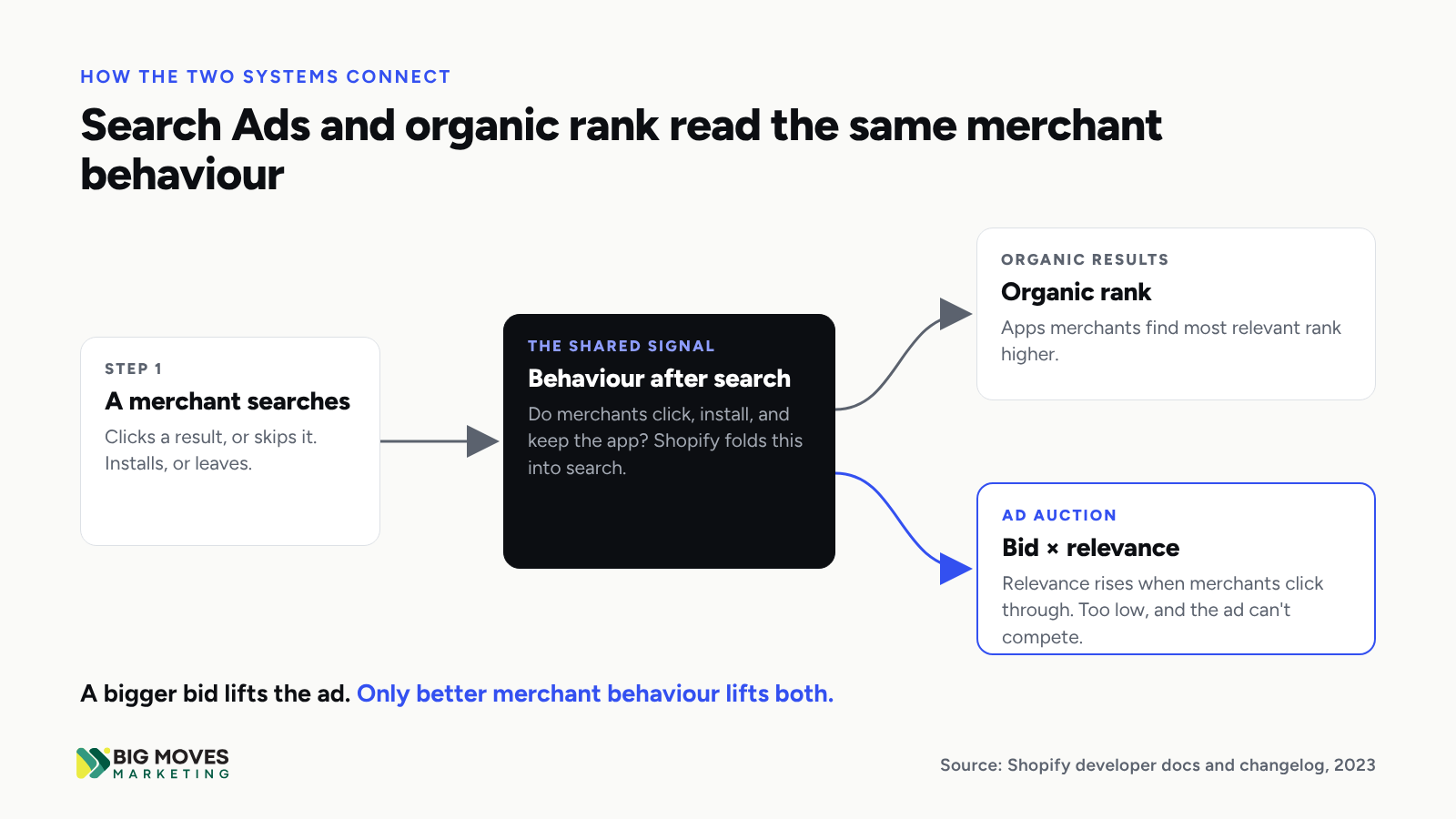
The accompanying Partner Blog announcement added two details that matter for incumbents. Search now includes a mechanism that lifts smaller apps gaining traction, especially high-quality ones. And rankings became more dynamic, with more day-to-day movement than before.
An honest caveat belongs here. Shopify describes the input as behaviour after search. It does not publish a list naming installs, uninstalls, retention, or activation as discrete signals. Practitioners infer those signals from observed ranking movement, and the inference is reasonable: a merchant who installs and keeps an app has interacted with that result more meaningfully than one who bounces. But it remains an inference, and you should weigh it as one.
Reviews affect rank through the displayed rating, and that rating has favoured recent reviews since April 2020. Shopify moved from a historical average to a weighted average that favours recent reviews, so the score reflects the app as it is today. Current documentation goes further: the overall rating is weighted toward recent, useful, and trustworthy reviews, and reviews Shopify archives no longer count toward it.
Three further rules shape review strategy:
The practical consequence: review velocity outweighs review volume. A bank of 900 reviews collected in 2022 carries less weight each quarter, while a competitor earning ten strong reviews a month keeps its rating fresh.
Yes, and it is the most explicitly documented boost available. Shopify states that Built for Shopify apps appear higher in search rankings, carry a badge on app cards in search and category pages, appear under a dedicated search filter, and can target their ads to specific merchant plans. The standards are demanding by design, covering performance, design, and reliability. For an established app, they are also a forcing function for the product quality that drives the behavioural signals above.
The listing does two jobs: it establishes term relevance, and it converts searchers into installs. Term matching still informs results, so the listing must use the language merchants search with. But Shopify's requirements now constrain how. The app card subtitle should summarise value, and Shopify explicitly tells developers not to add keywords to it for search performance. App details should explain functionality without excessive marketing keywords, and listings may not include statistics or claims like "the best."
The listing's second job matters more after 2023. Every merchant who clicks and leaves is a behavioural data point. Clarity, a gallery that shows the real interface, and pricing that answers the merchant's first question are ranking work, not cosmetic polish. For keyword selection itself, see keyword research for Shopify app growth.
Established apps lose rank because the algorithm now rewards current momentum over accumulated history. Every documented change since 2020 points the same direction.
Consider how each signal treats an incumbent. Recency-weighted ratings discount the old review bank. Behavioural ranking measures how merchants respond to the app today, not how many installed it in 2021. The trending mechanism lifts a smaller rival that is gaining traction. Built for Shopify gives a boost to whichever app meets the bar first, regardless of age. And the ad auction favours whichever app merchants already click.
The pattern that follows is predictable. A competitor ships a cleaner onboarding flow. Its activation rate rises, its recent reviews improve, and its organic position climbs. The incumbent sees fewer organic installs, buys more ads to compensate, sends paid traffic to a listing that converts below the category, and records more weak installs. Each cycle compounds the last.
Incumbency still carries real assets: brand recognition, an installed base that can produce fresh reviews, and data on what successful merchants do. The task is to convert those assets into current signals.
Diagnose the leak by following a merchant through four checkpoints in order: search ad, listing, first session, and review. The first checkpoint where performance falls below your category tells you where to work first.
Each checkpoint below follows the same scaffold: the symptom, where to look, what it usually means, and the first move.

Symptom: healthy click-through on ads and organic results, but few installs per click.
Where to look: the Search Ads report in the Partner Dashboard, which Shopify built so you can compare install rates independently of click-through rate.
What it usually means: merchants are interested enough to click, then the listing fails to convince them. A strong CTR paired with a weak install rate isolates the problem to the listing page itself: positioning, messaging, gallery, or pricing. As a practitioner benchmark rather than Shopify data, category leaders tend to convert roughly 20–25% of clicks into installs and mid-range apps 15–20%. An app converting in single digits has room to double its installs from the same traffic.
First move: rewrite the introduction and subtitle around the merchant's outcome, rebuild the gallery around the real interface, and make the pricing section answer "what does this cost a store my size?" Then measure install rate weekly.
Symptom: rising cost per install, missing bid suggestions, or ads that trigger on searches unrelated to your core job.
Where to look: the relevance column, match types, and the search-term report. Shopify uses a 30-day post-click attribution window for installs, so judge keywords over at least a month.
What it usually means: budget is spread across broad terms with weak relevance. Broad match is Shopify's default and suits discovery, but it can match synonyms and loosely related searches. Exact match triggers only on the precise term.
First move: sort keywords into three tiers. High-volume, high-relevance core terms get exact match and the bulk of budget. Low-volume, high-relevance long-tail terms get exact match at modest bids, because they often convert best. Broad match stays in a small discovery budget, mined weekly for new exact terms and negatives. Where relevance reads "low," fix the listing and the post-install experience before raising the bid.
Symptom: installs arrive, but many merchants uninstall within days or never complete setup.
Where to look: install and uninstall data in the Partner Dashboard, paired with product analytics that track the first session step by step.
What it usually means: the gap between install and first value is too long. Merchants installed for one outcome and met a configuration screen, an empty state, or a theme step they could not finish.
First move: define the activation event, the single action that predicts a merchant will stay. Map every step between install and that event, remove the steps you can, and support the rest with in-app guidance and a short email sequence. Track time to first value as a weekly metric owned by product.
Symptom: a solid lifetime rating, but few reviews in the last 90 days, or recent reviews that skew lower than older ones.
Where to look: the date and star distribution of your most recent 20 reviews, compared with the top three competitors in your category.
What it usually means: the review engine stalled. Often the team still asks during the free trial, which has been impossible since December 2024.
First move: move the review request to the moment of proven value once the merchant has left the trial, such as the first successful outcome the app delivers. Use neutral wording, reply to every review, and route every support resolution into a timely, compliant ask. Shopify has also observed a positive correlation between replying to reviews and updated star ratings.
Marketing should own the listing and Search Ads; product and customer success should own the post-install experience and review velocity, with marketing contributing expertise. Splitting ownership this way matches each fix to the team that controls the lever.
Listing optimisation and ads management are marketing work with marketing tools, and they can move within weeks. Activation and reviews depend on the product itself: onboarding flows, in-app messaging, support quality, and documentation. Marketing can diagnose the friction and design the motion, but only the teams who build and support the product can remove it and sustain the result.
Doing the listing and ads work alone produces a ceiling. A better listing sends more merchants into the same first session. If that session still loses them, the behavioural record barely improves, and neither does rank.

The first 60 days should establish a baseline, fix the fastest leaks, and set up weekly measurement for the slower ones. A practical sequence:
Expect listing and ads metrics to move first. Organic rank follows more slowly, because it responds to accumulated merchant behaviour. The Built for Shopify gap analysis can start in parallel as a longer-term product roadmap item.
Yes, selectively. Defending your core, high-intent terms with exact-match bids keeps you visible while the underlying fixes take hold, and it protects installs you would otherwise lose to a competitor's ad.
The discipline is to buy visibility where the economics hold. Bid on terms where your install rate is at or above your listing average, and track cost per retained merchant rather than cost per install. Pull back on broad terms that deliver clicks without installs, because those clicks cost money and add nothing to your relevance. Paid placement buys time. The listing, the first session, and the review engine decide what that time is worth.
Expect listing and Search Ads metrics to respond within weeks and organic rank to respond over months. Install rate changes as soon as the new listing goes live, and ad efficiency improves once budget moves to proven exact-match terms. Organic rank lags because it reflects accumulated merchant behaviour and a rating that weights recent reviews, so improvements need time to build a new record. Shopify has also said rankings move more from day to day than they did before 2023, so judge progress on multi-week trends rather than single readings. A realistic plan sets 60-day targets for install rate, activation, and review velocity, and treats organic position as the lagging indicator that confirms those inputs are working.
Shopify has not published uninstall rate as a named ranking factor, so no one outside Shopify can state its exact weight. What Shopify has documented is that search incorporates how merchants interact with results after they search, and that apps merchants find most relevant rank higher. An uninstall within days is strong evidence that an app was not the right result, and many practitioners report rank declines alongside rising early churn. The prudent approach treats early uninstalls as a likely negative signal and a certain commercial loss. Reducing them through faster activation pays off whether or not Shopify weights them directly, because retained merchants also generate the recent reviews the rating rewards.
Ask after a merchant has moved onto a paid or free non-trial plan and has seen the app deliver value. Since December 11, 2024, merchants on any trial plan, including paid trials, cannot leave reviews, so requests during a trial waste the moment. Only merchants with the app installed, or who recently uninstalled it, are eligible. Shopify requires neutral wording and forbids incentives or withholding features in exchange for a review, whether the request happens in-app or by email. The strongest timing pairs the ask with a concrete success, such as the first completed workflow or a resolved support ticket, because merchants who just experienced value write more specific, more useful reviews.
A falling rank on the Shopify App Store is a verdict on how merchants respond to your app today. Search Ads can hold a position while you respond, but they cannot overturn the verdict. Find the checkpoint where merchants leave, assign it to the team that controls the lever, and measure it weekly. Fix the listing so the right merchants install. Fix the first session so they stay. Fix the review motion so their experience shows up in your rating. Rank follows the merchants.




%20-%20white.svg)