%20png%20copy.avif)
Email marketing for SaaS doesn't fail because teams send too little. It fails because they measure activity instead of product movement. Lifecycle benchmark data puts SaaS email open rates broadly around 20% to 40%, while one software and web app benchmark reported a 39.31% open rate and 1.15% click rate. Another benchmark summary estimates that email can generate approximately £36 to £40 for every £1 spent, but those returns only materialize when messages move users toward activation, expansion, or retention rather than producing another open. (SaaS email benchmarks and ROI data)
For founders and revenue leaders, the strategic question isn't whether email still works. It does. The question is whether your email system is connected tightly enough to the product, customer data, and commercial model to create revenue that can be attributed and improved.
Most SaaS companies treat email as a broadcast channel. They send a newsletter, announce a feature, promote a webinar, and occasionally remind trial users that their evaluation is ending. The calendar fills up, the team reports open rates, and leadership still can't explain which messages caused users to adopt the product or expand an account.
That operating model confuses distribution with orchestration. A batch send reaches a list because the marketing calendar says it should. A lifecycle message reaches a user because a product event, support interaction, or account signal shows that the message is relevant now.

A newsletter can support positioning and keep a category narrative alive. It can't compensate for an onboarding experience that leaves new users confused, a trial that never reaches a meaningful product event, or an account that has stopped using a core feature.
The strongest programs assign each sequence a commercial job:
Benchmark data supports separating these jobs rather than forcing every send into one global KPI. Trial welcome and onboarding emails average 50% to 65% opens, 12% to 20% click-through rates, and 5% to 12% conversion, while trial-expiry and upgrade emails average 35% to 50% opens, 6% to 12% click-through rates, and 8% to 20% conversion. Churn-prevention emails average 30% to 45% opens, 5% to 10% click-through rates, and 3% to 8% conversion. (SaaS lifecycle email benchmarks)
These ranges don't tell you what your product should achieve. They do show why a single blended open rate hides useful information. A transactional or lifecycle message has a different recipient intent from a newsletter, so its success should be judged by what happens after the click.
Start with the events that indicate progress inside the product. Account creation is rarely the activation event. For a developer platform, it might be a successful API call. For a sales platform, it might be a completed workflow shared with a team. For an analytics product, it might be a connected data source and a viewed report.
Your email system should recognize those events and change the message accordingly. If the user has already completed the critical setup action, don't keep sending setup instructions. Move them toward depth, collaboration, or a relevant use case. Teams that need a more detailed consent and list-quality framework can also review this double opt-in guidance, particularly when they're building a permission-based lifecycle system.
Practical rule: If a sequence can't name the product event it is meant to influence, it probably isn't a lifecycle sequence yet.
Segmentation isn't a contact-database exercise. It's a decision about which different user situations deserve different commercial treatment. A founder who segments only by company size or job title may have useful firmographic data, but still send the wrong message to two users with completely different product behavior.
A better model combines lifecycle stage, product usage, account context, and revenue potential. Each dimension answers a different question. Lifecycle stage tells you where the relationship stands. Usage tells you what the user has done. Account context helps explain buying authority and use case. Revenue potential determines how much human attention or expansion focus the account warrants.
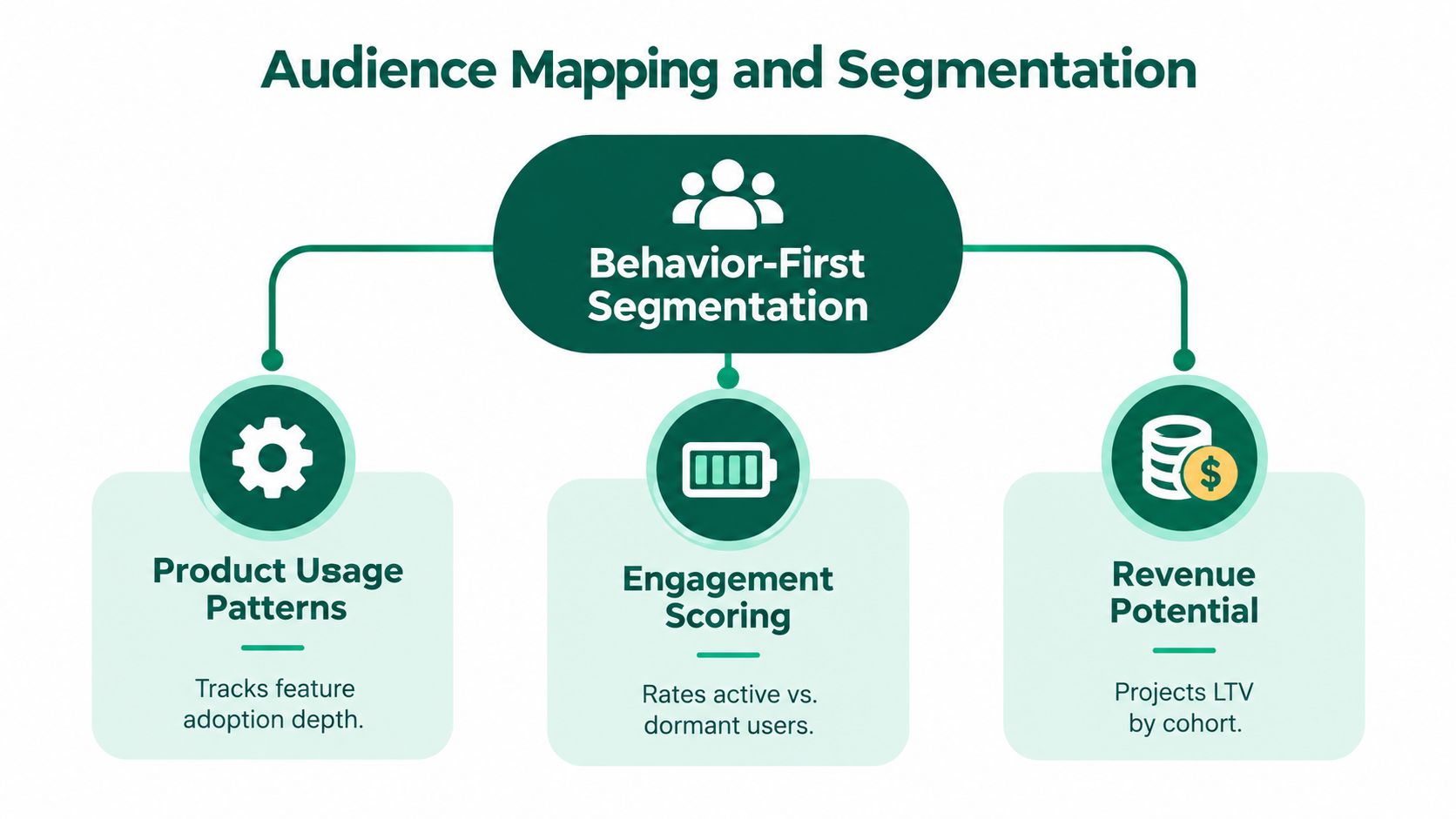
Use a practical mapping process.
Define the product milestones. List the events that distinguish a visitor, a new account, an activated user, a habitual user, and an expansion-ready account. Don't start with the fields your CRM happens to contain. Start with the behaviors that correlate with value.
Separate active from merely reachable. A contact who opens emails but never returns to the product isn't necessarily engaged. Compare email activity with logins, feature use, collaboration, support activity, and completed workflows.
Create behavior-based cohorts. Useful cohorts include trial users who activated a core feature, trial users who completed setup but stalled before value, accounts with declining usage, and customers whose usage is approaching a plan limit.
Add firmographic context after behavior. Company size, role, industry, and sales segment can change the message, but they shouldn't override clear product evidence. A small account showing strong team adoption may deserve more expansion attention than a larger account with shallow use.
Define exit conditions. A segment should update when behavior changes. If an inactive user returns and completes a meaningful action, remove them from the winback flow immediately.
Behavior-first segmentation also prevents a common PLG mistake. Teams often send the same upgrade prompt to every free user, even though one user may be exploring casually while another has built a workflow the team now depends on. The second user needs a conversion message tied to continuity and capability, not a generic discount.
For a useful grounding in list structure and audience logic, this segmentation guide for B2B from Machine Marketing provides a helpful complement to product-event analysis. The strategic point remains simple: segment when the recipient's situation changes, not merely when a campaign needs a new list.
A strong audience map should let a revenue leader answer, in plain language, why a recipient is receiving a message and what action the company expects next. If nobody can answer both questions, the segment is probably too broad or the trigger is too weak. Teams building a broader segmentation model can use this B2B customer segmentation framework as a reference, but the product should remain the source of truth for lifecycle behavior.
Onboarding email should not explain the entire product. That approach overwhelms new users and shifts the burden of prioritization onto people who don't yet understand what matters.
The sequence should help each user reach the smallest meaningful product outcome as quickly as possible. That outcome differs by product. A developer tool may need a working integration. A sales platform may need a first pipeline workflow. A collaboration product may need a second user invited and a shared project completed.
A useful onboarding architecture has distinct messages, but not necessarily fixed calendar intervals.
Event-based timing matters because a calendar assumes all users move at the same speed. They don't. A user who completes setup immediately should receive depth-oriented guidance, while a user who hasn't started needs friction removal. A message sent at the wrong stage can make a good product look harder than it is.
Open rate is a useful diagnostic, but it isn't the onboarding outcome. Track the product events that indicate progress:
Use micro-actions carefully. Asking a user to connect a source, import a record, or complete a short setup step can create momentum. Asking them to read a long resource, attend a webinar, and review every feature before using the product adds work without proving value.
Email infrastructure also affects activation. Invalid addresses and poor list hygiene create delivery failures before the user has a chance to act. A practical resource such as this Email Validation API can help teams think through validation as part of the acquisition and onboarding system rather than as an afterthought.
The best onboarding sequence is often shorter than the product team expects. It removes decisions, adapts to behavior, and hands the user back into the product at the exact point where the next action is obvious. Teams reviewing the broader experience can also use these customer onboarding best practices to connect email prompts with in-product guidance.
Acquisition gets attention because it creates visible activity. Expansion often creates better economics because the customer already understands the product, has existing usage, and has a reason to care about additional capability.
The mistake is treating expansion as a recurring promotional campaign. An account shouldn't receive an upgrade email just because the team has a quarterly target. It should receive a relevant commercial message because its behavior indicates a new need or a growing dependency.
Expansion signals vary by business model, but the reasoning is consistent. Look for evidence that the current plan, workflow, or user configuration is becoming insufficient.
Common signals include:
The email should interpret the signal rather than expose raw tracking. If a team is using a reporting feature heavily, explain how a more advanced reporting workflow could reduce manual work. If several departments have joined, make the case for governance, permissions, or shared visibility. The message earns attention by connecting the next capability to an observed business situation.
A generic nurture stream can educate. An expansion sequence must also create a credible reason to change. That doesn't mean manufacturing urgency. It means showing the consequence of staying with the current setup when the customer's workflow has already moved beyond it.
Preference centers and opt-down choices give active customers more control over frequency and topic. They also help separate valuable product guidance from announcements that can wait. A customer who reduces promotional email may still want usage education, billing notices, or support-related communication.
The video below illustrates how customer journey thinking can shape the relationship between lifecycle communication and product behavior.
Measure expansion against the action that matters, such as an upgrade, an additional workspace, or adoption of the relevant capability. Clicks and replies help explain intent, but they don't replace revenue attribution. If the campaign produces engagement without account movement, the team may have found an interesting topic rather than a commercial trigger.
Churn prevention deserves the same strategic seriousness as acquisition. A new lead starts with uncertainty. An existing customer who is disengaging starts with product knowledge, historical context, and a reason they once believed the solution mattered. That gives the company a better foundation for intervention, but only if the team notices the risk early.
The weakest winback email says, “We miss you.” It asks the customer to return without explaining what changed, what problem the product can solve now, or what help is available. Re-engagement works when it responds to a recognizable pattern.
Set signals around declining behavior, not just a cancellation event. Examples include fewer meaningful sessions, loss of a core feature, unfinished setup after an account change, unresolved support friction, or a sudden drop in activity from a previously active team.
Then design the sequence around the likely cause:
The sequence should escalate thoughtfully. Start with useful guidance, then invite a response or a specific product action. An incentive may be appropriate for a price-sensitive segment, but a discount won't repair a broken onboarding path or an unaddressed product gap.
Retention reporting often becomes vague because teams count any customer who remains active after a campaign. That makes the program look effective without proving causation. Define the intervention, the at-risk condition, the recovery action, and the resulting commercial outcome.
A recovered account is more meaningful when the system can show that the user received a targeted message, returned to a relevant workflow, resumed meaningful usage, and remained active. For a sales-led account, connect the sequence to the customer success or sales follow-up rather than claiming email created the result alone.
A winback message should make returning easier, not make leaving feel guilty.
The practical value of reducing customer churn comes from finding the product and account signals that precede cancellation. Email is the intervention layer. It isn't the diagnosis.
A lifecycle email program can have excellent copy and still underperform because the measurement model is wrong or the messages don't reach the inbox. Senior teams should treat creative, data, and deliverability as one operating system.
Start by assigning a primary downstream metric to each sequence. Onboarding may focus on activation. Trial conversion may focus on paid conversion after a meaningful product event. Expansion should focus on account growth. Churn prevention should focus on retained usage or recovered revenue. Open and click rates remain useful for diagnosis, but they shouldn't become the board-level outcome.
A practical measurement view includes:
Across 4.4 billion messages sent in 2023, an all-industry benchmark reported an average 39.64% open rate, 3.25% click-through rate, 8.62% click-to-open rate, 0.15% unsubscribe rate, 2.33% bounce rate, and spam-complaint rate below 0.01%. (All-industry email benchmark data) Use broad benchmarks as directional context, not as a substitute for sequence-level baselines.
Testing also needs discipline. Change one meaningful variable at a time, state the hypothesis before launch, and select the downstream decision metric in advance. Testing a subject line is reasonable when opens are the constraint. It isn't useful if the problem is that activated users don't complete the next product action.
Average global inbox placement fell to 84.6% in 2024 to 2025, down from 87.3% the prior year, with Europe at approximately 80.2%. That means roughly one in six marketing emails may not reach the inbox globally, according to the cited deliverability reporting. (Email deliverability report and inbox placement data)
Google and Yahoo's bulk-sender rules, enforced from February 1, 2024, require senders to use SPF and DKIM, publish an aligned DMARC record, offer one-click unsubscribe through the relevant headers, and keep spam complaints below 0.3% in Google Postmaster Tools. (Google and Yahoo bulk-sender requirements)
You don't need a larger team to establish a dependable cadence:
Teams working through list warming and sender reputation can also consult these warming and content best practices. The central discipline is to scale only after the system demonstrates that it can protect recipient trust.
Open tracking itself deserves caution. Privacy changes and automated activity can make opens noisy, so teams should use them as a directional signal rather than a proxy for attention or revenue. This guide to tracking email opens is useful when deciding where open data belongs in the reporting model.
Lifecycle email becomes a serious growth system when leaders connect three layers: the product behavior that triggers the message, the commercial outcome that defines success, and the deliverability controls that determine whether the message arrives. Remove any one of those layers and the dashboard may still look active while revenue remains unaffected.
Big Moves Marketing helps B2B SaaS teams clarify positioning, map lifecycle and nurture systems, and connect email activity to pipeline, activation, and revenue decisions. If your current program is sending more messages than it can explain, visit Big Moves Marketing to discuss a sharper growth system.

%20-%20white.svg)