%20png%20copy.avif)
Use three required parameters: utm_source, utm_medium, and utm_campaign. Write every value in lowercase, separated by hyphens, using only letters, numbers, and hyphens. Assign one owner to approve new values, keep a single source of truth, and build links through an automated tool instead of typing them by hand.
TL;DR:
- Using consistent, lowercase, hyphen-separated values for
utm_source,utm_medium, andutm_campaignhelps prevent data fragmentation and misclassification in GA4 reports.- Enforcing a strict taxonomy with approved values, locked dropdowns, and automated validation reduces common errors like case mismatches and free typing.
- Mapping
utm_mediumvalues accurately to GA4 channel groupings is essential for correct attribution across multiple sources and campaigns.- A single owner must approve and maintain the UTM taxonomy, with regular audits to catch drift before reporting is compromised.
- Using clear, readable key-value models for UTM values generally benefits teams under 20 reviewing performance weekly, while cryptic IDs suit high-volume programmatic campaigns.
Most naming conventions die within two quarters. Someone types Facebook instead of facebook, a new hire invents email-blast when the team standard is email, and suddenly your channel report shows four versions of the same campaign. Here’s the checklist to test whether your convention will hold up.
The three non-negotiables:
utm_source, utm_medium, and utm_campaign are mandatory on every tagged link, no exceptions.utm_content only when you need to distinguish creative variants (banner A versus banner B, or two ad copy versions).utm_term only for paid search keyword tracking; skip it everywhere else.Formatting rules that stop drift before it starts:
Google and google look identical to a human and completely different to GA4.Governance checkpoints:
Five standard query tags make up the full UTM parameter set: utm_source, utm_medium, utm_campaign, utm_content, and utm_term. Each one answers a different question about where a click came from, and Wikipedia’s UTM parameters entry documents this as an established tracking standard dating back to the original Urchin analytics platform.
utm_source names the platform sending the traffic: google, linkedin, newsletter. utm_medium names the delivery method: cpc, email, social. utm_campaign names the specific initiative: q1-2026-webinar-series. Those three answer where, how, and why a visitor showed up.
utm_content and utm_term are situational. Use utm_content when two ads or two email links point to the same campaign but you need to know which one won. Use utm_term almost exclusively for paid search, where it captures the keyword that triggered the ad. Most teams only need the first three; TrackRev’s guide to UTM parameters confirms this three-parameter minimum is the practitioner standard, with the other two reserved for specific edge cases.
Here’s the part that trips up most teams: GA4 doesn’t read your campaign name to decide which channel bucket a session lands in. It reads utm_medium. Type cpc and it slots into Paid Search. Type paid-social and it goes to Paid Social. Get the medium wrong and your entire channel report misattributes revenue, no matter how well-named the campaign itself is.
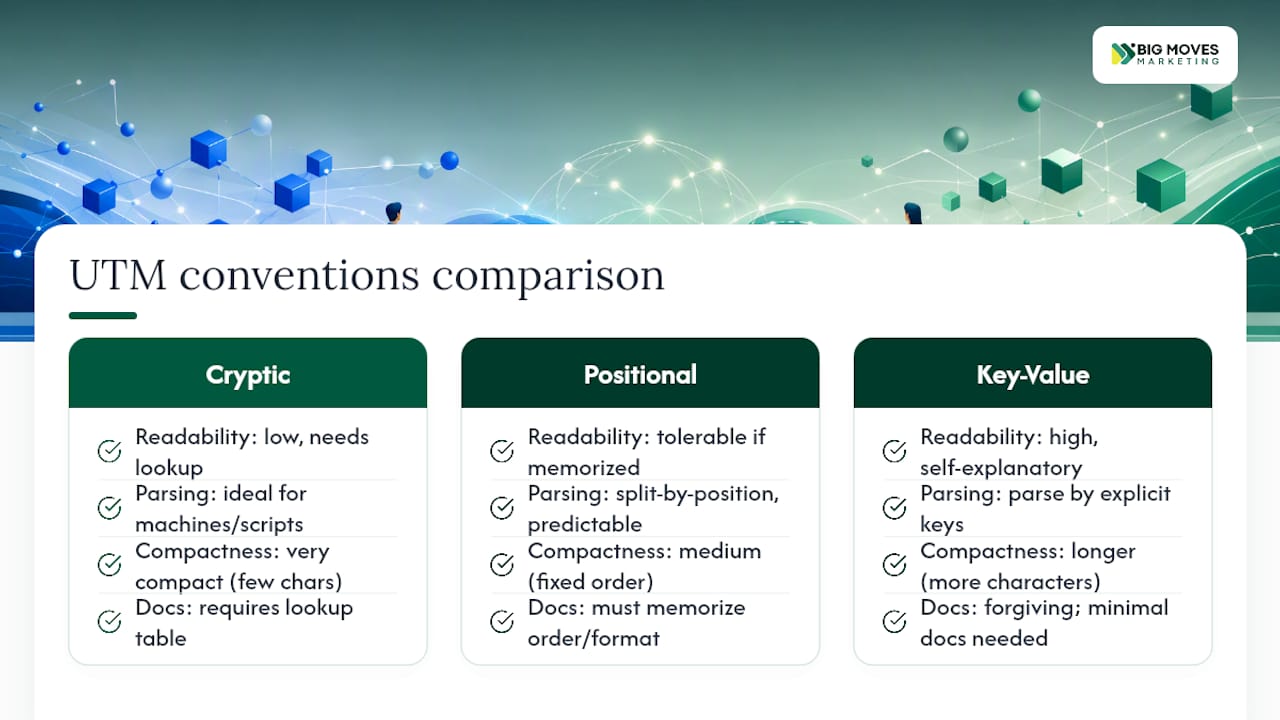
Three distinct models exist for structuring UTM values, and picking the wrong one for your team’s size is why so many conventions collapse under their own complexity.
Cryptic conventions use compact IDs instead of readable words: utm_campaign=q1a-4471. They’re fast to generate programmatically and take up almost no character space, which matters when you’re running thousands of dynamic links through an ad platform’s feed. The tradeoff is obvious the first time a teammate tries to read a report without a lookup table in front of them. Nobody glances at q1a-4471 and knows what it means.
Positional conventions fix a fixed order of fields inside one string: utm_campaign=2026-q1-launch-linkedin-video. Date, quarter, initiative, channel, format, always in that order. Parsing scripts love this because they can split on hyphens and know exactly what sits in each position. Humans tolerate it, but only if everyone on the team memorizes the order and never breaks it.
Key-value conventions spell out what each segment means: utm_campaign=launch:product-x_quarter:q1-2026. It’s the most readable format for a marketer scanning a dashboard, and the most forgiving when someone joins the team mid-year and has to make sense of six months of historical campaigns without a decoder ring.
For most B2B SaaS teams, key-value or a simplified positional model wins. Cryptic IDs make sense only once you’re running high-volume programmatic campaigns where a machine, not a person, reads the tag first. If your team is under 20 people and reviewing performance in GA4 weekly, readability should beat compactness every time.
A worked example helps make the tradeoff concrete. A cryptic tag might read utm_campaign=w26q1-047. A positional version of the same campaign reads utm_campaign=2026-q1-webinar-saas-ops. A key-value version reads utm_campaign=type-webinar_topic-saas-ops_period-2026-q1. All three point to the same campaign. Only one of them is legible six months from now without documentation open in another tab.
Case sensitivity is the single biggest source of broken UTM reporting, and it’s also the easiest to fix. LinkUTM’s research on UTM naming conventions identifies inconsistent casing as the leading cause of fragmented reports across GA4 and other platforms, because analytics tools treat Google and google as two separate values, splitting one channel’s traffic into two disconnected rows.
Four rules stop nearly every case of drift before it happens:
%20 and looks broken in raw links), never an underscore.Pro Tip: Enforce these rules at the moment a link gets created, not after the fact. A dropdown-based builder that only accepts pre-approved lowercase values makes it structurally impossible for someone to type Newsletter instead of newsletter. Cleanup scripts after the data’s already fragmented are a patch, not a fix.
Skip any one of those three and you’re back to reconciling duplicate rows by hand every month.
Building a controlled vocabulary from scratch wastes a week most teams don’t have. Start with this list and adjust it to your actual channel mix.
Approved utm_source values: google, facebook, linkedin, instagram, newsletter, partner-{slug} (swap in the partner’s name), event-{slug} (swap in the event name).
Approved utm_medium values, matched to how GA4 buckets them into Default Channel Groupings:
| utm_medium value | GA4 channel grouping |
|---|---|
| cpc | Paid Search |
| paid-social | Paid Social |
| social | Organic Social |
| display | Display |
| referral | Referral |
| affiliate | Affiliates |
This mapping comes straight from how GA4 interprets medium values, and getting it wrong is one of the fastest ways to misclassify revenue. Mapping utm_medium values correctly is what makes channel reports categorize traffic the way your team actually intended, as TrackRev’s parameter guide lays out in its own mapping table.
Here’s why this matters beyond individual link tagging: the real power shows up when one campaign runs across multiple sources and you roll it up in a single report. Say you’re promoting a webinar. Your LinkedIn ad carries utm_source=linkedin&utm_medium=paid-social&utm_campaign=q1-2026-webinar-saas-ops. Your email blast carries utm_source=newsletter&utm_medium=email&utm_campaign=q1-2026-webinar-saas-ops. Same campaign name, different source and medium. Now GA4 can show you total webinar performance across every channel that touched it, while still breaking out which channel actually drove the registrations. That’s the entire point of a shared campaign name paired with distinct source and medium values, and it’s the pattern worth using for any webinar promotion tagging you run.
Someone has to own this, or it dies. Assign a marketing ops lead or analytics lead as the single approver for any new source, medium, or campaign value. That person maintains the canonical taxonomy, and nobody adds a value outside the approved list without their sign-off. Guidance from MissingLinkZ’s UTM best practices recommends exactly this single-owner model to keep ad-hoc values from creeping into the system.
The taxonomy itself belongs in one shared document, with a change log tracking who added what and why. Not a spreadsheet buried in someone’s downloads folder. Not a Slack thread from eight months ago that half the team never saw. One canonical source, version-controlled, linked from your team’s onboarding docs.
Enforcement is where most conventions actually fail, and automation is the fix. Link builders with locked dropdown fields, programmatic generation for high-volume campaigns, and validation scripts that reject malformed tags before they go live all reduce the human error that no amount of documentation eliminates on its own. MissingLinkZ’s research points to programmatic generation as the reliable fix, not a nice-to-have.

One more piece worth building into your governance from day one: utm_id. When you’re importing cost data from a non-Google ad platform into GA4, campaign names are unreliable join keys because they change. Google’s own guidance on utm_id recommends using it as a stable, unique identifier, a UUID or internal campaign code, so cost rows and session rows still match even after a campaign gets renamed midstream.
Pro Tip: Schedule your audit cadence before you launch the taxonomy, not after you notice drift. A 15-minute monthly check against the approved value list catches a typo’d source before it corrupts a full quarter of channel data.
Most fragmented reporting traces back to a handful of repeat offenders. Here’s what to look for and how to fix each one.
Google and google split into separate rows in GA4. Fix: audit your source and medium columns for any capital letters and standardize going forward; don’t try to merge historical data unless you’re comfortable with a manual reprocessing pass.medium=social instead of paid-social dumps paid spend into your organic channel bucket. Fix: cross-check every medium value against your GA4 channel mapping table before a campaign launches.linked-in, another writes LinkedIn, a third writes li. Fix: lock source and medium fields to a dropdown in your link builder so free text isn’t an option.utm_campaign on paid links. Traffic shows up correctly bucketed by channel but with no way to tie it back to a specific initiative. Fix: make utm_campaign a required field in your builder, not optional.A quick audit query filtering your analytics platform’s source/medium report for anything outside your approved list will surface most of these within minutes.
Getting from “we have a mess” to “we have a system” takes five concrete steps.
Copy-paste starting templates for common channels:
utm_source=newsletter&utm_medium=email&utm_campaign=2026-q1-product-updateutm_source=google&utm_medium=cpc&utm_campaign=2026-q1-demand-gen&utm_term=b2b-saas-crmutm_source=linkedin&utm_medium=paid-social&utm_campaign=2026-q1-webinar-saas-opsutm_source=partner-acme&utm_medium=referral&utm_campaign=2026-q1-co-webinarutm_source=event-saastr&utm_medium=qr-code&utm_campaign=2026-q1-conference-boothDating each campaign by quarter, as in every template above, is a pattern Terminus’s 2026 UTM tagging guide recommends specifically because it kills the ambiguity of a name like summer-sale showing up identically two years running. Test every template link before it goes live, and slot this naming pattern directly into whatever go-to-market plan governs the campaign calendar around it.
Veb has spent 17 years building marketing systems for more than 75 startups and enterprises, and the UTM mess looks nearly identical at every company: three years of campaigns, four naming styles, and a channel report nobody trusts.
The fix that works fastest is splitting your taxonomy into two lanes. Product launches get a positional pattern: date, product name, channel, format, in that fixed order, because launches are time-boxed and everyone needs to pull a clean report the week after. Evergreen acquisition campaigns get a simpler key-value pattern, because those campaigns run for months and readability matters more than parsing speed.
Two quick wins consistently move the needle for demand-gen and analytics teams. First, locking utm_medium to the GA4 channel mapping table before launch, not after, eliminates the single most common misattribution we see. Second, tying every paid campaign to a shared utm_campaign string across channels turns a scattered set of single-channel reports into one roll-up view of true campaign performance, which is usually the first time a growth team sees their real cost per lead by initiative instead of by platform. That single change routinely shifts budget conversations within a quarter.
Disciplined UTMs cut reconciliation time to nearly nothing. Instead of a marketing ops analyst spending three hours a month untangling duplicate rows, the report is clean the day it’s pulled, and decisions happen the same week instead of the following one.
One pattern shows up consistently across the B2B SaaS teams we’ve worked with: the companies that treat UTM naming as a system, not an afterthought, catch underperforming channels weeks earlier than the ones improvising tags campaign by campaign. That earlier signal is the whole value. A clean taxonomy doesn’t generate leads by itself, but it’s the difference between knowing what’s working in week two versus finding out in week eight, after the budget’s already spent.
If your team is still improvising tags campaign by campaign, that’s exactly where a structured rollout, and outside help implementing one, pays for itself fast.
— Veb
Most teams don’t fail at UTM naming because they lack a rulebook. They fail because nobody owns the rollout, trains the team, or builds the taxonomy into a tool people actually use. Bigmoves handles the part most guides skip: turning a naming convention into a working system your team follows without thinking about it.
A typical engagement starts with an audit of your existing tags, followed by a locked taxonomy, a link builder your team actually adopts, and a short training session so the convention survives past the first month. The outcome most B2B SaaS teams walk away with is a channel report they trust enough to make budget calls from, without a manual cleanup pass every quarter. If your GTM systems need this kind of structure built into a full site rebuild or campaign infrastructure, Bigmoves can launch your B2B SaaS website with tracking and taxonomy baked in from day one. Reach out to scope your audit and get a working link builder in place before your next campaign launches.
The five standard tags are utm_source, utm_medium, utm_campaign, utm_content, and utm_term, each identifying a different detail about where a click originated.
Case mismatches, incorrect medium values, tagging internal links, and free-typed source names are the top four errors, and all four are preventable with a locked builder and a controlled vocabulary.
Use utm_source, utm_medium, and utm_campaign at minimum, all lowercase, words separated by hyphens, with campaign names kept to three to five words for easy scanning.
UTM stands for Urchin Tracking Module, named after Urchin, the analytics platform Google acquired that later became the foundation for Google Analytics.
No. Most campaigns only need the three core parameters; add utm_content for creative variant testing and utm_term for paid search keyword tracking, and skip both otherwise.




%20-%20white.svg)