%20png%20copy.avif)

Buying marketing automation to generate pipeline is the most common mistake B2B teams make with the category. A platform can send more relevant emails, but it can't compensate for unclear positioning, unreliable records, or a sales team that doesn't trust marketing's handoffs.
For B2B SaaS leaders, marketing automation should function as a revenue operating system. It should help the team decide which accounts to prioritize, what buyers need next, when a person should step in, and whether those actions are producing qualified pipeline. That's a harder standard than reporting opens and clicks. It's also the standard that matters.
The default playbook is familiar: buy a platform, build email sequences, add lead scores, then wait for pipeline. The problem isn't that sequences are useless. It's that they're only one component of a system that also needs trusted data, connected tools, clear lifecycle rules, and agreement between sales and marketing about what counts as progress.
The technology market has expanded well beyond basic email scheduling. A 2023 University of Hamburg report found that the global marketing-automation market had grown by 24% since 2020, reaching 9,932 solutions worldwide (University of Hamburg Marketing Technology Report). More options don't automatically produce better decisions. They make it easier to buy software before defining the process it's supposed to improve.

A SaaS company can have polished email reporting and still lack answers to basic revenue questions. Which accounts fit the ICP? What buyer behavior signals a real evaluation? When should a lead move to sales? What should stop once an opportunity is active? If those decisions aren't defined, automation just moves confusion through the funnel faster.
Strong programs connect audience definitions, lifecycle stages, behavioral signals, CRM records, and sales follow-up. The point isn't to automate every interaction. It's to make the next action more consistent and better informed.
Practical rule: Don't automate a decision your team hasn't agreed how to make manually.
Teams evaluating the business case can use these B2B automation ROI frameworks as a reference for connecting workflow activity to commercial outcomes. But a framework won't fix a broken handoff or unreliable account data. The operating rules have to come first.
Start with the commercial result, not the campaign. If the company needs more qualified pipeline in a specific segment, automation should help identify, progress, and route accounts in that segment. If the team can't explain how a workflow affects a revenue outcome, it's probably a task to automate later, not a priority now.
Use a simple working session:
B2B teams that treat automation as a pipeline engine tend to organize around lifecycle stages, behavioral triggers, and explicit qualification thresholds rather than form-fill counts alone, a distinction highlighted in the American Marketing Association's analysis of automated lead nurturing.
The discipline is traceability: every automated action should connect to a buyer signal, a stage decision, and a business measure. Use Big Moves Marketing's guide to measuring marketing ROI to sharpen that connection. If a workflow can't be tied to a meaningful change in account quality or progression, don't defend it with activity metrics.
Don't shortlist platforms by counting features. Start with the questions your revenue system must answer: Can it resolve who a person belongs to? Can it sync opportunity changes back to marketing? Can sales see why an account was routed? Can the team govern fields and consent status? How much integration work will the system demand?
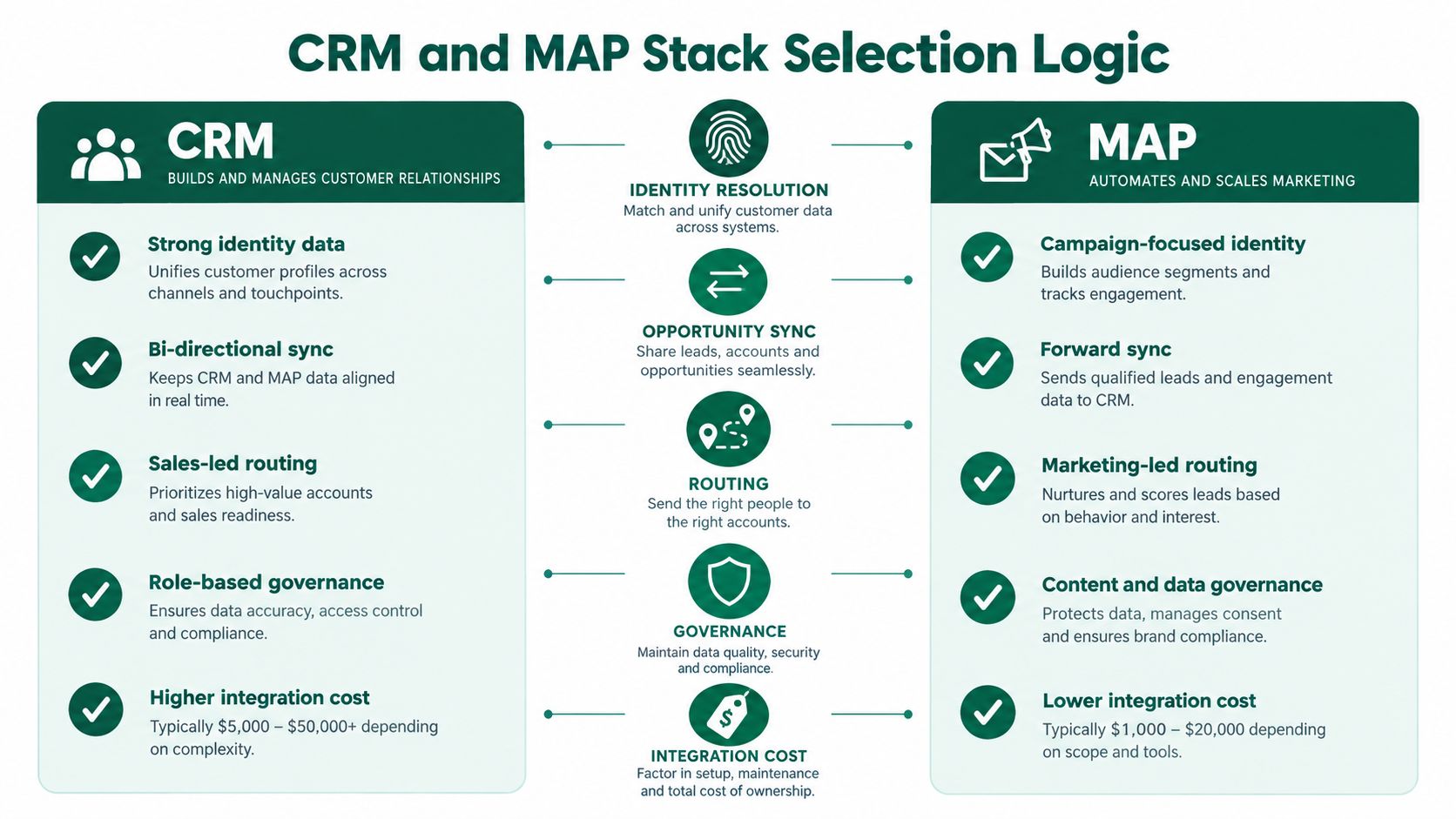
An all-in-one suite can suit an early-stage SaaS company that needs a shared view of contacts, campaigns, and deals without maintaining a complex integration layer. The trade-off is that the team may eventually outgrow the suite's flexibility or reporting model.
A separate CRM and marketing automation platform (MAP) can give a more mature team greater control over campaign logic and operational workflows. It also creates more responsibility for identity matching, field mapping, sync rules, and troubleshooting. If the people who own those connections aren't clear, the stack will become a source of disagreement.
A lightweight stack makes sense when the team has a narrow motion and limited operational capacity. It's a poor fit if the company is already running multiple segments, complex sales handoffs, or account-based programs that depend on shared context.
The practical recommendation is simple: select the least complex architecture that can preserve account identity, lifecycle state, consent, campaign history, and opportunity outcomes. Don't pay for advanced orchestration before the underlying records and ownership rules are dependable.
Ask vendors to show what happens when a contact changes companies, an opportunity opens, or sales disqualifies a lead. Find out which system owns lifecycle fields and how the platforms handle conflicting values. A polished journey builder won't tell you whether sales and marketing will see the same account history.
For a closer look at CRM selection, use this guide to B2B CRM software. Evaluate the CRM and MAP together. Buying them separately without a shared data model is a fast route to duplicate records, inconsistent routing, and untrusted reports.
Scoring only works when the underlying stages mean something. If sales calls a record qualified because it booked a meeting while marketing calls it qualified because it downloaded content, your automation isn't prioritizing demand. It's preserving a disagreement.
For every lifecycle stage, document three things: entry criteria, exit criteria, and owner. Spell out what evidence moves an account forward, what disqualifies it, and who acts when it reaches a handoff point. Make suppression rules part of that definition. Active opportunities, existing customers, and converted contacts shouldn't continue receiving prospecting messages by default.
Then build scoring across fit, behavior, recency, and stage relevance. A senior contact at a target account may have strong fit but no active intent. A pricing-page visit may signal interest, but it can't compensate for a poor company match. A cluster of current behaviors from several people at one account may be more meaningful than repeated activity from a single contact.
B2B buyers use an average of ten channels across the purchasing journey, up from five in 2016, according to McKinsey's research on B2B growth. A model that relies only on email clicks or form fills will miss activity elsewhere and overstate what those signals mean.
| Signal category | Example trigger | Weight direction | Use with caution when |
|---|---|---|---|
| Firmographic fit | Company matches the ICP and target market | Positive when verified | Company data is stale or the account spans multiple business units |
| Role and buying-group fit | Contact has a relevant role in the evaluation | Positive, weighted by relevance | Job title alone doesn't establish influence or intent |
| Behavioral intent | Pricing visit, product usage, or webinar attendance | Positive when tied to a meaningful stage | Activity is isolated, ambiguous, or shared across a network |
| Recency and repetition | Relevant actions recur within an active evaluation | Positive while current | Repeated activity comes from one person or low-value engagement |
| Disqualifying conditions | Unsupported market or active customer status | Negative or suppress | Account ownership or status fields conflict |
For teams that need a plain-language refresher on qualification criteria, Lead Printer's qualification breakdown is a useful companion. Keep the scoring model explainable. Sales should be able to see why an account surfaced and what evidence supports the handoff.
Use the marketing-qualified lead definition as a starting point, then define how qualification works for your own sales motion. Score accounts as well as contacts. A buying group is not one person with a bigger score.
The strongest automation doesn't force every prospect through the same email funnel. It combines lifecycle nurture, account-specific plays, and channel context so the next interaction reflects what the buyer is trying to do. Gartner's buying-journey model distinguishes problem identification, solution exploration, requirements building, and supplier selection, and recognizes that buyers move between digital and human interactions (Gartner's B2B buying journey research).
For named accounts, coordinate marketing touches with sales activity. A pricing revisit, technical-content interaction, and webinar attendance can justify a conversation, but they don't all warrant the same message. Use account-level suppression and frequency controls to prevent a prospect from receiving overlapping nurture and ABM messages.
Triggered automation benchmarks report average flows at 48.57% opens and 4.67% click-through, compared with 37.93% opens and 1.29% clicks for standard campaigns, but these figures are directional because automated flows often reach more engaged audiences (email automation benchmark data). Don't treat them as a target or proof of pipeline impact.
For a broader view of demand-generation planning across channels, consult 100Signals' B2B go-to-market resources. Then align each workflow with the account's stage and existing sales conversations. A B2B account-based marketing approach is useful when the account, not the individual contact, is the unit of planning.
Email metrics describe engagement with messages. They don't prove that automation created a qualified opportunity or helped close a deal. A leadership dashboard should show whether target accounts are progressing, whether sales accepts the handoffs, and whether automated programs improve outcomes compared with a reasonable alternative.

Distinguish sourced pipeline from influenced pipeline. Sourced pipeline means the program met your agreed criteria for originating the opportunity. Influenced pipeline means the program engaged an account connected to an opportunity, without claiming that automation alone caused the deal. Keep those definitions stable; otherwise every campaign becomes a contest to claim revenue.
Use account-level reporting to follow progression across contacts and interactions. Where feasible, compare an automated audience with a randomized or matched holdout. Review qualified meetings, opportunity creation, stage movement, conversion, and pipeline per enrolled account or contact. Opens and clicks remain useful for diagnosing delivery and content, but they're supporting signals, not the business case.
One benchmark summary reports 53% higher lead-to-customer conversion rates for companies using marketing automation and another reports a 14.5% increase in sales productivity. These figures are contingent on integrated lifecycle and CRM processes, not software adoption alone (marketing automation benchmark summary). Treat them as directional context, not a forecast for your company.
The harder work is keeping campaign history connected to opportunity records and handling multi-person buying groups without pretending every touchpoint deserves precise revenue credit. A useful attribution model won't capture every influence. It will make assumptions visible and support better decisions. For a closer view of the limits of single-touch reporting, see Big Moves Marketing's guide to last-touch attribution.
Most automation failures aren't caused by a weak workflow builder. They come from unclear ownership, poor inputs, and teams measuring the wrong outcome. The symptoms often appear in campaign reports, but the causes sit in the operating model.
A stronger operating rhythm: Fix the data and ownership rules before expanding the workflow catalog.
In the coming quarter, make a small set of decisions. Choose the revenue metric automation must improve. Rework one lifecycle transition that sales doesn't trust. Rebuild scoring around account fit and stage-relevant behavior. Run one named-account pilot with clear suppression and sales coordination. Upgrade measurement with a holdout or matched comparison.
The mental model is straightforward: automation should improve revenue decisions, not merely produce more marketing activity. Keep the system simple enough to govern, connected enough to preserve context, and measurable enough to justify its place in the go-to-market motion.
Big Moves Marketing helps B2B technology companies clarify positioning and build measurable growth programs, including marketing automation tied to lifecycle and pipeline outcomes. If your team needs sharper priorities and a revenue system that sales can trust, visit Big Moves Marketing.




%20-%20white.svg)