%20png%20copy.avif)

Stop optimizing Google Ads for B2B toward the cheapest lead. That's the popular advice, and it's why accounts look efficient in Google Ads and empty in the CRM. A form fill tells you someone completed a form. It doesn't tell you whether sales accepted the lead, whether an opportunity opened, or whether revenue followed.
Treat search as a pipeline instrument. Judge it by cost per opportunity, pipeline created, and closed-won value. If your bidding, structure, and reporting can't answer those questions, you don't have a scaling problem. You have a measurement problem.
A benchmark can tell you what to budget for clicks and leads. It cannot tell you whether those leads will become revenue.
Reported B2B conversion rates vary sharply by what counts as a conversion. Flint's benchmark analysis puts the average B2B paid-search conversion rate at 1.42% in 2024. A separate dataset reports a 5.14% conversion rate and $103.54 cost per lead for B2B services across 16,446 US campaigns, according to The Ad Spend's B2B search benchmarks.
Those figures measure different things. One advertiser may count a content download; another may count a demo request or qualified inquiry. A cost-per-lead comparison is useful only when the conversion definitions match.
A spend-weighted average can hide what a typical advertiser pays. Metadata's B2B Google Ads cost data reports a $524 spend-weighted cost per lead across 56 B2B advertisers and a $920 median cost per lead among 34 lead-generation accounts. Large spenders can pull the weighted average down, so the median is a better reference point for planning.
Use these figures to set an initial budget, not to judge campaign success.
| Metric | Benchmark | Source and sample | How to read it |
|---|---|---|---|
| Click-through rate | 6.33% | 56 B2B advertisers, 2025 | Ad relevance check, not a pipeline result |
| Average cost per click | $9.76 | 56 B2B advertisers, 2025 | Estimates how many clicks the budget buys |
| Click-to-lead rate | 1.9% | 56 B2B advertisers, 2025 | Landing page and offer signal |
| Cost per lead, spend-weighted | $524 | 56 B2B advertisers, 2025 | Influenced by high-spend accounts |
| Cost per lead, median lead-generation account | $920 | 34 lead-generation accounts, 2025 | A more useful reference for a typical team |
| Conversion rate and cost per lead, B2B services | 5.14% and $103.54 | 16,446 US campaigns, 2025 | Lead-based figures; not comparable with pipeline metrics |
| Paid-search conversion rate | 1.42% | Flint benchmark, 2024 | Click-to-conversion rate as reported in the benchmark |
Set the allowable cost per lead from your opportunity target. In a worked example, a 15% lead-to-opportunity rate and a $2,000 target cost per opportunity allow up to $300 per lead. At a 1.9% click-to-lead rate, that supports a maximum CPC of about $5.70.
The benchmark figures show the same relationship in reverse. A $9.76 CPC at a 1.9% click-to-lead rate implies roughly $514 per lead, close to the reported $524 spend-weighted figure. The arithmetic lines up; your opportunity rate and closed-won value determine whether the cost works.
Planning rule: Use benchmarks to size the first test. Set the next budget from cost per opportunity and closed-won value.
After roughly 60 days of CRM-validated data, replace external benchmarks with your own reconciled results. Report branded and non-branded search separately, and pair cost per lead with lead-to-opportunity rate and cost per opportunity.
One campaign covering every plausible B2B keyword is the fastest way to fund low-intent search. Google will spend where clicks are available. Clicks are most available where buyers aren't ready.
Split the account by intent tier. Give each tier its own budget decision, landing page, and success metric. Don't let branded efficiency disguise weak category performance in a blended report.
| Intent tier | Query pattern | Pipeline role | Budget stance | Landing page type |
|---|---|---|---|---|
| Branded | Company or product name, plus login or support terms | Defends demand the team already created | Capped, reported separately | Product or demo page |
| Competitor | Named rival products and alternative searches | High intent, costly, restricted ad copy | Capped, tested one rival at a time | Comparison page with factual claims |
| Solution category | Category phrases tied to a workflow or outcome | Core acquisition and most pipeline | Largest share, tight match types | Category page with customer proof |
| Problem-aware | Pain-phrased searches, such as ways to reduce a manual process | Earlier intent, longer cycles | Small test budget, judged on opportunity rate | Diagnostic guide with a clear next step |
| Informational | Definition and how-it-works queries | Volume without buyers | Excluded or heavily negated | Not a paid landing page |
Branded search defends demand. Competitor search can work, but test one rival at a time and keep claims factual. Solution category terms should receive the largest share because the searcher is naming a workflow they want to buy. Problem-aware terms deserve a test budget only. Informational terms belong in organic content, not paid search.
Google's close variants documentation states that close variants are automatically included for every keyword match type and advertisers cannot opt out. A keyword can match searches that are similar but not identical. Wording changes can also change buying intent.
That makes the search-terms report an operating control, not an occasional audit. Build ad groups around one buying problem. Use exact or phrase match for your highest-value terms. Review actual queries weekly and add negatives before weak queries train your bidding.
Relevance also affects whether you're allowed to compete efficiently. Weak keyword, ad, and landing page alignment hurts visibility and cost, which is why Google's Quality Score mechanics matter commercially, not cosmetically.
Say a workflow software company bids on a category term. The search-terms report shows clicks for free templates, definitions, and student assignments. Click volume looks healthy. Sales sees no fit.
The fix isn't a higher bid. It's a shared negative keyword list for free, template, definition, jobs, and login variants, plus a separate ad group for problem-phrased queries with a diagnostic page. Keep the category ad group focused on buying language.
A term keeps its budget only when its opportunities justify the spend. Clicks don't renew a budget.
Review tier performance by qualified-lead rate, opportunity rate, and cost per opportunity. If a tier produces inquiries but no sales-accepted leads after a full review cycle, cut it or rebuild the offer. Don't wait for volume to fix intent.
A demo request isn't a business outcome. It's an inexpensive event that may precede one. If it's your primary conversion, automated bidding will find more people who complete demo forms, including students, vendors, competitors, and companies sales would never call.
Build a hierarchy. Let bidding learn from events closer to revenue, while keeping earlier events visible for diagnosis.
| Event | Source | Signal strength | Import to Google Ads | Value basis |
|---|---|---|---|---|
| Demo or contact form submission | Website | Weak alone | Yes, as a secondary action | Low fixed value |
| Pricing or product page engagement | Website | Weak, mainly diagnostic | No | None |
| Marketing-qualified lead | CRM | Medium | Yes | Fixed value from historical lead-to-opportunity rate |
| Sales-accepted lead | CRM | Strong | Yes | Fixed value reviewed quarterly |
| Opportunity created | CRM | Strong | Yes, primary optimization event | Average pipeline value per opportunity |
| Closed-won revenue | CRM | Strongest, but lags weeks or months | Yes | Actual contract value |
Consider a hypothetical month with 20 demo requests, 8 sales-accepted leads, 3 opportunities, and 1 closed-won deal. Cost per demo request may look acceptable. Cost per opportunity tells you whether the account deserves more money. It also exposes campaigns that generate calls without producing pipeline.
Closed-won revenue is the cleanest signal, but it arrives too late to steer bids alone in a long cycle. Use opportunity created as the bridge. Assign MQL and SAL values from historical stage conversion, keep them conservative, and review them quarterly against actual CRM outcomes.
Don't invent precision you haven't earned. If sales and marketing can't agree on the definition of a sales-accepted lead, the imported value is decoration. That disagreement is part of the broader failure described in what's replacing broken B2B marketing measurement.
A higher cost per lead is acceptable when it produces a lower cost per opportunity. That's not a reporting nuance. It's the decision rule.
Measurement setup is part of the campaign. Launching spend before the CRM can return outcomes means Google learns from shallow events during your most expensive learning period.
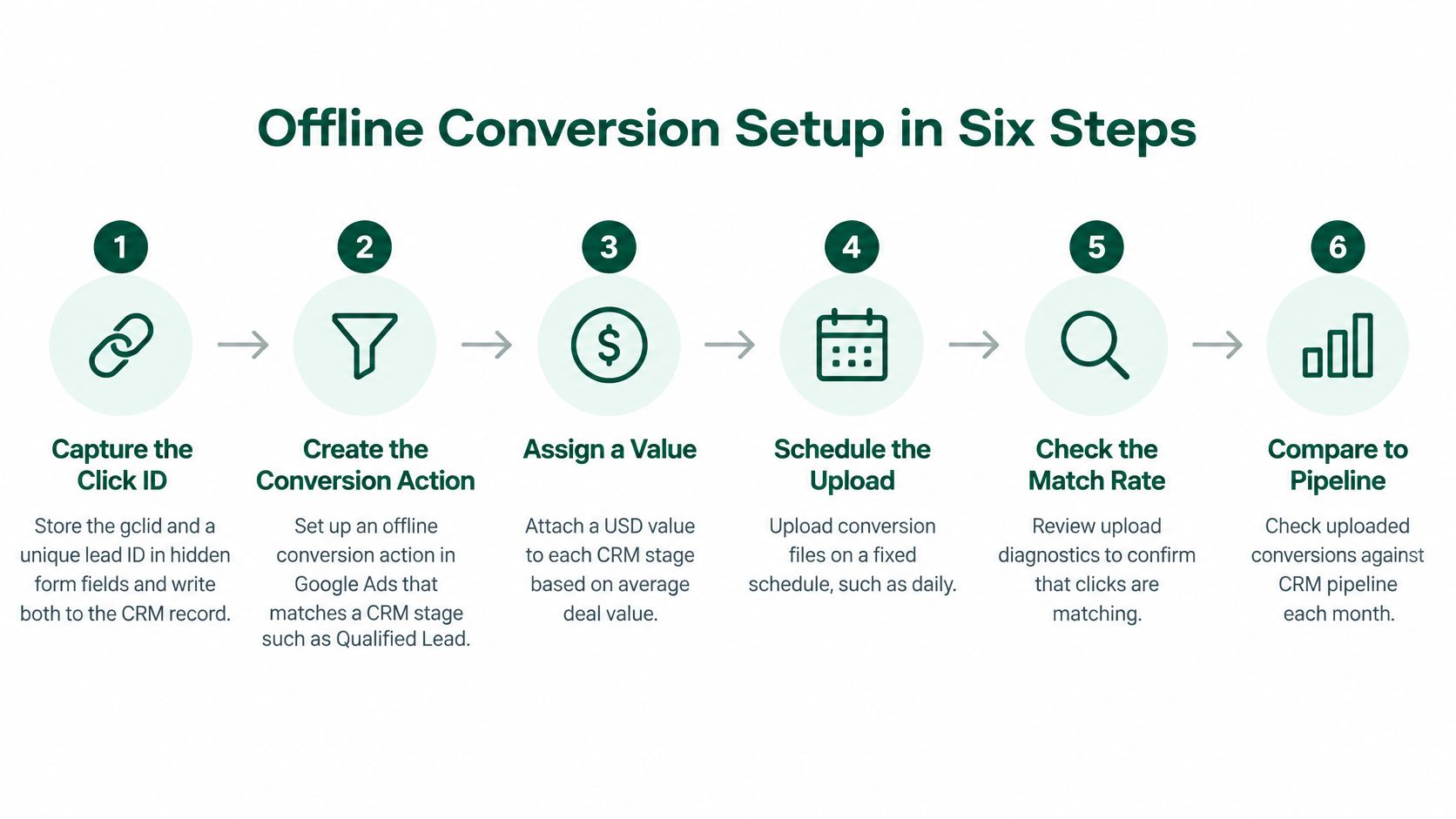
Google's offline conversion import guidance supports importing leads qualified outside Google Ads, using identifiers such as GCLID or Enhanced Conversions for Leads. It also notes that enhanced conversions supplement imported data with hashed first-party information, such as an email address, to improve attribution and bidding.
The common slip is at step four. Sales redefines SAL mid-quarter, marketing doesn't update the import logic, and the trend line becomes meaningless. Stage governance is not administrative work. It's bidding input.
Name one reconciliation owner before launch. That person checks Google Ads diagnostics, upload errors, CRM counts, and unexplained gaps. Good CRM data hygiene determines whether imported stages are reliable enough to influence spend.
Don't ask bidding to optimize toward pipeline if your CRM can't tell Google what pipeline is.
Test the full chain, not each tool in isolation. Click an ad, submit the form, advance the CRM record, upload the stage change, and confirm the conversion appears once with the right timestamp and value. If that chain breaks, pause expansion and fix it.
Bidding sophistication doesn't compensate for weak signals. Choose the strategy your conversion volume and value reliability can support.
The dashboard below shows the core management problem clearly. Activity is visible immediately, while commercial quality appears later.

| Bidding approach | Use when | Data needed | Failure mode |
|---|---|---|---|
| Manual or enhanced CPC | The account is still learning which terms convert | Clicks only | Slow, labor-heavy, learns nothing from outcomes |
| Maximize conversions | Lead volume is steady, values are not yet reliable | Consistent conversions, often around 30 a month | Buys cheap, weak leads when events are shallow |
| Target CPA | Lead cost per stage is validated against the CRM | Stable conversion history | Starves volume when the target is set too low |
| Maximize conversion value or target ROAS | CRM values are trusted and closed-won data is flowing | Opportunity or revenue values | Overweights a few large deals |
Manual or enhanced CPC is unglamorous and appropriate early. Maximize Conversions becomes dangerous when the conversion is a shallow form fill. Target CPA needs a target the market can realistically deliver. Value-based bidding should wait until sales trusts the CRM values feeding it.
Put in-market and custom intent audiences in observation mode first. Learn which segments produce qualified outcomes before restricting search traffic. Build custom intent audiences from competitor URLs and high-intent phrases, but don't confuse audience membership with buying intent.
Separate remarketing lists for pricing and demo page visitors from acquisition budgets. Exclude existing customers and recent converters where appropriate. Remarketing should recover stalled consideration, not inflate acquisition reporting.
The walkthrough below is useful for seeing how account settings translate into bidding behavior before you change targets.
Don't share budgets across tiers with different economics. Branded, competitor, and category campaigns will compete internally, and the cheapest conversion usually wins. Fund tiers that produce opportunities. Change targets no more than once every two weeks unless tracking is broken, so each change has time to produce interpretable data.
Sending a problem-aware query to the homepage wastes the click. The buyer must translate your generic pitch into their situation. Most won't.
Give each intent tier one page with one primary claim. The ad headline should name the buying problem in the buyer's words. The page should continue that exact promise, not restart with company positioning.

B2B buyers check proof before they talk to sales. Include these elements:
Form length should match intent. A diagnostic guide can ask for little. A demo form needs company size, role, and use case because fit scoring depends on those fields. Asking for less isn't always better if sales receives unusable records.
AI-mediated research raises the proof bar. Digital Commerce 360's summary of 2025 research found that 72% of B2B technology buyers encountered AI Overviews during research, while 90% of those buyers clicked cited sources. Your paid page and your authoritative proof page are now part of the same consideration system.
That's where disciplined organic work supports paid acquisition. Resources such as The SEO Agent can help teams think through search visibility, while your landing page best practices should govern message match and conversion design. Pin ad headlines only when a message must be controlled. Relevance earns eligibility and placement. Pinning doesn't.
Budget increases amplify whatever your account already does. If the account buys weak intent, more money buys more weak intent. Review pipeline first.
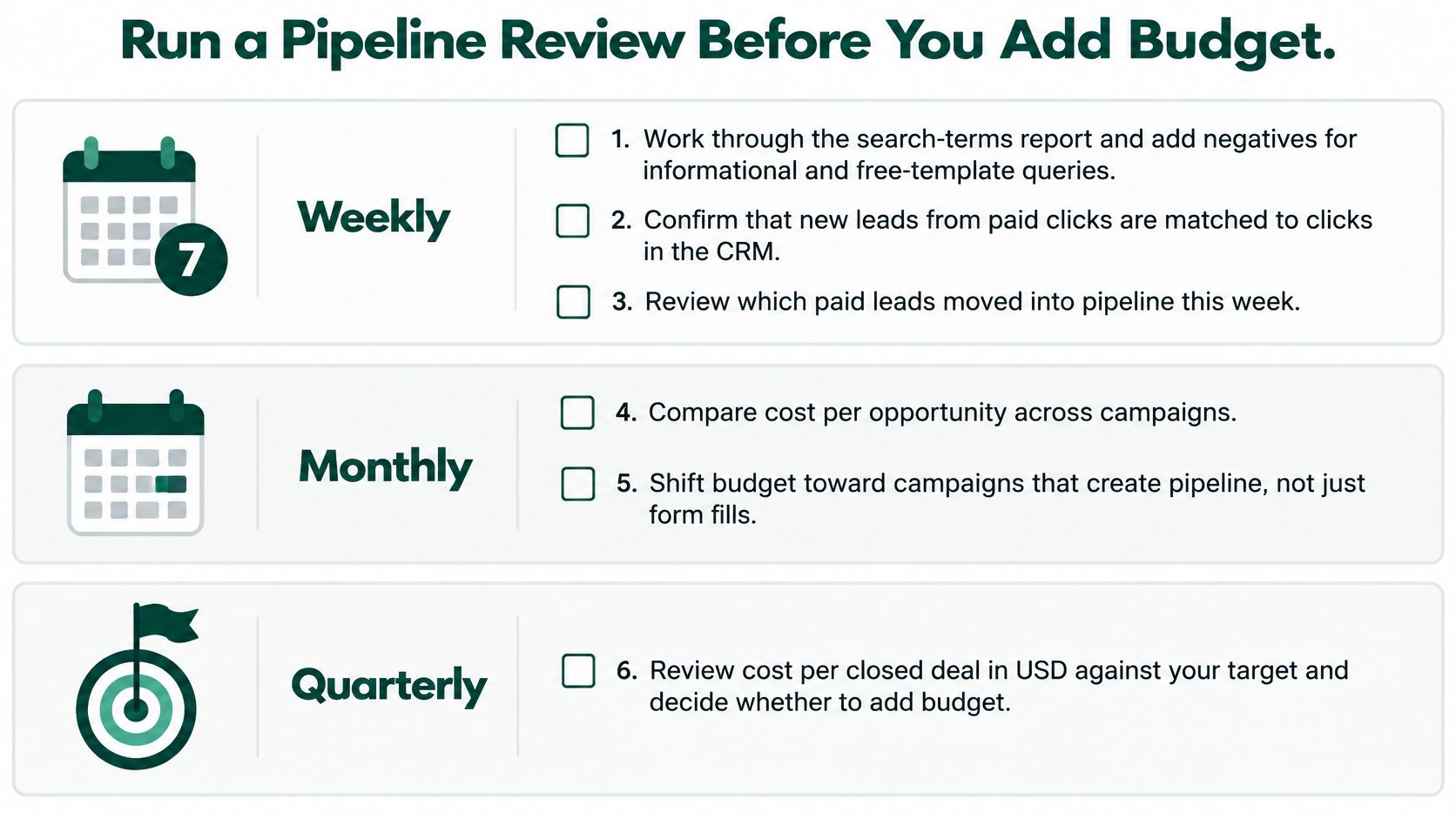
Confirm the event hierarchy still matches how sales qualifies accounts. This requires direct agreement, not dashboard alignment, and it's one reason aligning sales and marketing is a paid media issue.
Scale a tier only when cost per opportunity is under target for two consecutive monthly reviews and reconciliation shows no unexplained gaps. Pause a tier when spend rises while opportunity counts stay flat for a full sales cycle.
Change one variable per test. Landing page or match type or bid target. Not all three. Before your next budget increase, run the reconciliation and read cost per opportunity by tier. If you can't do both, you're not ready to scale.
If your Google Ads report shows cheap leads but your CRM shows thin pipeline, Big Moves Marketing can help you rebuild the account around positioning, intent tiers, offline conversion signals, and cost per opportunity. Visit Big Moves Marketing to discuss a fractional CMO engagement focused on clearer decisions and measurable pipeline, not more form fills.





%20-%20white.svg)