%20png%20copy.avif)
CRM data hygiene is the ongoing discipline of keeping your customer records accurate, complete, consistent, and current, not a one-time cleanup project. Skip it, and lead routing misfires, forecasts drift, and AI-driven workflows amplify bad data instead of catching it. The fix is a repeating framework with clear ownership, a fixed cadence, and automation doing the grunt work.
TL;DR:
- Regularly tracking decay, bounce, and duplicate rates is essential before implementing any data hygiene measures to understand the current state of your CRM records.
- Establishing clear governance, standards, and ownership, especially for required fields and formatting, is fundamental to maintaining data quality over time.
- Deduplication should rely on defined rules and merge rather than delete, preserving activity history and ensuring accurate deal and contact tracking.
- Automating validation, enrichment, and deduplication at lead entry points reduces manual effort and keeps data accurate across all systems.
- A sustained hygiene process requires a recurring cadence of daily, weekly, monthly, and quarterly tasks, with leadership sign-off and cross-team ownership to prevent data degradation.
Three terms get used interchangeably, and that confusion causes real damage. Hygiene is the continuous maintenance layer: validation, deduplication, and standardization running every day. Cleansing is reactive, a one-time scrub you run when things get bad enough to force action. Enrichment appends third-party data, like firmographic or intent signals, on top of records that are already clean. ZoomInfo’s operations team frames it directly: hygiene is what makes enrichment worth doing in the first place. Enrich a messy database and you just multiply the mess with better metadata.
Hygiene has to start at the point of entry, not downstream in a quarterly project. A form field with no validation, an API integration with no dedupe check, a rep typing “Acme Corp” one week and “ACME” the next. Each of those seeds decay that compounds fast.
Track these signals to know where you stand:
Get a baseline on these three before you touch a single field. You can’t fix what you haven’t measured.
Bad data doesn’t sit quietly in a spreadsheet. It moves through your funnel, corrupts every system downstream, and shows up in the numbers your CEO reviews. Forecasting breaks because pipeline reports double count deals split across duplicate accounts. Attribution breaks because a contact’s source field got overwritten by a second form fill. Lead routing breaks because a required field like company size sat blank and the record never triggered the right assignment rule.
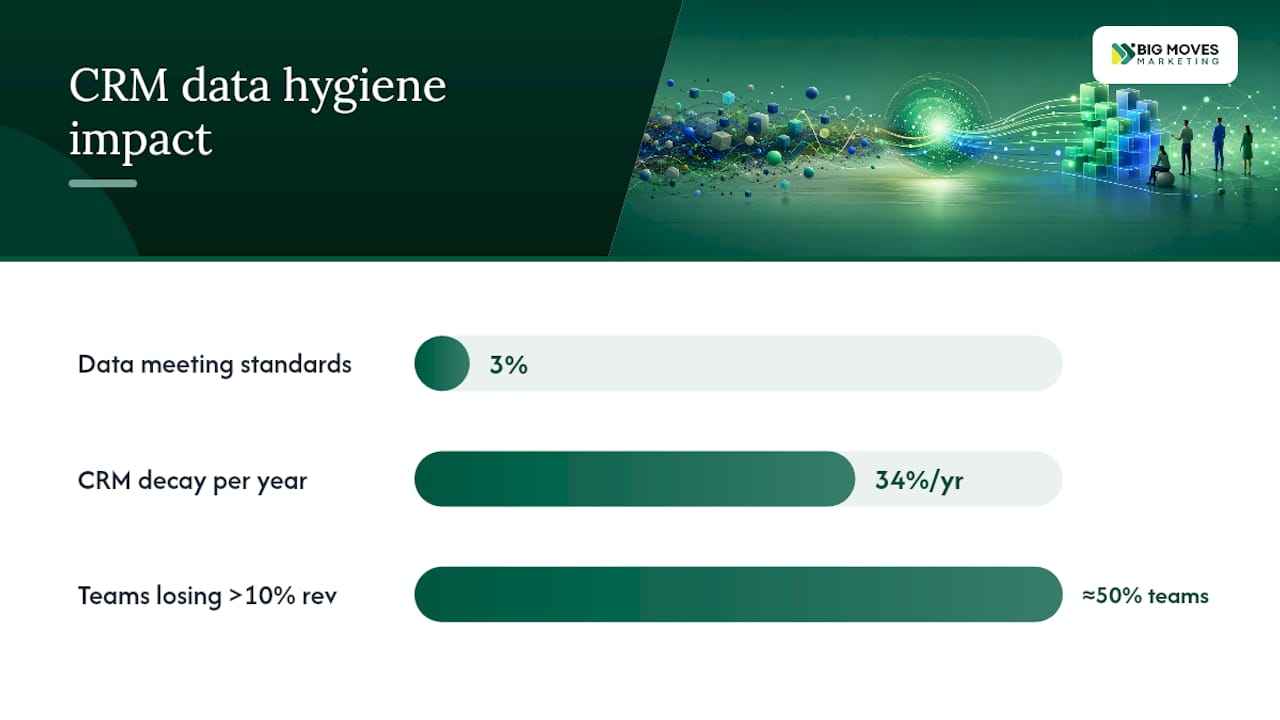
The scale of the problem is bigger than most teams assume. Harvard Business Review found that only about 3% of data at the average company meets basic quality standards. That’s not a niche operational glitch, that’s most of your CRM.
By the numbers: CRM data decays at roughly 34% per year, and nearly half of RevOps teams surveyed estimate they’re losing more than 10% of revenue to poor data quality.
AI makes the stakes higher, not lower. Lead scoring models, routing algorithms, and predictive forecasting tools don’t pause to sanity check a bad input the way a skeptical rep might. They act on it instantly and at scale, which means one dirty field can now produce a wrong decision in seconds instead of getting caught in a Tuesday pipeline review.
The economics of ignoring this follow what’s known as the 1-10-100 rule: verifying data at the point of entry costs a fraction of what cleaning it later costs, and failing to fix it at all costs the most of all, in blown forecasts, missed leads, and reps who stop trusting the system.
What breaks first when hygiene slips:
Most CRM messes trace back to five recurring failure modes. Know what each looks like and you can diagnose your own database in an afternoon.
Duplicates. The classic offender. A contact submits a form, then gets manually added by a rep who didn’t check first, then re-imports through a webinar list. Now you’ve got three records, three activity histories, and a forecast that’s counting the same deal twice. Duplicates don’t just clutter, they actively split the story your data is supposed to tell.
Missing or invalid required fields. A blank “industry” field means your segmentation logic skips that record entirely. A malformed phone number breaks your dialer integration. These gaps are invisible until the exact moment a workflow depends on them, and by then the lead’s already gone cold.
Inconsistent values. “VP of Sales,” “VP Sales,” and “Vice President, Sales” are the same job title to a human and three different values to a filter. Normalizing fields like industry, company size, and job seniority is unglamorous work, but it’s what makes routing and segmentation rules actually fire correctly.
Stale records. People change jobs constantly. Emails bounce. Companies get acquired or rebrand. A contact record that was accurate eighteen months ago can be actively wrong today, and nothing in the CRM flags that unless you’re watching for it.
Siloed data across tools. Your marketing automation platform, your CRM, and your billing system each hold a slightly different version of the same customer. Without integration logic reconciling them, reps end up working from whichever version they happened to open last.
Pro Tip: *Run a quick gut check before any formal audit: pull 50 random contact records and manually verify job title, company, and email against LinkedIn.
Cleanup projects fail because they’re treated as projects. Hygiene only works as a system, something that runs on a loop with clear rules at every step. Here’s the sequence that holds up across B2B SaaS and tech RevOps teams, in order.
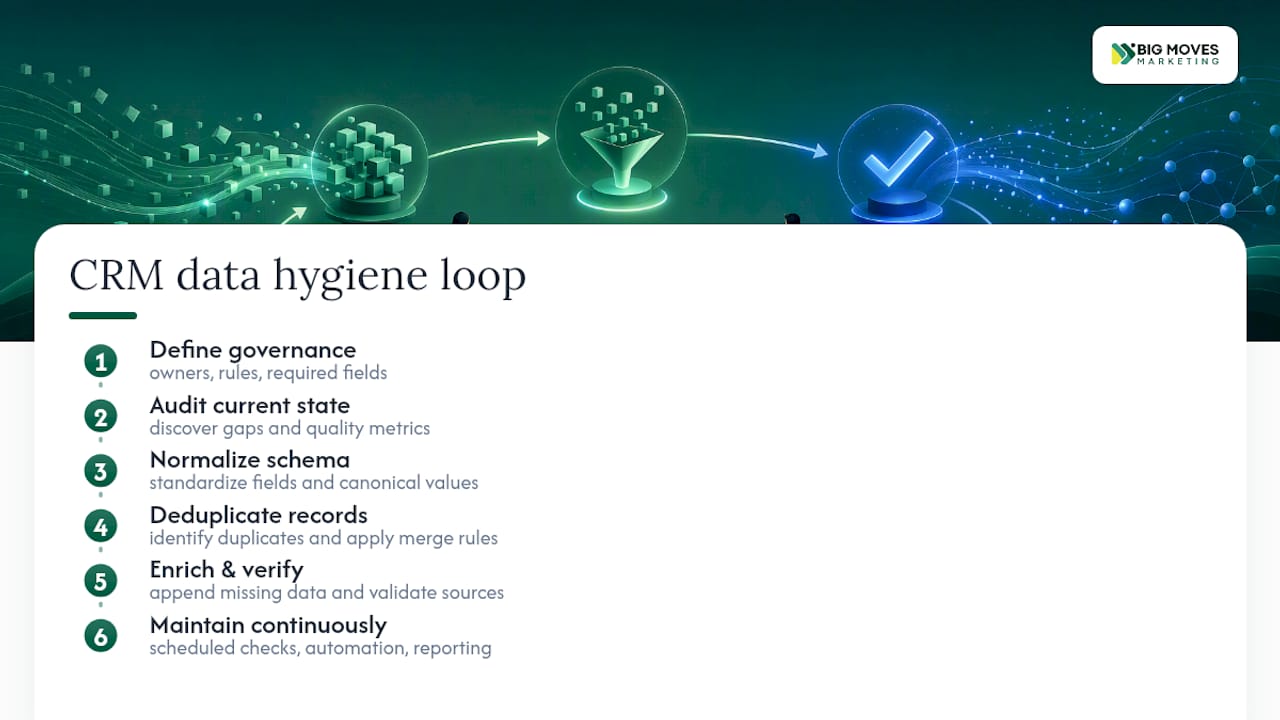
Before touching a single record, decide who owns what. Appoint a data steward, usually someone in RevOps or marketing operations, who has final say on schema changes and merge disputes. Document which fields are mandatory for a lead to enter the pipeline (email, company, job title, lead source, at minimum), and write down your formatting standards: how phone numbers are entered, how company names are capitalized, which picklist values are valid for industry and company size.
Skip this step and every later step has nothing to enforce against.
You need a baseline before you can prove improvement. Pull your duplicate rate, field completeness percentage, data age distribution, and email bounce or connect rates. These four numbers tell you where the damage is concentrated, whether that’s a duplicate problem in your accounts object or a completeness problem in lead records from a specific channel.
Segment the audit by lead source and by age. Leads imported from a trade show list eighteen months ago will look very different from leads captured last week through a validated web form, and treating them the same hides where the real problem lives.
Fix the picklists. Fix the formats. Turn free-text fields like “industry” into dropdowns wherever the CRM allows it, and reconcile every non-standard job title into a fixed taxonomy. This step is slow and it’s not glamorous, but it’s what lets automation and reporting actually trust the data underneath them.
Deduplication only works if the rules are defined before you start merging, not decided case by case as you go. Match on multiple signals, not just email, since pairing email with domain or a normalized company name catches near-duplicates that a single-field match misses (think “Acme Corp” and “Acme Corporation”).
Critically: merge, don’t delete. Deleting a duplicate wipes out its activity history, every email open, call log, and deal touchpoint attached to it. Merging preserves that history under a single surviving record.
A sample merge rule set:
| Field | Merge rule |
|---|---|
| Keep the most recently verified address | |
| Job title | Keep the most recent update |
| Original source | Preserve the earliest recorded value |
| Activity history | Combine all records, never discard |
| Owner | Keep the rep with the most recent activity |
Once the schema is clean and duplicates are gone, enrichment finally does what it’s supposed to. Append firmographic data, verify emails against a validation service, and confirm job titles against a reliable data provider, at the point of entry for new records and on a recurring schedule for existing ones. This is also where a well-configured B2B CRM setup earns its keep, since the platform’s native validation rules can catch a large share of bad entries before they ever reach a human reviewer.
The framework only holds if step six actually happens. Build a recurring calendar (the next section covers exactly what that looks like day to day) and put dashboards in front of the people accountable for the numbers. Hygiene that isn’t measured on a recurring basis quietly reverts to the mess it started as.
Quick-reference takeaways:
| Step | Core action | Owner |
|---|---|---|
| 1. Governance | Set standards and required fields | Data steward |
| 2. Audit | Measure duplicate rate, completeness, decay | RevOps |
| 3. Normalize | Standardize picklists and formats | RevOps / Marketing Ops |
| 4. Deduplicate | Merge with documented rules | Data steward |
| 5. Enrich | Verify and append at entry and on schedule | Marketing Ops |
| 6. Maintain | Run recurring cadence and reporting | Whole team |
A framework without a calendar is a plan nobody follows. Fairview’s operational model breaks the work into four rhythms, and it holds up well for most B2B teams because it matches effort to how fast each problem actually accumulates.
Daily tasks catch problems before they spread:
Weekly tasks keep the pipeline honest:
Monthly tasks handle the buildup daily checks can’t catch:
Quarterly tasks are the deep structural review:
One insight worth building your calendar around: a quarterly deep audit paired with lighter weekly and monthly checks tends to balance effort against results better than an all-or-nothing monthly overhaul. Most teams that try to do everything monthly burn out on it within two quarters.
Hygiene at scale doesn’t run on manual review, it runs on rules enforced automatically at every point data enters or moves through your stack.
Validate and enrich at ingestion. Every form, API integration, and inbound lead source should hit a validation layer before it ever creates or updates a CRM record. This is where operational best practices point clearly toward enforcing field checks at the capture point rather than fixing bad entries after the fact.
Automate deduplication with confidence scoring. Not every potential duplicate should merge automatically. Tiered logic works best: high-confidence matches (exact email plus domain match) merge automatically, medium-confidence matches queue for human review, and low-confidence matches just get flagged for later.
Schedule re-enrichment for active segments. Contacts you’re actively selling to decay faster in relevance than contacts sitting cold in a nurture list. Prioritize re-enrichment and decay monitoring on your active pipeline, not your entire database evenly.
Choose orchestration versus CRM-native automation deliberately. CRM-native workflows handle simple, single-object rules well, like flagging a blank field or triggering an alert. Orchestration platforms earn their cost when logic spans multiple systems, your marketing automation platform, your CRM, and your billing tool all need to agree before an action fires.
For teams evaluating what to buy, think in categories rather than brand names:
Pro Tip: Before buying anything new, audit what your current CRM’s native automation can already do. Most platforms handle basic validation and simple dedupe rules out of the box, and the budget you save skipping a redundant tool is better spent on the enrichment layer, which almost always needs a specialist provider.
Here’s how the teams Bigmoves works with tend to sequence this without stalling the rest of the business.
Days 1 to 30: Stabilize.
Days 31 to 60: Automate.
Days 61 to 90: Institutionalize.
Ownership matters more than most teams admit up front. A simple matrix works: marketing owns lead source and campaign fields, sales owns opportunity and account fields, RevOps owns the schema, validation rules, and cross-object reporting. Get explicit sign-off from all three functions before rollout, because a hygiene program that only one department believes in dies the first time it creates friction for someone else.
If your team is also rebuilding its go-to-market motion from the ground up, a clean CRM foundation pairs naturally with a rebuilt GTM website, since both depend on the same accurate data flowing between your marketing site, forms, and pipeline.
Pro Tip: *Don’t wait for perfect data to launch automation.
Every team that calls Bigmoves about their CRM has already tried the one-time cleanup. It works for about six weeks. Then a new integration goes live, a sales hire starts importing contacts their old way, and the duplicate rate creeps right back up.
The lesson isn’t that cleanups don’t work, it’s that they solve the wrong problem. A cleanup fixes a database. A cadence fixes a habit. Governance is the boring part nobody wants to own, and it’s exactly why the teams that assign it a real owner outperform the teams that leave it to whoever notices the mess first.
If you’re building or rebuilding your go-to-market motion around clean data, that’s foundational work worth getting right the first time, and it’s the kind of system Bigmoves helps SaaS and tech teams put in place.
— Veb
A CRM stores and organizes customer data, but it isn’t a dedicated cleaning tool on its own. Most platforms offer native validation and basic dedupe features, though ongoing hygiene usually requires added rules, automation, or specialized tools layered on top.
CRM data hygiene is the continuous process of keeping records accurate, complete, consistent, and current through validation, deduplication, normalization, and regular audits. It’s distinct from a one-time cleansing project because it never stops.
Within data management, a CRM functions as the system of record for customer and prospect information, feeding data into marketing, sales, and reporting tools. Its accuracy determines how reliable every downstream process, from forecasting to lead routing, actually is.
Definitions vary across sources, but a common framework centers on operational management (day-to-day processes), analytical capability (reporting and forecasting), collaborative function (aligning teams across data), and strategic use (guiding customer relationship decisions). Data hygiene underpins all four, since none of them work reliably on inaccurate records.






%20-%20white.svg)