%20png%20copy.avif)
Most advice on how to embed a video in an email starts with HTML5 syntax. That's the wrong starting point for most B2B SaaS teams in 2026. True native playback still isn't broadly supported across the inboxes that dominate business lists, so the core problem is designing a fallback that earns the click, preserves deliverability, and moves the buyer to a controlled viewing experience.
The practical default is a linked thumbnail, supported by a static image, animated preview, or plain-text link when the client blocks richer content. Video can still improve response. Marketing summaries report gains including 65% higher click-through rates, 19% higher open rates, and 26% fewer unsubscribes, while one cited sales case compared 17% CTR and 6% reply rate for video emails with 2.5% CTR and 1.5% reply rate for text-only emails (Validity's video email guidance). The upside is real. The old implementation assumption isn't.
The most popular advice is technically possible and commercially misleading. You can place a <video> element in an email, but that doesn't mean most recipients will see a working player.
A 2026 summary of current client behavior says Gmail and most Outlook environments don't support standard HTML5 video playback in email, while Apple Mail support has shifted away from reliable native rendering. The same summary identifies only Samsung Mail and Thunderbird as reliable embedded-video environments in 2026 (current email client behavior). That leaves the dominant B2B inboxes with a static or broken experience unless you build the fallback deliberately.
The production question isn't “Can this email contain video?” It's “What does the recipient see when the inbox refuses to play it?”
Gmail strips the <video> tag, Outlook for Windows blocks HTML5 video, and major clients commonly fall back to a static image or blank space (email client support details). YouTube and JavaScript embeds don't solve the problem. Email clients sanitize or ignore the code long before a player can load.
The audience distribution makes this a business issue, not a developer preference. The 2026 client summary reports Apple Mail at 64.66% of opens, Gmail at 24.11%, and Outlook at 6.49% (inbox distribution and fallback strategy). Universal rendering matters more than a technically elegant player that works for a narrow segment.
For a B2B sequence, use a hosted landing page as the destination. Put a clear thumbnail with a play icon in the email, then route the click to a page where you control the player, captions, next action, and tracking.
Use a GIF only when motion communicates something valuable before the click. Use a static image when the email needs to remain light and dependable. Use plain text in SDR sequences when the message should feel like one-to-one outreach rather than a campaign.
Teams that ignore this architecture create heavy emails, inconsistent layouts, and broken attribution. A recipient may see a blank block, a blocked image, or a click that never reaches the intended video page. The B2B email marketing practices still matter, but video adds a sharper requirement: every creative decision must survive the recipient's inbox before it can influence pipeline.
True native video playback remains a 2026 myth for most B2B lists. There are five workable approaches, but they serve different jobs. Treating them as interchangeable wastes production time and can weaken deliverability.
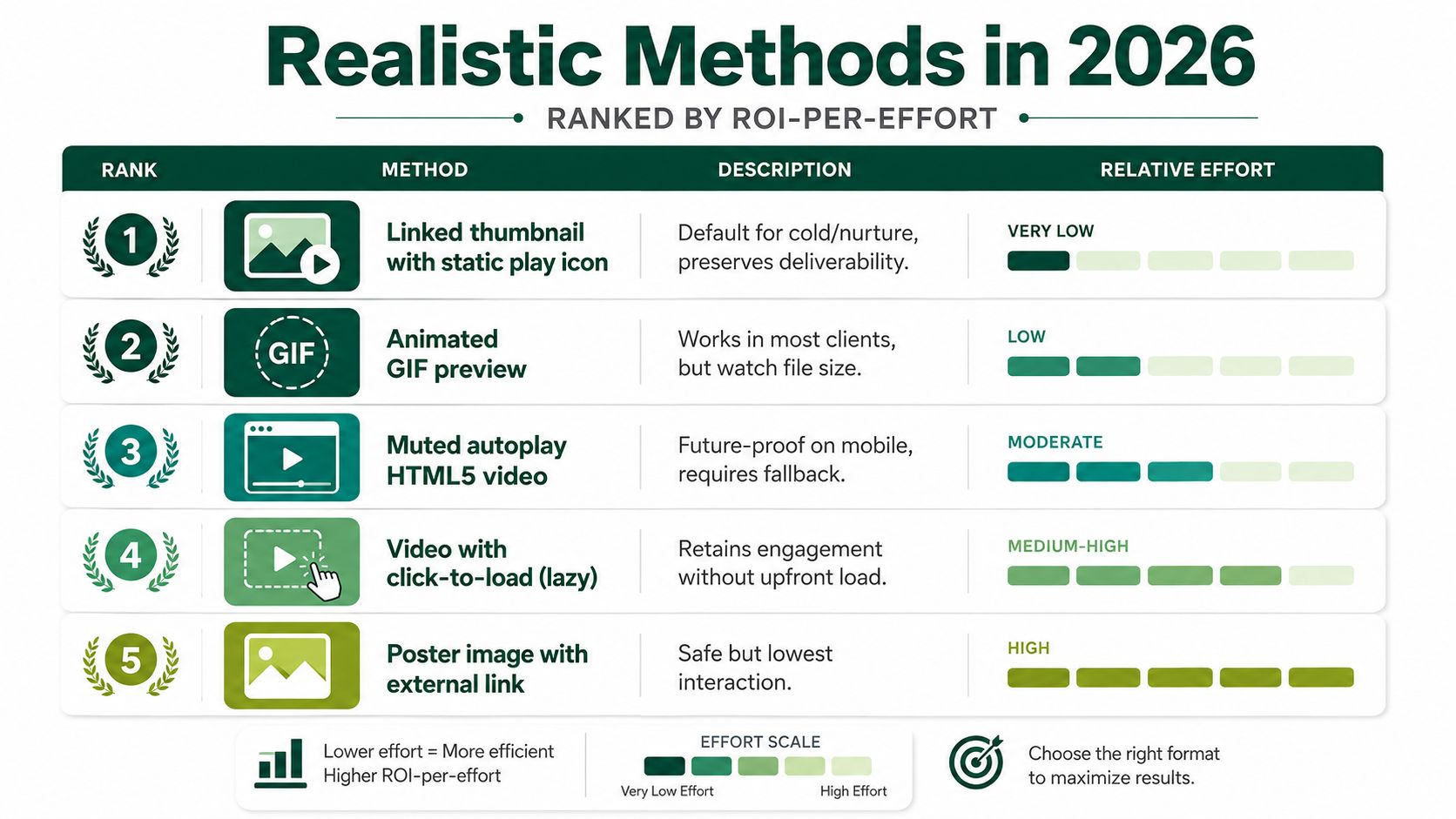
Use this method for cold outbound, nurture, and most product announcements. Create a strong static hero image, add a visible play icon, link the full image, and send recipients to a hosted landing page. The email remains relatively light, the link works across clients, and the landing page gives your team control over playback, captions, conversion, and tracking.
The thumbnail must explain the subject without forcing the email copy to carry the entire message. “See the workflow” is weak. “How security teams review access requests” gives the buyer a specific reason to click.
Teams building repeatable layouts can use resources to create newsletters in an email builder. Standardize image-link modules instead of rebuilding each send as a custom development project.
A GIF provides movement without relying on HTML5 playback. Keep it short, compress it aggressively, and link the full animation to the hosted video. Product UI motion, before-and-after workflows, and interface interactions work well when they make sense without audio.
A GIF is a teaser, not the viewing experience. Keep the controlled video page as the destination.
An inline attempt can include a poster image, explicit dimensions, and a fallback link. Use it only for a subscriber segment whose client data supports the experience. Do not make it the universal build.
The video, webinar, and interactive content perspective supports a practical rule: richer content earns production effort when it matches audience intent and context, not because the format appears advanced.
AMP for Email can support interactive experiences in Gmail-hosted inboxes. Reserve it for controlled, opt-in use cases such as product updates or transactional triggers. It does not replace a linked thumbnail.
Outlook offers a separate, limited link-to-player behavior for certain enterprise users. Microsoft describes a link-to-player experience in Outlook or Loop, not universal HTML5 playback across email clients (Microsoft's Outlook video behavior). Treat that capability as an enhancement for eligible recipients, never as the foundation of the campaign.
For SDR sequences, use plain text when the message should feel one-to-one: “I recorded a short walkthrough of the access review workflow. You can watch it here.” That format often fits cold outreach better than a campaign-style visual.
Build order should follow your actual list composition. Don't choose a video method because a tutorial says a client supports it. Export your open-share data, identify the inboxes that matter, and then decide which fallback deserves engineering time.
The matrix below uses qualitative rendering guidance. Open-share percentages vary by list and aren't safe to assume without your own data. One 2026 summary reports Apple Mail, Gmail, and Outlook as the largest named sources of opens, while another notes that Gmail plus Apple Mail account for roughly 84% of opens in one benchmark (client coverage benchmark).
| Method | Gmail, web and mobile | Outlook desktop, 2016 to 365 | Outlook web | Apple Mail, macOS and iOS | Samsung Mail |
|---|---|---|---|---|---|
| Linked thumbnail | Static image and link render reliably when images load | Static image and link are the safe path | Static image and link render reliably | Static image and link render reliably | Static image and link render reliably |
| GIF preview | Animation support varies, with a fallback frame required | May show a static frame or inconsistent animation | Usually falls back safely to an image | Generally suitable, but test mobile rendering | Suitable for a motion preview with image fallback |
| Inline HTML5 | Video tag is stripped or blocked, poster fallback required | HTML5 playback is blocked, poster fallback required | Playback isn't a dependable universal behavior | May support playback in some contexts, but user interaction and rendering vary | Reliable embedded playback is reported |
| AMP video | Available only for eligible Gmail AMP contexts | Falls back to standard HTML | Falls back to standard HTML | Falls back to standard HTML | Falls back to standard HTML |
| Outlook link-to-player | Not applicable | Limited Outlook and Loop behavior for eligible enterprise users | Depends on Microsoft account and feature availability | Not applicable | Not applicable |
The linked thumbnail wins because it fails gracefully. A blocked image still leaves room for a text CTA. A blocked video tag can leave a blank, oversized region unless the fallback is carefully coded.
Inline HTML5 is a segmentation tactic, not a campaign default. AMP is a specialized product capability. Outlook's player behavior is useful when you know your audience and Microsoft environment, but it doesn't justify building an Outlook-first email for every list.
Build for the largest reliable audience first. Add client-specific richness only after the baseline experience works.
A B2B marketer should know whether the next send is primarily Gmail, Outlook desktop, Apple Mail, or mixed. The exact open-share bands are list-specific, and enterprise audiences can skew heavily toward desktop Outlook. Your matrix, not speculation about client support, should determine the build order.
The code is the easy part. The difficult part is accepting that the code must fail well.
Use the HTML5 pattern only when your segment justifies it. The linked-thumbnail pattern should ship first for almost every mixed B2B list.
<videowidth="640"height="360"poster="https://cdn.example.com/video-poster.jpg"controlsmutedautoplayplaysinlinearia-label="Watch the product access review walkthrough"><source src="https://video.example.com/access-review.mp4" type="video/mp4"><trackkind="captions"src="https://cdn.example.com/access-review.vtt"srclang="en"label="English captions"><a href="https://www.example.com/access-review-video">Watch the access review walkthrough</a></video>The width and height attributes establish a predictable box before the client decides what to do. The poster image gives unsupported clients something to render. muted, autoplay, and playsinline express the intended mobile behavior, but they don't override inbox restrictions.
The aria-label describes the asset for assistive technology. The captions track supports viewers who watch without sound on clients that honor the element. The anchor inside the video block provides a meaningful destination when playback isn't available.
Don't rely on CSS alone to rescue the fallback. Email clients treat CSS differently, and hiding a link can remove the only usable action. The poster and anchor should remain useful even when the player disappears.
<table role="presentation" width="100%" cellpadding="0" cellspacing="0" border="0"><tr><td align="center" style="padding:24px 0 16px 0;"><ahref="https://www.example.com/access-review-video?utm_source=email&utm_medium=nurture&utm_campaign=access-review"target="_blank"style="text-decoration:none;"></a></td></tr></table>The table wrapper is deliberate. It survives Outlook's table-based rendering model better than a layout built from modern containers. The 640px width gives desktop clients a stable maximum, while width:100% and height:auto protect mobile layouts.
Use an image that already contains the play treatment if the email must remain simple. An inline SVG overlay can reduce the need for a second image, but you still need to test it because some clients restrict SVG rendering. The essential components are a clear poster, one anchor, descriptive alt text, and a landing page with a real CTA.
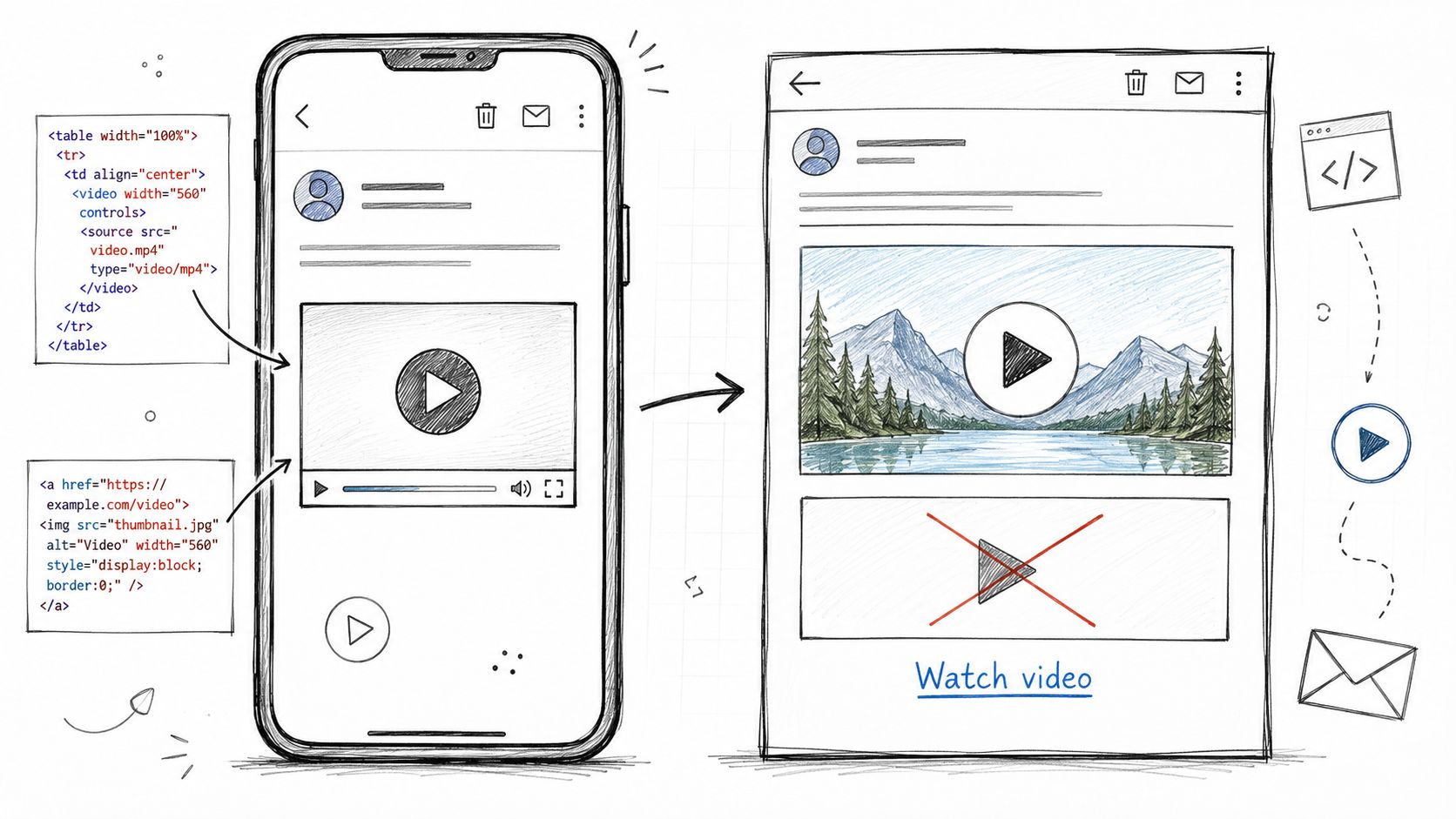
Ship the linked thumbnail first. Keep the HTML5 attempt for a tested segment or an AMP-capable program. Teams trying to generate leads with email marketing should optimize for completed actions, not for the satisfaction of inserting a player tag.
Video decisions are deliverability decisions. The inbox doesn't care that a video is strategically important. It cares whether the message is clean, fetchable, and easy to render.
A 2026 guidance summary recommends keeping GIFs under 500 KB and HTML totals under 80 KB, with an image fallback for unsupported clients (video email deliverability guidance). The same source reports a study summary covering 2.1 million cold emails across 340 B2B companies, with 4.9% reply rates for video-thumbnail emails versus 3.9% for text-only emails, while warning that video usually belongs later in the sequence after inbox trust is established.
Don't attach an MP4. Host it externally and link to it. Base64 embedding inflates the message, makes the HTML harder to inspect, and turns a client-rendering problem into a weight problem before the recipient even clicks.
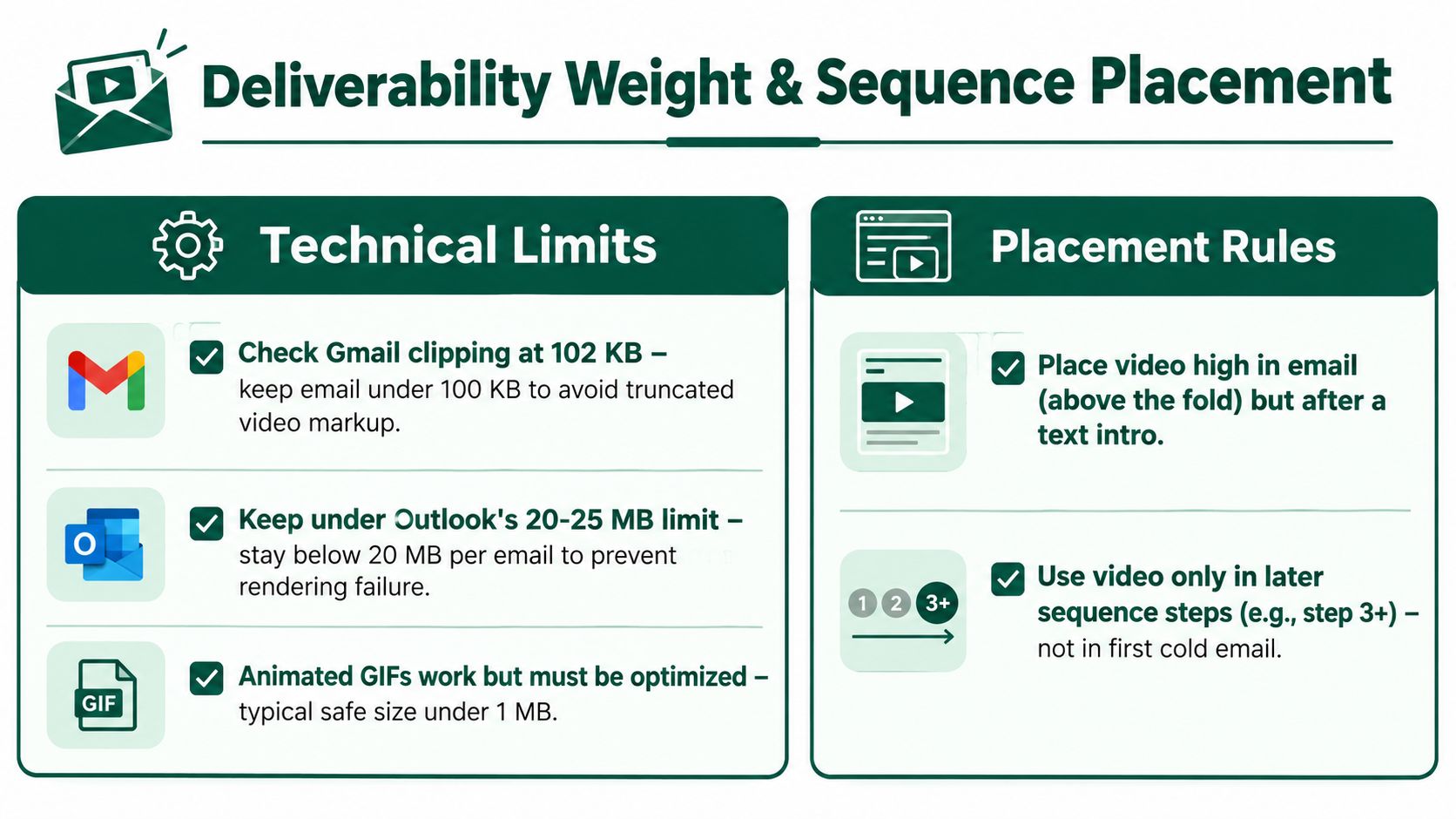
Cold Day 0 outreach usually has the weakest tolerance for a heavy creative treatment. The buyer doesn't know you, doesn't expect a video, and may be reading quickly on a corporate connection with images disabled.
Video earns more attention after a reply, demo, event interaction, or meaningful content action. Use it in a reply nudge, demo follow-up, onboarding note, or post-event re-engagement email. The placement makes the creative feel relevant rather than intrusive.
Video is a mid-sequence accelerant, not a substitute for trust.
Before launch, check:
The marketing automation best practices should support this logic. Automation should decide when video is appropriate based on buyer context, not insert the same asset into every branch.
A video email isn't ready when it looks correct in the builder preview. Builder previews hide the failure modes that matter: stripped tags, blocked images, altered spacing, dark-mode collisions, and mobile scaling.
Run every production build through Litmus Email Testing or Email on Acid. Test Gmail web, Gmail mobile, Outlook 2019, Outlook 365, and Apple Mail on iOS. Then toggle image blocking and dark mode manually. A poster that looks strong with images enabled may become meaningless when the client shows only alt text.
Use a unique landing-page URL for each audience segment, with UTM parameters that identify the sequence, asset, and CTA. The landing page should send a video_viewed event to the CRM after the recipient reaches the defined viewing threshold. Don't label a click as a view. A click only proves that the email created enough interest to open the page.
Compare the video version with a control email that uses the same offer and audience but omits the video treatment. That isolates the contribution of the creative instead of rewarding novelty or subject-line differences.
| Metric | Why it matters | Tool to capture |
|---|---|---|
| Render rate | Shows whether the intended module survives the client mix | Litmus or Email on Acid |
| Click-to-play rate | Measures whether the fallback earns attention | Email platform and tagged landing page |
| Video completion behavior | Distinguishes a curiosity click from meaningful consumption | Video host analytics |
| Pipeline stage progression | Connects the video interaction to revenue motion | CRM and marketing automation |
| Seven-day opportunity movement | Shows whether the send influenced active buying activity | CRM reporting |
The three numbers leadership should see are render rate, click-to-play rate, and pipeline stage progression within seven days. Open rate is useful context, but it won't tell you whether the video changed the buying process.
Teams building a broader measurement system can use this guide to measuring marketing effectiveness. For calibration, a resource such as email marketing benchmarks for mattresses can provide category context, but it shouldn't replace your own control group.
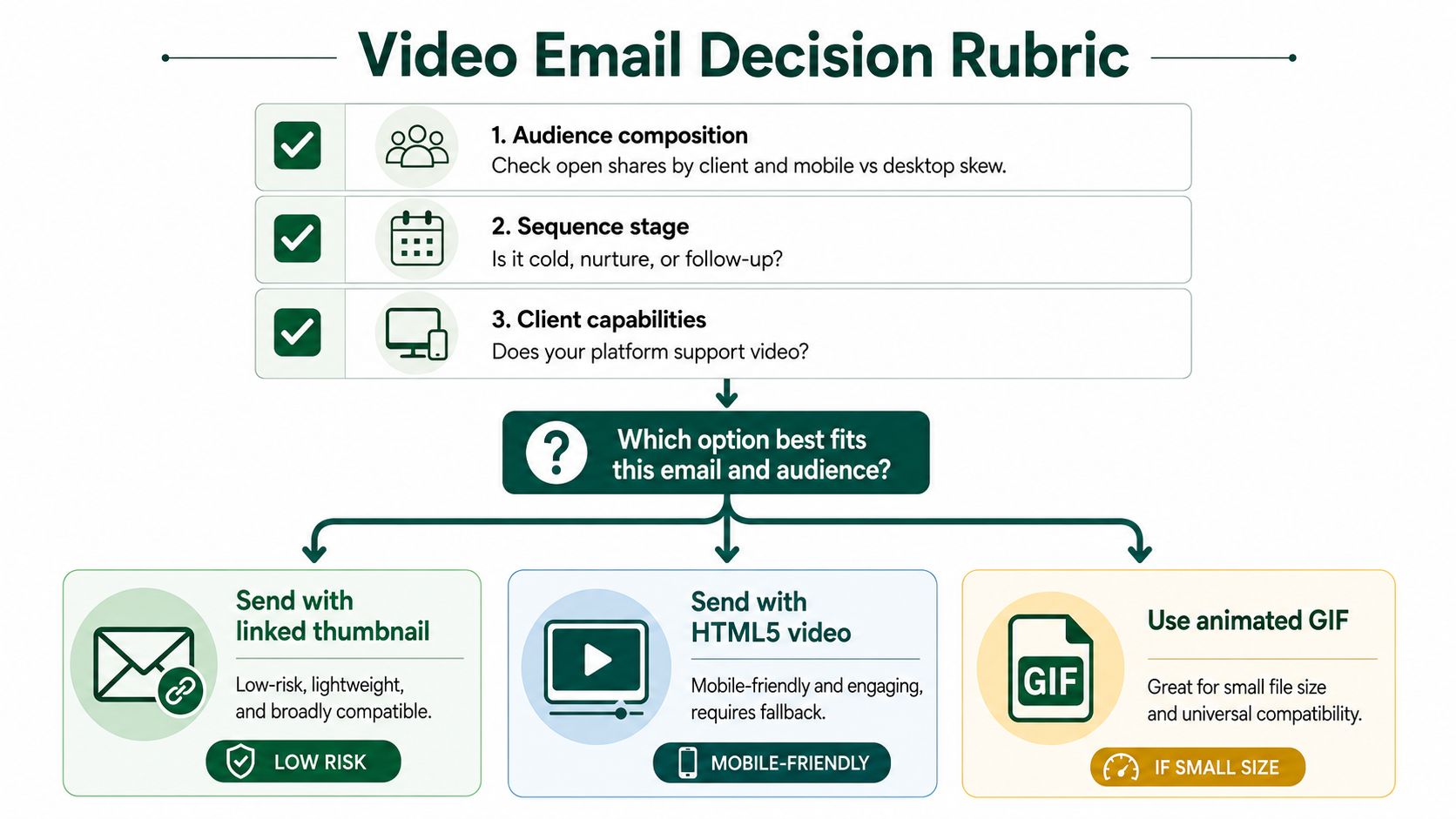
Approve a video email only after it passes three filters.
Audience composition comes first. Check your own open shares by client and device. If the list is dominated by Gmail and Outlook, build a linked thumbnail. If a known segment consistently uses a client that supports richer playback, test an enhanced version for that segment only.
Sequence position comes next. Cold outbound gets a static linked thumbnail or plain-text link. Mid-sequence nurture can use a compact GIF when the motion helps explain the product. Demo follow-ups and customer re-engagement can route to a richer landing page because the recipient already has context.
Asset format determines the fallback. A talking-head video needs a compelling still and captions after the click. A product UI walkthrough can benefit from a short GIF preview. A motion graphic may work well as a poster with a clear action. AMP for Email belongs only on owned Gmail lists where the team can support the extra implementation.
Retire heavy HTML5 builds that lack a solid fallback. Retire oversized autoplay GIFs that add weight without adding understanding. Retire YouTube thumbnail hacks that route buyers through unsafe or poorly controlled redirects.
The better rule is simple: design the fallback first, then add richer media only where your open-share data supports it.
Big Moves Marketing helps B2B SaaS teams turn scattered growth activity into clear positioning, focused demand programs, and measurable pipeline systems. If your video emails are generating clicks without advancing buyers, visit Big Moves Marketing to get a sharper growth plan and a fallback-first email program built around your actual audience.




%20-%20white.svg)