%20png%20copy.avif)
Yes, SaaS companies should run Google Ads, but only after building closed-loop measurement. The recommended approach is CRM-integrated, value-based bidding on search campaigns, launched once you have product-market fit and steady conversion volume. Your first move: import offline conversions from your CRM into Google Ads before you spend another dollar on new campaigns.
TL;DR:
- Import offline conversions from your CRM into Google Ads before scaling campaigns to ensure effective revenue-based bidding strategies.
- Build your account with separate campaigns for brand, category, competitors, problem-aware searches, and remarketing, each with targeted structures and budgets.
- Achieve 30 or more conversions per campaign monthly and a minimum $3,000 to $5,000 budget for reliable data, then gradually scale spend by 10-20%.
- Use offline revenue data and proper attribution windows to shift focus from lead volume to actual deal value, improving pipeline outcomes.
- Prioritize connecting your CRM to Google Ads early, as accurate measurement is the key to successful bidding, scaling, and campaign optimization.
The winning sequence runs in four stages: measurement, search-led demand capture, remarketing, and scale. Skip a stage and you build on sand.
Start by wiring your CRM to Google Ads so every click ties to a real deal outcome, not just a form fill. Then launch tightly themed search campaigns targeting people already looking for a solution like yours. Search still captures the largest share of buyer intent on both mobile and desktop, which is why it comes before anything else. Once search is producing qualified pipeline, layer in remarketing to nurture the visitors who did not convert on the first visit. Only then do you scale spend.
A few numbers anchor this sequence:
Everything else, ad copy, keyword lists, audience segments, is in service of hitting those numbers faster and cheaper.
Most SaaS accounts fail before the first ad ever runs. The account structure itself is broken, mixing brand searches with cold prospecting terms in the same campaign, burying signal under noise. B2B SaaS buying cycles run longer than B2C, audiences are smaller, and conversion definitions rarely match what the platform tracks by default, which means your structure has to compensate for that from day one.
Build your account around five distinct campaign layers, each with its own goal and budget:
Inside each campaign, keep ad groups tight. A single ad group should hold a moderate number of closely related keywords, all pointing to one landing page that matches the searcher’s exact intent. An ad group mixing “free trial” and “enterprise pricing” keywords sends half your clicks to the wrong page, and Google’s Quality Score suffers along with your conversion rate.
Remarketing deserves its own attention because it is where most SaaS accounts leave money on the table. Segment your Display and YouTube audiences by the page they visited, pricing page visitors are a different audience than blog readers, and should see different messaging. Customer Match lists, built from your CRM’s contact data, let you target known leads and existing customers directly inside Search, Display, and YouTube. This account architecture also gives you the clean segmentation you need for closed-loop reporting, since B2B buying cycles and smaller addressable audiences demand a structure C2C advertisers never have to think about.
One structural discipline pays for itself repeatedly: in poorly organized accounts, as much as 57% of spend goes to search terms that never convert. Tight ad groups and aggressive negative keyword lists are the fix, and they belong in the account from the first day, not as a cleanup project six months later.
Here is the uncomfortable truth about most SaaS Google Ads accounts: they optimize for form fills, not revenue. A demo request costs whatever it costs, but not every demo request turns into a paying customer, and Google Ads has no idea which ones do unless you tell it.
Closed-loop tracking fixes that. The mechanics are straightforward, even if the setup takes real effort:
This is the single highest-leverage change most SaaS marketing teams can make to their Google Ads accounts. Accounts running offline conversion tracking with value-based bidding generate roughly three times more pipeline at a 31% lower cost per lead than accounts optimizing on form fills alone.
Pro Tip: Set up your CRM to pass deal value, not just a binary “won” flag, into the offline conversion import. Google’s bidding algorithms weight conversions by value once you feed them value, and a $50,000 enterprise deal should never look the same as a $500 self-serve signup to the algorithm.
Once revenue data flows back into the platform, you stop optimizing for the cheapest lead and start optimizing for the lead most likely to become a customer worth keeping. That shift alone explains why some SaaS accounts look unprofitable on the surface (a $5.34 average CPC and roughly 78% first-touch ROAS for non-branded terms) and yet perform fine once revenue is properly attributed. First-touch metrics simply cannot see the deals that closed 90 days after the click.
Attribution windows matter here too. B2B SaaS deals often close weeks or months after the first click, so watch your time-lag report inside Google Ads to understand how long conversions typically take to register, and set your conversion window accordingly. A 30-day window will systematically undercount a sales cycle that averages 90 days.
Bidding strategy should follow your data maturity, not a guess about what sounds sophisticated. Move through this sequence in order, never skip ahead:
Value-based bidding tends to outperform Target CPA once revenue data is reliable, because it optimizes for deal quality rather than raw lead count. Making that switch too early, before revenue data exists, throws away the benefit entirely.
Match types need the same disciplined sequencing. Start with exact and phrase match on your highest-intent terms, paired with a growing negative keyword list built from search term reports every week. Only add broad match after your negative keyword list is mature and your conversion tracking is trustworthy, broad match without guardrails is how budgets disappear into irrelevant traffic.
Performance Max deserves particular caution. It can outperform standard search campaigns, but only with the right inputs in place first: reliable CRM conversion data, a Customer Match list of at least 100 users, and a weekly negative keyword audit. Skip those prerequisites and PMax will happily optimize toward cheap, low-quality conversions that look great in a dashboard and terrible in your pipeline.
B2B SaaS deals rarely involve one decision maker. Gartner’s research on B2B buying journeys confirms what most SaaS sales teams already know from experience: purchases move through multiple stakeholders and multiple touchpoints, which means your ad targeting has to account for a buying committee, not a single persona.
That reality shapes how you should build audiences:
The mistake most teams make here is treating every retargeting audience the same. A visitor who abandoned a demo request form needs a different ad, and often a different offer, than someone who simply read a comparison article. Building that segmentation early keeps your remarketing spend efficient instead of just repeating the same banner to everyone who ever visited your site.
Your ad copy makes a promise. Your landing page has to keep it, or the click was wasted money.
Match landing page content to the intent behind the click. Someone searching your exact product category and clicking a “Book a Demo” ad expects a bottom-funnel page: a short form, clear next steps, maybe a calendar link. Someone clicking a problem-aware ad about “reducing manual reporting time” is earlier in their thinking and responds better to a gated guide or a case study than a hard demo ask.
A handful of elements separate landing pages that convert from ones that leak traffic:
Run A/B tests on headline framing, form length, and the specific call-to-action wording before you touch anything visual. Track micro-conversions, scroll depth, video plays, pricing page visits, alongside your primary conversion goal, since they often reveal exactly where a page loses momentum before the final form abandonment shows up in your numbers. Reviewing real ad copy examples built specifically for SaaS demand-gen campaigns is a faster starting point than testing from a blank page.
Pro Tip: Build one landing page variant with pricing visible and one without, then run both against the same ad set. For self-serve and mid-market SaaS, showing pricing usually raises lead quality even when it lowers total volume, exactly the tradeoff you want.
Budget planning starts with the math, not a gut number. To reach the 30-conversion threshold that unlocks smarter bidding, work backward from your expected cost per lead and set a monthly budget that gets you there inside four to six weeks. For most SaaS categories, that lands in the $3,000 to $5,000 monthly range per active campaign as a starting point, scaling toward $10,000 to $50,000 or more as accounts mature and conversion data accumulates.
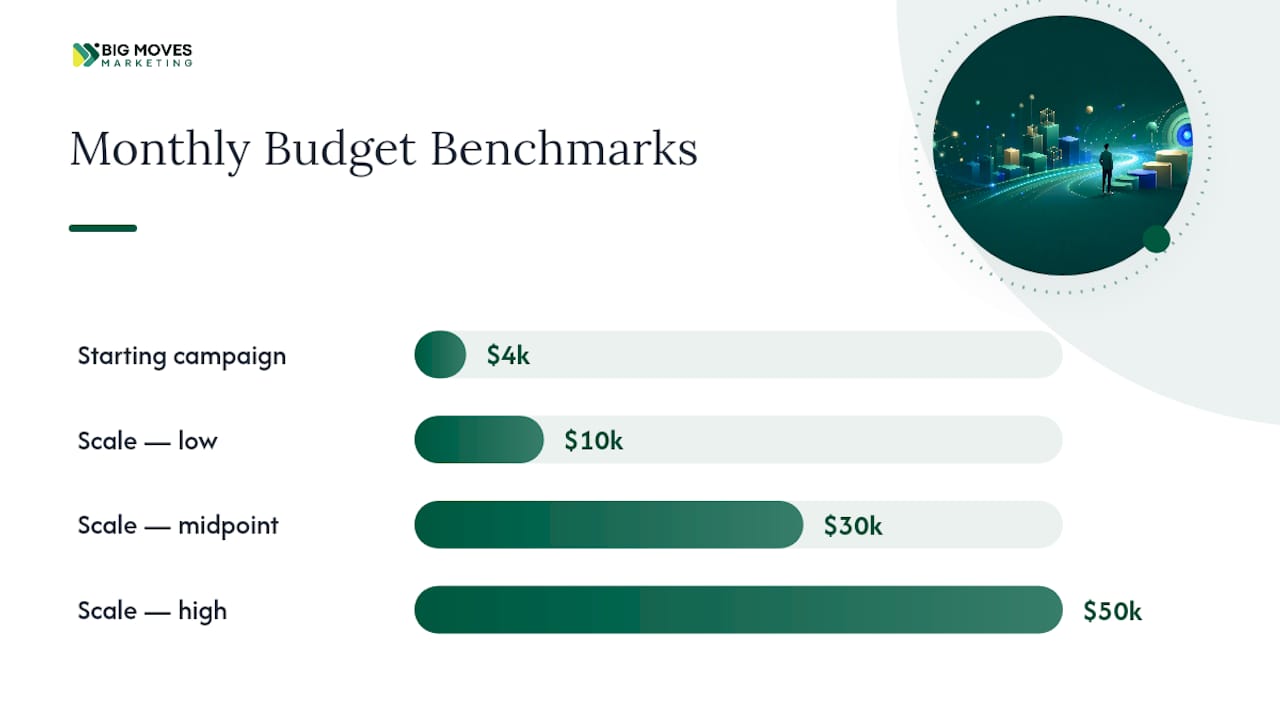
Once a campaign hits steady performance against your target KPIs, scale spend in 10% to 20% weekly increments. Larger jumps confuse the bidding algorithm’s learning phase and often spike your cost per lead temporarily.
Here is how typical SaaS benchmarks shake out, translated into planning numbers:
| Metric | Typical Range | Planning Note |
|---|---|---|
| Non-branded CPC | ~$5.34 average, rising ~29% year over year | Budget for continued upward pressure on cost per click |
| First-touch ROAS | ~78% for non-branded terms | Looks unprofitable alone; judge on full-funnel LTV:CAC instead |
| Conversion threshold for bidding shifts | 30+ conversions/month per campaign | Below this, stick with Maximize Conversions |
| Waste in unstructured accounts | Up to 57% of spend on non-converting terms | Fix with negative keywords and tight ad groups |
Translate every one of these numbers against your own LTV:CAC ratio, not against a generic industry average. A $5.34 CPC is expensive for a $300 annual plan and trivial for a $30,000 enterprise contract. Tools that track SaaS-specific marketing metrics make that translation far easier than pulling numbers manually from three different dashboards each week.
Three mistakes account for most of the wasted spend in SaaS Google Ads accounts, and all three are fixable within a single sprint.
Optimizing for surface conversions instead of revenue. A form fill is not a customer. If your bidding strategy only knows about form fills, it will happily fill your pipeline with leads that never close. Fix it by importing offline conversions weighted by actual deal value, so the algorithm learns what a good lead looks like, not just what a cheap one looks like.
Running broad match without guardrails. Broad match can find genuinely valuable new search terms, but only once you have a mature negative keyword list and Enhanced Conversions running to keep the data clean. Turning on broad match in week one, before either exists, is how budgets evaporate into irrelevant clicks.
Under-segmenting the account. Mixing brand, category, competitor, and remarketing traffic into shared campaigns hides which layer is actually working. Separate them from the start:
Each of these fixes takes a few hours of setup and pays back within the first month of cleaner data.
Get the foundation right in the first two weeks, then build outward.
Days 1 to 14: Set up GCLID capture on all forms, map that field into your CRM, define your core conversion events (demo booked, opportunity created, closed-won), build your first negative keyword list from historical search terms, and seed a Customer Match list from existing customers and pipeline contacts.
Days 15 to 45: Launch brand and category search campaigns with tight ad groups. Run on Maximize Conversions. Monitor weekly for search terms to add as negatives. Confirm offline conversion imports are flowing correctly from CRM to Google Ads.
Days 46 to 75: Once campaigns cross 30 conversions per month, migrate bidding to Target CPA or Maximize Conversion Value. Launch remarketing campaigns targeting site visitors segmented by page intent.
Days 76 to 90: If revenue data is importing reliably, test Target ROAS on your strongest campaign. Evaluate whether Customer Match lists have crossed 100 contacts to justify enabling Performance Max, with negative keyword audits scheduled weekly from launch.
Patterns repeat across SaaS companies running Google Ads: teams that measure revenue outperform teams that measure clicks. That is not a theory, it shows up consistently once CRM data starts flowing back into the ad platform.
The accounts that struggle almost always share one trait: they optimize for the metric that is easiest to see (a form fill, a cost per click) instead of the metric that actually matters (a closed deal). Once offline conversions are wired in, the same budget starts working differently, because the algorithm finally knows what a good lead looks like.
Two patterns hold up consistently across SaaS advertising accounts: offline conversion imports produce materially better pipeline outcomes than surface-level optimization, and Performance Max without proper guardrails routinely drifts toward cheap, low-value conversions. Neither pattern is exotic. Both require setup work most teams postpone until spend has already been wasted.
Most Google Ads advice for SaaS treats bidding strategy as the lever that matters most. It is not. Measurement is the lever. A mediocre bidding strategy layered on clean, revenue-connected data will consistently outperform a sophisticated bidding strategy layered on garbage data, because the algorithm can only optimize toward what you tell it to value.
The conventional advice, “turn on Performance Max, it’s automated and easy”, skips the part where PMax needs Customer Match lists, offline conversions, and weekly maintenance to avoid drifting toward junk leads. That omission costs SaaS companies real budget every quarter.
If you take one thing from this playbook, prioritize the CRM to Google Ads connection before anything else. Not the ad copy, not the audience targeting, not the bidding strategy. Get GCLID capture and offline conversion imports working first. Everything downstream, better bidding, smarter budgets, faster scaling decisions, depends on that pipe being built correctly. Skip it, and every other tactic in this article is operating on incomplete information.
— Veb
This playbook’s components, including GCLID capture, CRM mapping, campaign architecture, and conversion-focused landing pages, are based on experience running this sequence across multiple SaaS accounts rather than just from blog posts.
Measurement wiring, conversion-ready landing pages on Webflow, and pilot-led Google Ads execution based on this approach can be outsourced to expert teams, so your team avoids learning offline conversion imports and Performance Max guardrails on the fly while your budget burns. If your account is stuck optimizing for form fills instead of revenue, or you are not sure whether your CRM data is actually reaching Google Ads correctly, start with a website and go-to-market build that gets the foundation right before another dollar goes into campaigns.
It works best after you have product-market fit and steady conversion data. Without at least 30 conversions per campaign per month, the bidding algorithm has too little signal to optimize effectively.
Plan for $3,000 to $5,000 per month per active campaign as a starting point, scaling to $10,000 to $50,000 or more as offline conversion data matures and campaigns prove profitable.
Target CPA optimizes for a target cost per conversion and works well once you cross 30 conversions monthly; Target ROAS optimizes for revenue and should only launch once real deal value is imported from your CRM.
Only after CRM-based offline conversions are flowing reliably, your Customer Match list holds at least 100 contacts, and you have a weekly negative keyword audit process in place.
It connects ad clicks to actual closed revenue instead of just form fills, which accounts show can triple pipeline while cutting cost per lead by roughly 31%.
Bigmoves builds the CRM-to-Google Ads measurement pipeline, campaign structure, and landing pages this playbook describes as part of its go-to-market execution services for SaaS and technology companies.



%20-%20white.svg)