%20png%20copy.avif)
Most advice about an AI animation generator starts with the wrong question. Teams ask which tool is fastest, then act surprised when the bill shows up in cleanup, brand review, legal review, and scene-level rework. In B2B SaaS, speed is only useful if the asset survives the pipeline. Otherwise, you've just traded one bottleneck for another.
That's why the category needs to be treated as a workflow problem, not a novelty purchase. The market is already being framed as a large, scaling infrastructure story, with reports projecting major growth across AI animation and generative media categories, including forecasts that range from USD 91.38 billion in 2024 to USD 384.40 billion by 2030 in one segment estimate and from USD 110.65 billion in 2025 to USD 1,887.70 billion by 2035 in a broader market view, with North America at 34.5% of revenue, or USD 38.17 billion, in 2025 Grand View Research. That doesn't prove every tool is production-ready. It does prove the category is no longer a toy.
The failure usually starts before anyone opens the tool. A founder or marketing lead wants a faster explainer video, so the team skips the hard part and jumps straight into prompt writing. That feels efficient. It isn't.
In SaaS, the asset doesn't exist in isolation. It has to fit a landing page, a sales deck, a product launch, a compliance review, or a customer training flow. If the animation generator can't hold brand elements steady, keep product UI accurate, or survive approval cycles without endless fixes, the pilot becomes a rework engine. That's the wrong kind of busy.
Practical rule: if the tool saves time in the demo but creates more human review after render, it's not a fit for your pipeline.
Many teams get seduced by the surface layer. They compare polished clips instead of asking whether the model can maintain temporal consistency, per-scene control, and editability under real business constraints. That skepticism is warranted. Benchmarks for motion behavior and compositional consistency exist for a reason, because convincing output can still fail on the details that matter in production DEVIL benchmark, T2V-CompBench.
If you're evaluating an ai animation generator, don't ask, “Can it make a video?” Ask, “Where does it sit in the chain?” The answer determines whether the tool reduces cost or adds cleanup. That's the build-versus-buy question in disguise, and it matters just as much for creative systems as it does for software infrastructure Big Moves Marketing on build vs buy.
The teams that recover from bad pilots usually come back with a better question. They stop looking for full automation and start looking for controlled augmentation. That's the right frame.
An AI animation generator is not one thing. It's a category that includes different methods for creating moving visuals from text, images, video, or motion inputs. If you don't separate those methods, vendor pages blur together fast.
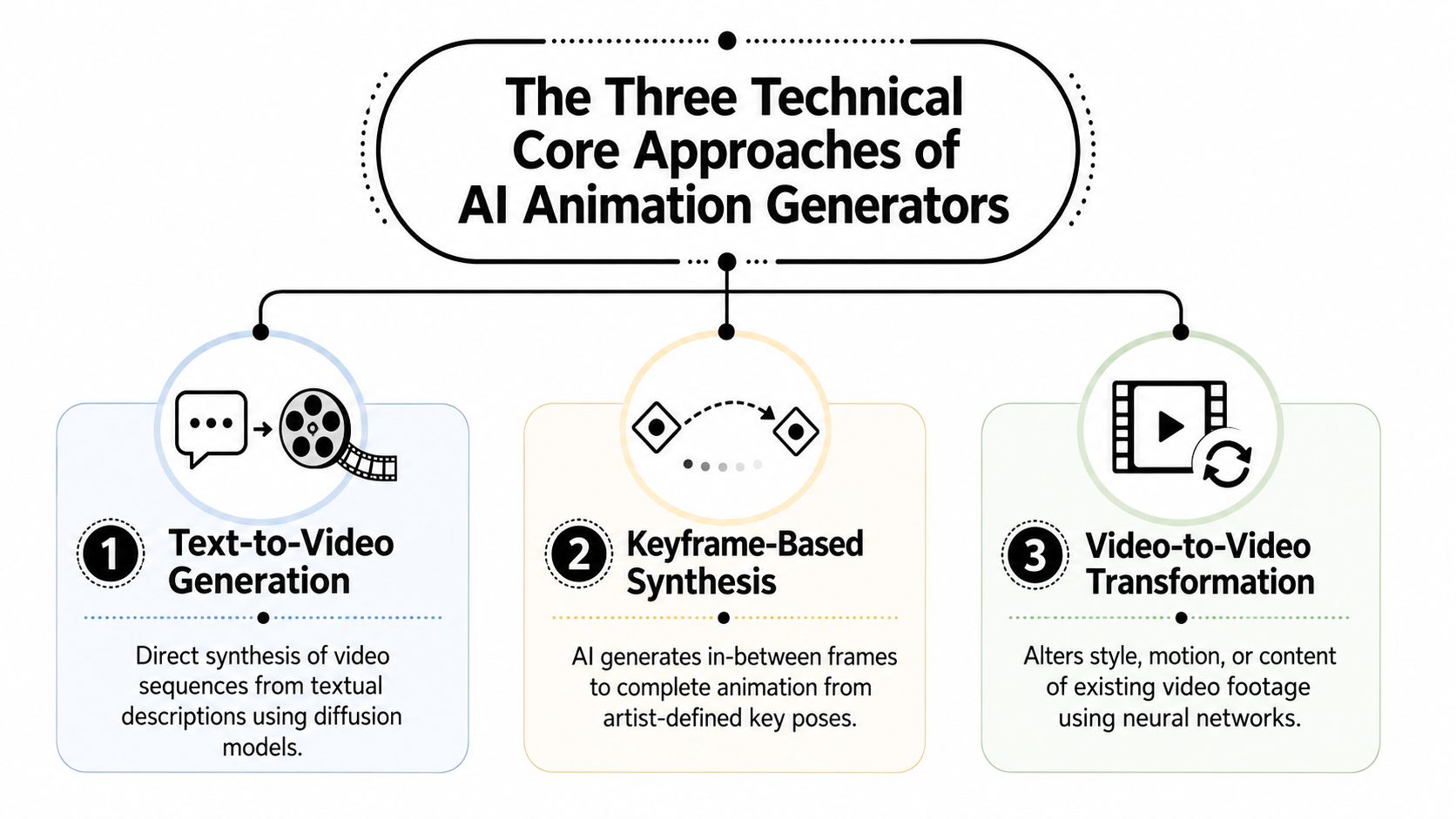
Text-to-video generation is the most familiar. You write a prompt, and the model synthesizes a video sequence from scratch. Think of it as a prompt-conditioned render engine. It's good for concepting, rough storytelling, and fast visual exploration. It's also the most likely to drift when you need precise product details or stable brand assets.
Keyframe-based synthesis is closer to enhanced tweening. You define the important poses or scene anchors, and the system generates the in-between motion. This is useful when you want control over timing, transitions, or character movement without hand-animating every frame. For founders, the key value is control. You're not asking the model to invent the whole sequence. You're constraining it.
Video-to-video transformation takes existing footage and changes its style, motion behavior, or content characteristics. If you've got a rough screencast, a simple talking-head clip, or a source animation, this approach can reshape it into a branded asset. It's often the most practical path for B2B teams because you're starting with something concrete, not a blank page.
Text-to-video expects prompts and sometimes reference images. Keyframe systems expect scene structure, poses, or motion references. Video-to-video expects source footage. The output is usually a playable clip, but the main question is whether you get usable scenes, not just a file.
If you're evaluating tools for B2B use, read the vendor claims through this lens. Some systems are better at ideation. Some are better at motion. Some are better at controlled edits. If you confuse those, you'll buy the wrong thing and call it a “pilot problem.”
The useful next step is not more jargon. It's choosing the right entry point for your team's workflow. That's exactly where most vendor comparisons fall apart.
The right use case is usually narrower than teams expect. In B2B SaaS, an AI animation generator earns its keep when it helps you ship something that would otherwise take too long to produce manually, not when it tries to replace a full studio pipeline. That distinction matters.
For landing pages, onboarding, and feature walkthroughs, AI can help generate rough motion, background scenes, simple object transitions, and narrated explainers. The best-fit approach is usually a mix of keyframe-based synthesis and video-to-video transformation, because you already know the narrative and need control more than novelty. The quality bar is simple. The viewer should understand the product faster. If they get distracted by motion artifacts, the asset failed.
This use case is strongest when the animation supports positioning, not when it carries the entire message. If your message is unclear, animation just makes the confusion more expensive. That's a common founder mistake. They try to animate weak positioning instead of sharpening the story first.
LinkedIn and social ads are a different game. You need enough visual motion to stop the scroll, but not so much complexity that every variant becomes a production project. Here, text-to-video can help with quick concept generation, especially for testing hooks, scene ideas, and rough cut directions. But the final version still needs human judgment. Brand safety, timing, and readability matter more than cinematic polish.
AI is most useful when the asset has a short life, a narrow message, and a clear performance goal.
The third use case is demo animation. AI can be useful for founder-led sales and sales enablement. A 30-minute product walkthrough can often be reframed as a 90-second narrative that shows the core workflow, the before-and-after state, or the category problem. That's not about replacing the live demo. It's about giving the sales team a clean asset that front-loads context and reduces repetition.
This is also where the limits show up fast. UI precision, logo stability, and exact timing are unforgiving. If the model moves the wrong element or drifts between scenes, the sales team notices immediately. So do prospects.
The right pilot is the one with controlled scope and a clear owner. If you can't describe who will approve it, where it will live, and what it replaces, don't start there.
Knowlify is a useful option when the problem isn't just animation, it's conversion of messy source material into a usable communication asset. The platform turns documents, URLs, and ideas into narrated, animated videos, and it also offers a full-service studio for teams that want the work handled end to end. That combination matters because most B2B teams don't need more raw generation. They need output that fits a real process.
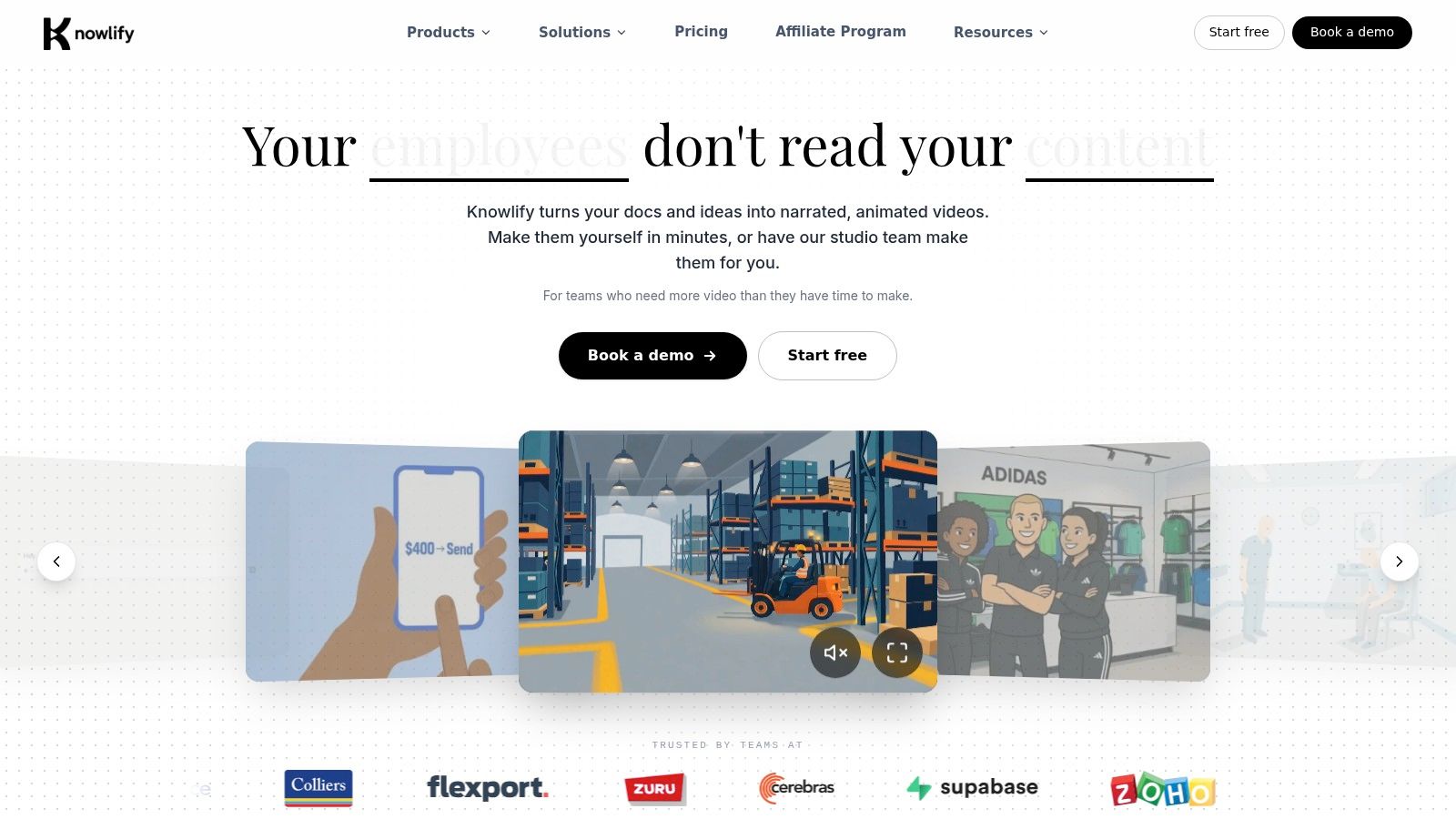
The strongest case for Knowlify is internal training, customer education, product explainers, and content that needs to be distributed in multiple formats. Its self-serve platform supports chat-based editing, AI script generation, document and URL conversion, voice tools with 140+ voices, voice cloning, brand kits, reference images, custom characters, saved templates, avatars, and localization into 30+ languages with captions. It also supports SCORM packaging, LMS integrations, team collaboration, API access, and top-priority rendering.
That's a real stack, not just a demo feature list. It matters for teams that need consistency across regions, departments, or training environments. If your use case is a policy update, a customer onboarding sequence, or a feature rollout that needs to ship in several markets, those workflow features can save more time than a flashy text-to-video tool ever will.
Knowlify's studio offering is the better choice when your team has the message but not the production bandwidth. If you need scripts, storyboards, and animation delivered with a turnaround as short as 72 hours, handing the execution to a dedicated studio can be smarter than forcing marketers to become motion producers. The key point is not speed alone. It's reduced coordination cost.
The platform also looks more enterprise-ready than many point tools, with SSO/SAML, SOC 2, ISO 27001, and GDPR-aligned practices. For teams operating in regulated or review-heavy environments, that matters more than a few extra visual effects.
If you want a broader comparison lens before shortlisting, Knowlify's AI animation generator is a practical reference point for how the category is being framed from a buyer's perspective. I'd still judge it by workflow fit, not by the prettiness of the outputs.
The decision rule is simple. If you need self-serve production plus governance and distribution, Knowlify is worth a look. If you only want experimental motion clips, it may be more system than you need.
Vendor demos sell novelty. Your production workflow exposes the truth. A tool that looks impressive once and falls apart on the second asset is a liability, not a buying shortcut.
Judge the boring parts first. Motion controllability shows whether you can direct timing and movement. Temporal consistency shows whether characters, objects, and scenes stay stable across frames. Editability shows whether you can fix one scene without regenerating the whole video. Brand and asset safety shows whether the tool respects your visual system. Integration shows whether it fits your existing creative stack. Cleanup time shows what the asset costs.
Risk is subtle compositional failure. A video can look convincing and still swap attributes, break object count, or drift on branding. That makes polished first renders a weak evaluation method, not due diligence. If product accuracy matters, you need per-scene control and traceable edits, not a pretty preview.
| AI Animation Generator Vendor Evaluation Matrix | ||
|---|---|---|
| Criterion | Why It Matters | Question to Ask the Vendor |
| Motion controllability | Timing errors are obvious in product and sales assets | Can I control scene timing, motion intensity, and transitions per clip? |
| Temporal consistency | Brand elements and characters must stay stable | How do you prevent drift across scenes and frames? |
| Editability | Regeneration wastes time | Can I revise a single scene without rerunning the whole video? |
| Brand and asset safety | Off-brand visuals create review cycles | Can I lock colors, logos, characters, and style references? |
| Integration | The tool must fit existing workflows | Does it connect to our creative tools, CMS, LMS, or API stack? |
| Cleanup time | True cost includes human fixes | How long do teams usually spend cleaning one finished asset? |
A vendor is selling novelty if it has no API, no audit trail, no scene-level control, and no clear answer on revision history. Closed systems can work for experiments. They are a poor fit for production.
Approval-heavy B2B teams need visibility into prompts, settings, versions, and handoffs. That is the key filter. If a tool cannot show who changed what and when, it creates rework the moment legal, brand, or product owners get involved.
For a practical implementation lens, Big Moves Marketing's AI implementation guide for B2B marketers reaches the same conclusion. Match the tool to the workflow, then judge whether it reduces review burden or just shifts it around.
The cleanest workflow starts with a human brief, not a prompt. That's where many teams go wrong. They ask the model to invent structure that should already exist in the marketing plan. AI should sit in the middle of the process, not at the start and not at the finish.
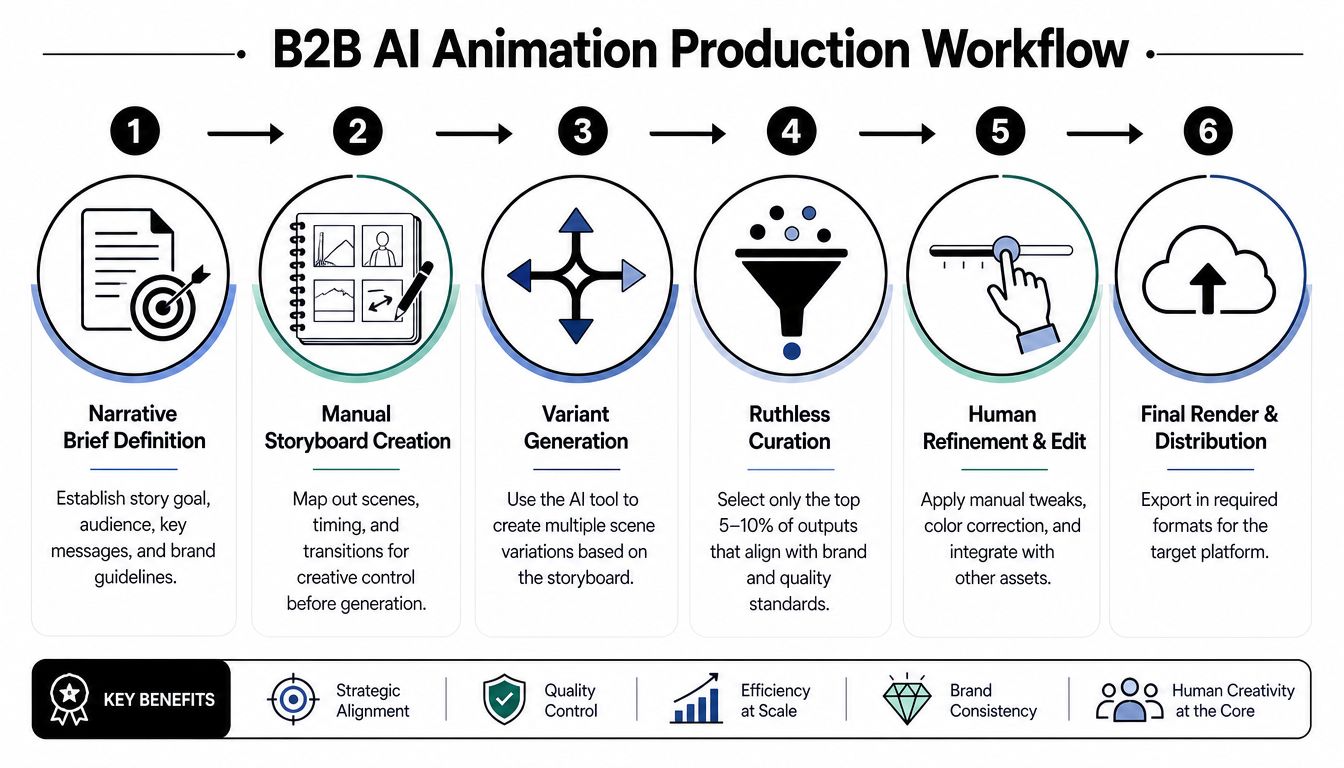
Start with a narrative brief. Define the audience, the message, the proof point, and the action you want the viewer to take. Then storyboard manually, even if the tool says you don't need to. Manual storyboarding forces decisions on pacing, scene order, and brand emphasis before the machine starts generating noise.
After that, generate multiple variants and curate ruthlessly. Don't keep the “pretty” versions. Keep the ones that are structurally correct. Then hand off to human editing for brand polish, timing fixes, and product fidelity. If product UI or legal-sensitive language appears on screen, that review should happen before distribution, not after the launch email goes out.
Practical rule: if legal or brand reviewers enter the process after final render, your workflow is backwards.
Approval owners need to sit at the right gates. Brand should review the storyboard and final cut. Legal should review anything that references claims, assets, or externally sourced material. Product should review any sequence that shows interface behavior or workflow logic. If those people only see the final file, they'll catch problems late and force rework.
The Copyright Office has also made the legal posture clear enough to matter operationally. Purely AI-generated outputs are not copyrightable, while human-authored works that use AI as part of the creative process may still qualify for protection, and the review has to be fact-specific Copyright Office guidance, Congressional Research Service summary. If you care about defensibility, document human contribution. Log the brief, prompts, revisions, and final editorial choices.
The workflow only works when the AI step is treated as a controlled production phase. That's how you keep the tool useful instead of letting it create a second job for your team.
The mistake here is simple. Teams see a polished output and assume it is ready for use. It is not. The U.S. Copyright Office has been examining AI-related copyright issues since early 2023, and its AI page was updated on 2026-08-13 U.S. Copyright Office AI page. Human authorship still matters.
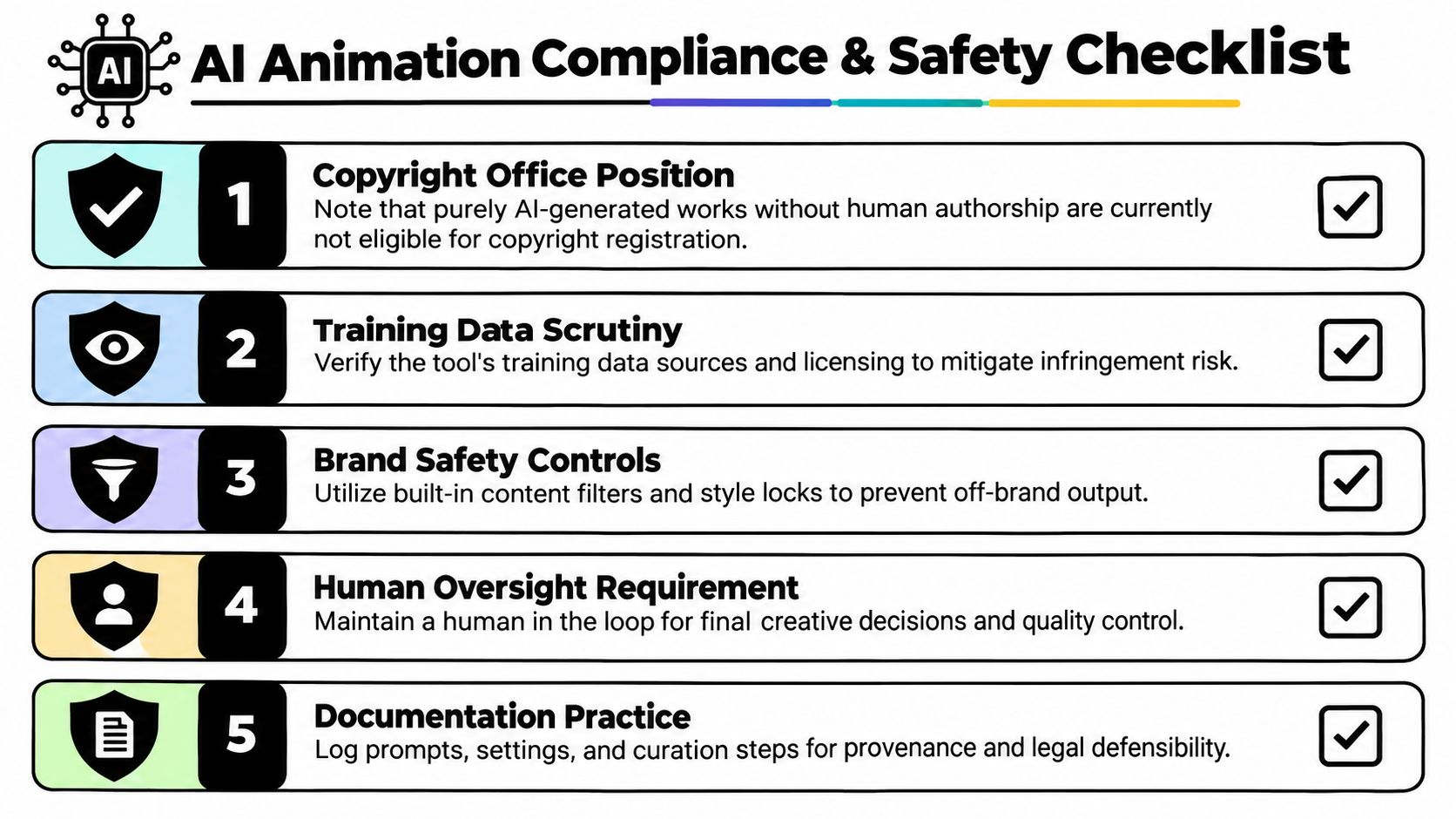
A marketing team cannot press generate and assume the asset is clean to own, reuse, or defend in a dispute. The copyright framework does not recognize protection for works without human authorship, and the issue has to be reviewed case by case when AI material is involved.
That means you need a paper trail. Who wrote the brief, who picked the outputs, who edited the motion, and who approved the final version? If those steps are invisible, ownership gets murkier fast. This matters even more when agencies, freelancers, and multiple internal owners touch the same asset.
A model can produce something that looks on-brand and still be wrong. It may use the wrong logo treatment. It may imply a feature that does not exist. It may introduce a character or visual asset that conflicts with your guidelines. The model does not know your approval policy. It only knows the prompt.
The same caution applies to training data provenance and asset handling. Ask how the tool handles references, retained prompts, and generated assets. That is the failure mode many B2B teams miss when they buy software built for content novelty instead of approval-heavy workflows. For a sharper view of those hidden costs, see Big Moves Marketing's article on algorithmic growth risks.
If you scale output without governance, you do not have an efficiency gain. You have a cleanup project.
If you can't measure the full cost, you'll overstate the value. That's the trap with AI animation. Teams count renders and ignore cleanup. They count drafts and ignore rework. Then they call the tool efficient because the machine did something quickly.
Start with cost per asset, not cost per render. Then track time from brief to published, not time from prompt to first output. Add rework hours per minute of finished animation. That metric is ugly, but it tells the truth. If your team spends two hours cleaning one minute of video, the tool may be fine for concepting and terrible for production.
For marketing performance, look at the asset in context. Did the animation replace a static explainer on a page that mattered? Did it support a sales motion? Did the demo animation get used by revenue teams, or did it just sit in a library? The only relevant distribution metric is whether the asset changed behavior. Everything else is decoration.
For a clean ROI lens, Big Moves Marketing's ROI measurement guide is the same kind of discipline I'd apply here. Tie the output to pipeline, usage, or conversion. Don't confuse motion with momentum.
Stop bragging about raw render count. Stop counting “time saved” unless you've included cleanup, review, and revision time. Stop using one good demo clip as proof that the category works. A single asset can be impressive and still be the wrong operational choice.
The smarter frame is simple. AI animation generators are powerful tools only when they sit inside a clear position, a clear message, and a clear production pipeline. That's not a limitation. It's the whole point. Big Moves Marketing helps B2B SaaS teams make those decisions with less noise and less wasted motion, so if you're considering AI animation for a product launch, onboarding flow, or sales enablement asset, start with the workflow first and the tool second.

%20-%20white.svg)