%20png%20copy.avif)
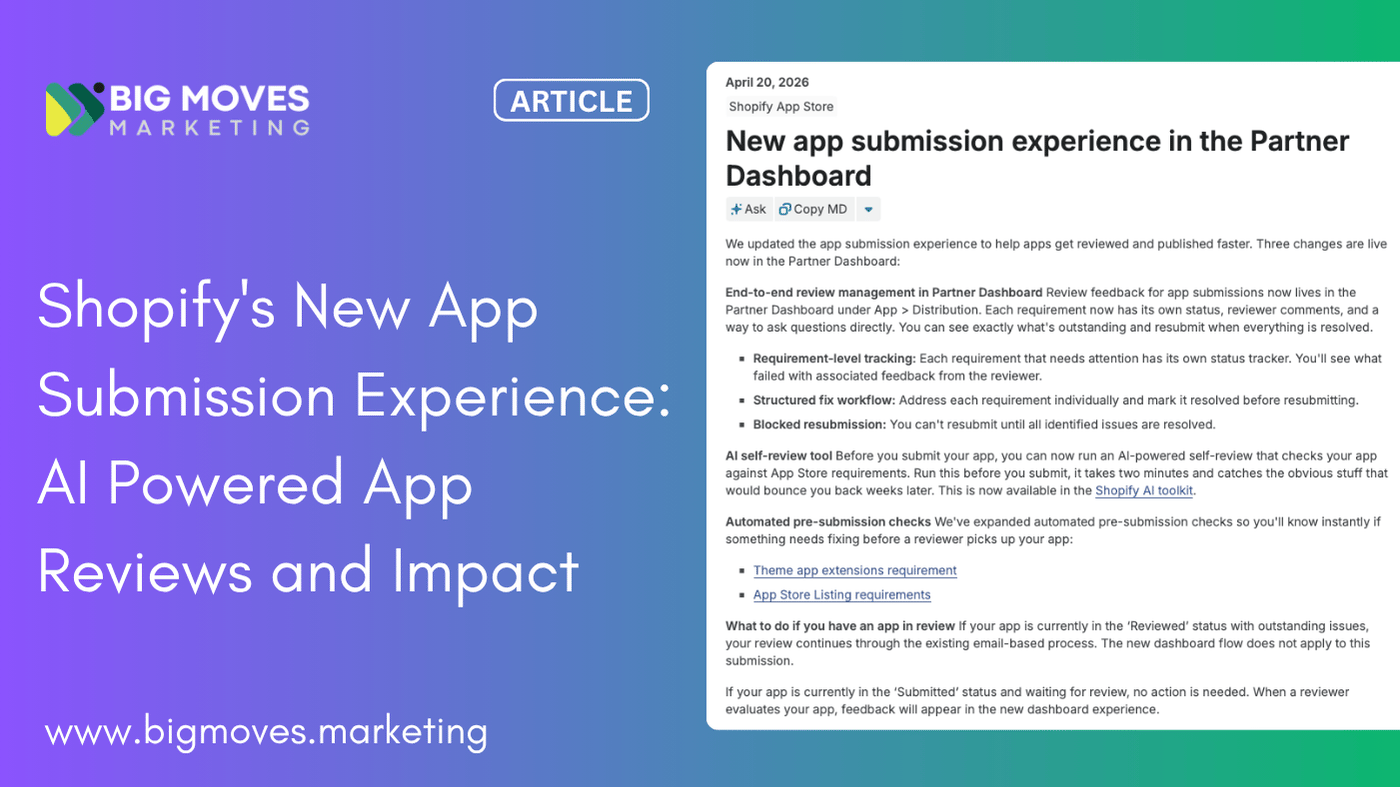
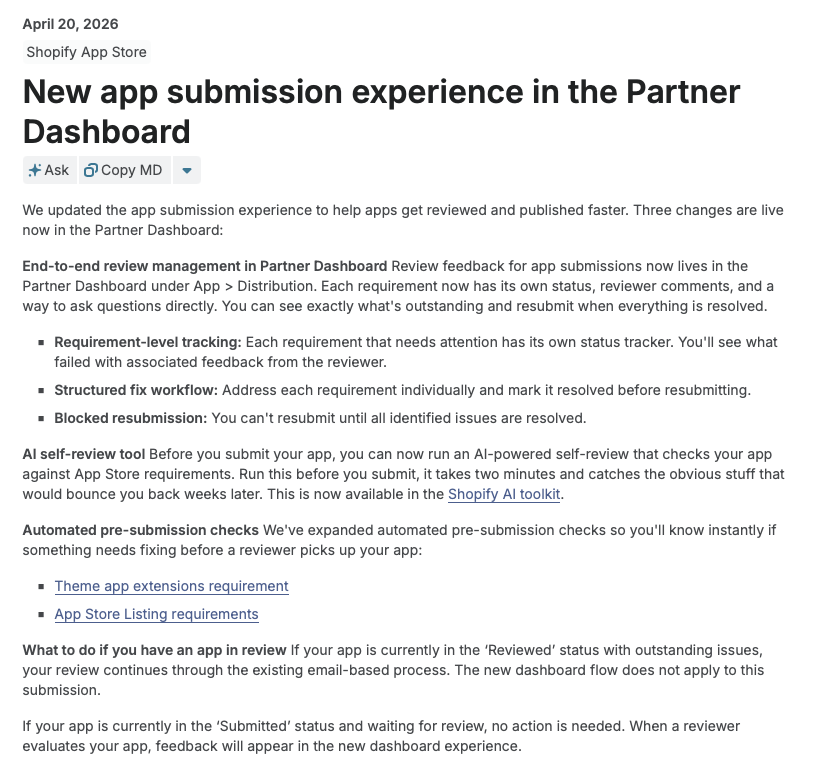
On April 20, 2026, Shopify updated the app submission experience in the Partner Dashboard. The changelog lists three updates: end-to-end review management inside the dashboard, an AI self-review tool, and expanded automated pre-submission checks.
Read literally, it sounds like a UX refresh.
It isn't. The launch is Shopify's response to a problem they publicly acknowledged earlier this year — submission volume had grown faster than reviewer capacity, and review timelines were stretching well beyond the typical 5-to-10 business day range the platform aims for. The new tooling is not just a better interface. It is a redesign of where the work of getting an app reviewed actually happens, and it shifts measurable cost and effort earlier in the cycle — onto the app team.
For Shopify app owners and the teams shipping new apps and new versions, the practical implications are bigger than a one-paragraph announcement suggests.
There are three discrete updates. Each one has a clear "before" and "after," and each one changes a different part of the submission workflow.
Until this update, most of the substantive back-and-forth between Shopify reviewers and app teams happened in email threads. When an app moved into the Reviewed status, the reviewer would send a list of issues by email, the team would fix them, the team would reply, and the reviewer would either approve or send another email round.
That flow had three persistent failure modes — email threads scattered across inboxes, ambiguity about which issues were actually blocking versus advisory, and no shared system of record for what "resolved" meant.
The new flow puts every requirement in its own row inside the dashboard, under App > Distribution. Each row carries its own status, its own reviewer comments, and its own notes thread for clarification. The team can see at a glance which requirements failed, and they can reply to the reviewer on a specific requirement without starting a parallel email conversation.
The most consequential detail is the last one in the changelog bullet list — and the easiest to skim past. Resubmission is blocked until every flagged requirement is marked resolved. Partial fixes will not move the queue. According to Shopify, this is by design: it stops the back-and-forth pattern where teams resubmit with two of three issues fixed, get rejected on the third, and re-enter the queue for a problem that was already known.
The second update is described in the changelog as "an AI-powered self-review that checks your app against App Store requirements." The instinct is to picture a button inside the Partner Dashboard. That is not what this is.
The self-review runs through the Shopify AI Toolkit — the same toolkit Shopify launched earlier to give AI coding assistants direct access to its docs, API schemas, and code validation. The toolkit installs as a plugin in supported environments: Claude Code, Cursor, Codex CLI, Gemini CLI, and VS Code. To run the self-review, the team copies a prompt from their app submission page and runs it against the codebase inside their AI assistant. The assistant then produces a compliance report mapped against App Store requirements.
A few characteristics matter for planning. The tool is a recommender, not a gate — Shopify has confirmed the team can still submit even if the self-review flags issues. Running it does not replace human review. There is a token cost each time the prompt runs, paid to whichever model provider the team is using. And running it on an already-submitted app does not push the team back in the queue — only an actual resubmission does.
The strategic positioning is more interesting than the feature itself. Shopify is treating the AI Toolkit as the primary developer tool for its platform, and the self-review is one capability inside that broader investment. App teams that have not adopted the toolkit yet now have a clearer reason to do so.
The third update extends Shopify's existing pre-submission check library to two new categories — the Theme App Extensions requirement (which says any app that modifies a merchant's theme must do so via theme app extensions, not direct theme code changes) and a broader sweep of App Store Listing requirements covering branding consistency, pricing placement, and listing accuracy.
Listing-related rejections are one of the most preventable categories of review failure. Industry coverage of Shopify rejections consistently flags issues like missing GDPR webhooks, broken billing flows, and incomplete or inaccurate listings as among the most common reasons apps fail review on first submission. Automating the listing checks moves these out of the human reviewer's queue and into a system that can return a verdict in seconds.
This update is incremental rather than dramatic — but it is part of a clear pattern. Each new automated check shrinks the surface area where human reviewers spend time, and shrinks it on exactly the issues that are easiest for app teams to catch on their own.
Stand back from the three updates and a coherent posture emerges.
Shopify is rebalancing the review process toward earlier intervention by the app team. The dashboard surface, the AI self-review, and the expanded automated checks all push the work of preventing rejections forward — into the build phase, not the review phase. The platform is not lowering the requirements bar. It is making the bar more visible, more inspectable, and more programmatically checkable before a human reviewer ever sees the code.
This is consistent with how Shopify has been positioning the Partner Program more generally. The 2025 requirements update tightened design and compliance standards. The GraphQL-only mandate for new public apps from April 2025 forced a structural migration. The Built for Shopify program raised a separate quality bar for apps that want extra distribution surface. The direction of travel has been consistent — fewer apps that scrape through, higher average quality, and more of the work of meeting standards distributed to partners.
The blocked-resubmission rule deserves particular attention. Before this change, the dominant workflow for many teams was rational: fix the obvious blockers fast, get back into the queue, and resolve edge-case feedback through email. This minimized total wall-clock time even if it added reviewer cycles. Shopify has now made that workflow strictly worse than full resolution, because the gate physically prevents resubmission. The optimal strategy now is comprehensive pre-resubmission cleanup, which is what the dashboard and the AI self-review tool are designed to enable.
There is also an honest question worth flagging. The promised payoff is faster reviews. We do not yet have data on whether the new system delivers that. Reviewer subjectivity has not been eliminated — the AI self-review is a recommender that catches mechanical issues, but qualitative requirements like "build apps without even minor errors to ensure review completion" or admin extensions being "feature-complete" still depend on human judgment. The new tooling improves throughput on the mechanical layer. The judgment layer is unchanged.
The reasonable expectation is that median review times will compress meaningfully for well-prepared apps, while tail-case reviews — the ones that already involved subjective judgment calls — will look about the same as before. Teams that operate at the median benefit most.
Three concrete shifts are worth making before the next submission.
Treat pre-submission cleanup as a release-blocker, not a final-stage task. Under the old workflow, missing GDPR webhooks or a misconfigured OAuth flow could be caught in review and fixed in a few days. Under the new workflow, those same issues will be caught — but the cost of being caught is now structural: every flagged requirement must be resolved before any resubmission. The implication is that pre-submission QA needs to be more thorough than it used to be, and ideally needs to live as a checklist that runs against the same App Store requirements taxonomy Shopify uses internally. Any team still treating the submission form as a final-day exercise should change that.
Add the AI self-review to the build cycle, not just the submit cycle. The framing in the changelog is "run this before you submit." That framing is too narrow. The Shopify AI Toolkit gives the assistant ongoing access to docs, schemas, and code validation tied to the app's category and type. There is no reason to limit it to one pre-submit check. Running the self-review at the end of every meaningful feature branch, or as part of CI, surfaces compliance drift while the cost of fixing it is low. This also amortizes the token cost across many small runs rather than one large pre-submit run, and gives the team an early-warning signal whenever a code change introduces a requirement violation.
Build a written record of reviewer notes per requirement. The new dashboard flow puts a notes thread on each requirement. This is an asset, not just a UI feature. Over multiple submissions and version releases, the notes accumulate into a structured history of how reviewers interpret each requirement for the specific app — including any negotiated clarifications. App teams that capture those notes in their internal documentation, alongside the requirement number, will compound their compliance knowledge over time. This matters most for teams shipping multiple apps under the same Partner account, where reviewer interpretations on one app often inform the next.
Re-examine where the listing copy gets written. The expanded automated checks on listing requirements catch the obvious mechanical violations — pricing in the wrong section, statistics in the description, brand misuse. Those checks will not catch listing issues that a reviewer might still flag qualitatively, like vague value propositions or feature descriptions that overpromise. With mechanical listing rejections now caught pre-submission, the marginal review time spent on listings will skew toward the qualitative issues. Tightening listing copy before submission — clear value proposition, accurate feature claims, language that matches the actual app behavior — becomes the higher-leverage activity.
Plan version submissions, not just launch submissions. The changes apply to all submissions, not just new app launches. Major version updates that need re-review benefit from the same workflow, and arguably benefit more — version updates often introduce small compliance drift in places that have been stable for a long time. Building the AI self-review into the version release process catches that drift before it becomes a review delay.
The three updates are usually discussed in the order Shopify listed them. They make more sense in reverse.
The expanded pre-submission checks deflect the most common mechanical rejections before submission. The AI self-review catches the next layer — issues that automated checks cannot easily verify but that an AI assistant with access to the codebase and the requirements can. The dashboard with blocked resubmission then handles whatever still slips through, by forcing comprehensive resolution rather than partial fixes.
Each layer narrows the funnel of issues that reach a human reviewer, and narrows the cost of issues that do reach one. For the app team, this is a meaningful change in expected cost per submission — but only if all three layers are actually used. A team that ignores the AI self-review and treats the dashboard as a passive feedback receiver will see modest gains. A team that runs the AI self-review iteratively, treats reviewer notes as documentation, and uses the dashboard's structured fix workflow as a project plan will see significantly more.
The losing posture is to treat submission as a discrete event that happens after development is done. The winning posture is to treat compliance as a continuous concern threaded through the build cycle, with the submission being the moment everything has already been verified.
The fundamentals of getting an app onto the Shopify App Store have not changed. The requirements bar is the same. The reviewer judgment is the same. The categories of common rejection — security headers, OAuth, GDPR webhooks, billing API integration, theme app extensions, listing accuracy — are the same.
What has changed is the execution environment around all of that. Shopify has tightened the workflow loop, made the requirements more programmatically inspectable, and removed the partial-fix shortcut. App teams that adapt their internal process to match — pulling compliance work earlier, instrumenting the AI Toolkit into the dev cycle, treating reviewer feedback as durable documentation — will see real time savings on every submission.
Teams that wait to find out what has changed only when they hit a blocked resubmission will not.
The early period after a workflow change like this one is also when the public guidance on it is thinnest. The detailed best practices that will eventually emerge — recommended AI self-review prompt patterns, common reviewer-notes failure modes, how the new dashboard interacts with version releases — do not exist yet. The teams that will produce that guidance are the ones submitting now.
Explore Big Moves Marketing Shopify App Growth services:





%20-%20white.svg)