%20png%20copy.avif)

The popular advice on HubSpot artificial intelligence is to switch it on, encourage adoption, and find more use cases as you go. That's backwards. Before anyone activates another assistant, decide which revenue outcome it must improve and whether the CRM contains information you'd trust a new hire to act on.
Faster execution isn't automatically better execution. For a SaaS company with an unclear ICP or inconsistent qualification, it can mean spending less time producing more of the wrong work.
A familiar SaaS operating failure starts with a reasonable request: help the team move faster. Marketing produces more pages, sales gets cleaner call notes, and founders see polished follow-ups. Yet nobody can show whether more suitable buyers entered qualified pipeline.
The mistake is treating Breeze like a writing add-on rather than a system operating within the CRM that sales is supposed to trust. A drafted sequence isn't a meeting. A summarized call isn't a higher win rate, and a scored lead isn't sourced pipeline.
HubSpot's operating results show what's possible inside an established business, not what your startup should expect. In its Q4 2024 results, HubSpot reported more than 75,000 weekly active Breeze Copilot users, more than 1,340 Customer Agent customers with an average resolution rate of 42%, an AI support bot handling more than 35% of support tickets, an AI sales bot resolving more than 80% of website chat inquiries, and AI-powered and automated communications generating more than 10,000 meetings for its sales team during Q4.
For 2025, Yahoo Finance's coverage of HubSpot's earnings call reported that more than 8,000 customers activated Customer Agent, with resolution rates in the mid-60% range.
Keep the populations separate. Customer Agent adoption and resolution figures describe customers using the product; the support, website-chat, and sales-meeting figures describe HubSpot's own operations. These are HubSpot-reported results, not independent evidence that installing the same features will reproduce its commercial outcomes.
Treat them as a ceiling for ambition, not a promise in your forecast.
A meeting generated inside HubSpot's own demand engine doesn't establish that an agent can create demand for your product.
Say an infrastructure SaaS company gets plenty of demo requests but few security-approved opportunities. Faster follow-up might improve responsiveness without addressing the constraint: buyers can't establish whether the product meets their deployment requirements.
A drafting assistant won't resolve missing security documentation. A content agent won't choose which deployment objection matters most. A founder or revenue leader must make that judgment first.
Separate potential benefits before rollout:
These benefits require different evidence. Don't report the first as proof of the third.
Choose workflows connected to outcomes your leadership team already reviews. If a feature can't be tied to qualified opportunities, conversion, cycle length, retention, or a meaningful cost constraint, keep it out of the revenue rollout.
HubSpot artificial intelligence isn't a separate chatbot sitting beside the business. Breeze is the embedded system connecting AI assistance with customer-platform workflows.
At INBOUND 2024, HubSpot launched Breeze with Copilot, four specialized agents, more than 80 additional AI-powered features, and Breeze Intelligence enrichment and buyer-intent capabilities drawing on more than 200 million buyer and company profiles.
The architectural distinction matters more than the feature count. An assistant working inside the customer platform can potentially connect audience records, campaigns, seller activity, and service history. A standalone writing tool usually starts with whatever context someone pastes into a prompt.
Read this as a buying classification, not a promise that every capability is included in your portal. For each row, mark it as available, requiring commercial verification, or irrelevant to your motion.
| Component | Job | Where it lives | Cost shape |
|---|---|---|---|
| Breeze Copilot | Drafting, summaries, in-app assistance, account-level forecast support | Across Marketing, Sales, Service, Content, and Operations workflows | Confirm enabled capabilities and subscription entitlement |
| Content Agent | Draft and adapt marketing and web content | Marketing Hub and Content Hub | Confirm required hub edition before purchase |
| Social Media Agent | Draft and support social publishing | Marketing Hub social tools | Confirm social-tool and agent entitlement |
| Prospecting Agent | Research accounts and support outbound | Sales Hub | Confirm agent access and usage terms |
| Customer Agent | Answer from approved sources, run configured actions, hand off | Service and shared customer channels | Usage credits with included allowances and paid capacity |
| Breeze Intelligence | Enrich records and surface buyer intent | CRM data layer | Confirm data access, allowance, and commercial terms |
| Other embedded AI | Campaign and content assistance, email and deal summaries | Marketing, Content, Sales, and Service Hubs | Check each feature against the contracted hub edition |
Don't buy a higher subscription tier because a product page groups several capabilities under the same brand. Ask for the entitlement, usage unit, and overage rule for the exact workflow you intend to run.
Copilot and drafting agents help someone prepare work. Customer-facing agents can take a more active role by answering questions or performing configured actions. Those aren't equivalent deployment decisions.
A draft creates an internal review obligation. An autonomous answer creates an external commitment risk. Your approval process should reflect that difference, even if both features appear under Breeze.
The data layer deserves separate scrutiny. Before paying for enrichment or intent signals, use Captiwate to explore buyer intent solutions and compare the decision each signal would change. A signal has little commercial value if the team can't explain how it changes account selection, timing, or the sales approach.
The practical question isn't whether Breeze has enough capabilities. It's whether your existing customer context supports a useful action.
For example, enrichment can add company information without resolving whether the account fits your deployment model. Intent can suggest interest without identifying a buying committee. Your team still has to define what makes an account worth pursuing.
Don't begin rollout by assigning tools to departments. Assign bounded jobs to models and keep commercial judgment with named people.
The same assistant can be useful in one motion and disruptive in another. Founder-led sales needs faithful learning from buyer conversations; a mature outbound team needs consistent account preparation. Neither needs an algorithm independently rewriting the company's strategy.
Use the human-versus-model split to define authority before enabling execution.
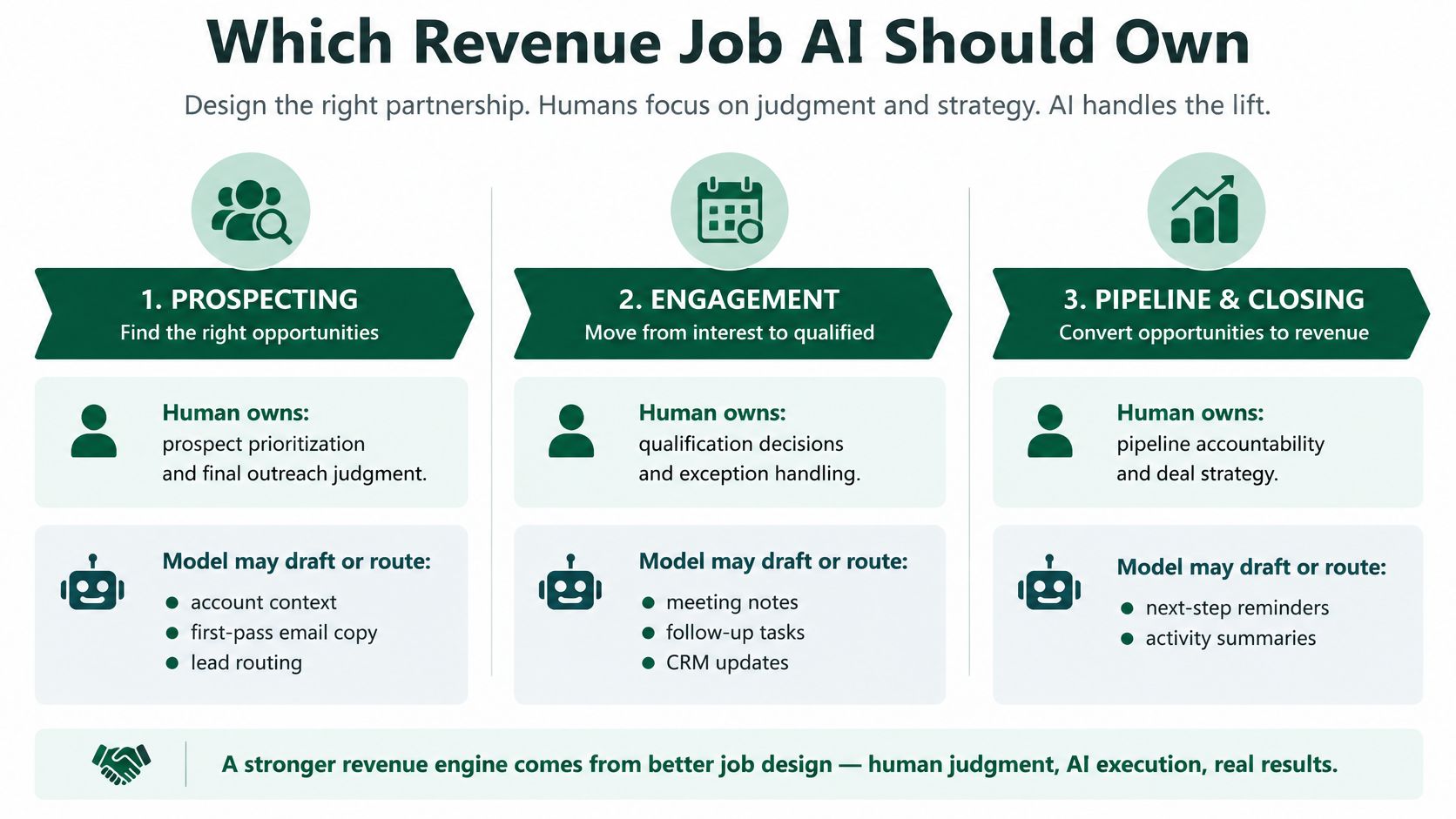
| Motion | Human owns | AI may do | Failure if unsupervised |
|---|---|---|---|
| Founder-led sales | Problem, proof, and the ask | Call summaries and follow-up drafts | Every pitch sounds different |
| Demand generation | ICP, offer, and message | Campaign and content drafts from approved copy | Volume without a sharper story |
| Outbound | Account choice and point of view | Research and first-draft sequences | Clean email to the wrong buyer |
| Forecasting | Commit judgment | Forecast from that account's own history | Dirty stages treated as truth |
| Service and chat | Pricing, security, and procurement exceptions | Answers from approved sources, then handoff | Unsupported claims to a buyer |
The founder-led sales failure is particularly costly. If every follow-up introduces a different problem statement, the founder loses a consistent basis for interpreting buyer response. The team may mistake message variation for evidence about demand.
Demand generation has a related problem. More content doesn't help if product marketing hasn't decided which alternative the buyer should stop using and why switching is worth the disruption.
PLG-to-sales handoffs and multi-product ICPs expose inconsistent CRM definitions quickly. A self-serve user can be highly active without representing a viable enterprise opportunity. A large company can fit one product while being unsuitable for another.
If product activity triggers sales outreach, the revenue leader must define the commercial interpretation. Is the trigger evidence of individual interest, team adoption, an implementation obstacle, or buying intent? Routing before answering that question just moves ambiguity into a seller's queue.
Use a shared qualification agreement, such as the approach in this guide to aligning B2B marketing and sales, before automating ownership changes. The agreement needs an accepted handoff condition, a rejection reason, and someone accountable for resolving disputes.
For a product-oriented introduction alongside that ownership discussion, use the following video.
Keep an explicit stop-list:
Delegating preparation is sensible. Delegating accountability isn't.
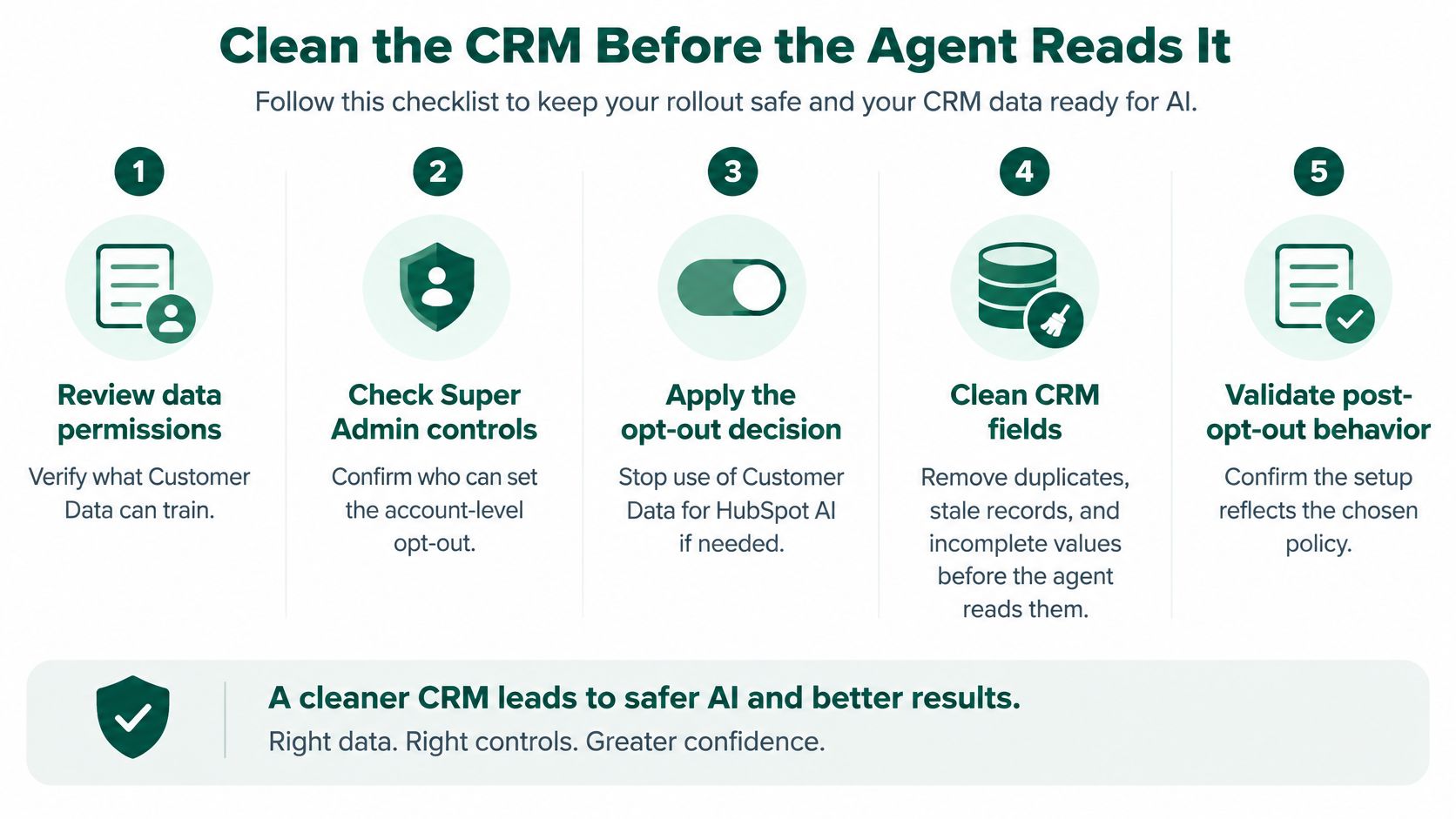
Vendor security doesn't make your implementation safe. A securely processed record can still contain incorrect consent, sensitive notes, or a lifecycle stage that nobody understands.
Separate the vendor's training policy from your company's operating responsibilities. They're different controls addressing different risks.
HubSpot's AI training policy distinguishes account-specific models from models improved across customer accounts and allows Super Admins to disable eligible account data's use in HubSpot model training. HubSpot says the resulting models don't contain or reproduce individual customer data or share proprietary CRM content with other customers.
HubSpot's AI infrastructure FAQ states that Customer Data may support and improve HubSpot AI and train its models unless customers opt out; separately, third-party AI providers aren't permitted to train on customer data, and HubSpot enforces zero retention with them wherever possible.
Those distinctions belong in a documented decision, not an assumption that customer data is never used for AI.
Use the permission review as an operational checklist.
The confidence gap is substantial: SAS's marketers-and-AI report found 79% of marketers had some confidence in their organization's AI governance, but fewer than 10% were strongly confident; the governance findings also cite 8% of organizations with a generative-AI governance model in 2025, up from 7%.
Don't substitute confidence for a completed control.
Multilingual content deserves native-language review. A technically accurate translation can still misstate a commercial promise or mishandle a procurement expectation.
Historical wins need similar scrutiny. If sellers previously concentrated on a particular market, their win history may reflect coverage decisions rather than superior product fit. A prediction built on that history can reinforce the same selection bias.
For small teams without legal or RevOps support, the sensible default is conservative: opt out of training and retain recommendation-only workflows until the control list is complete. Document who will reconsider that decision and what evidence they'll need.
HubSpot's customer comparisons are useful benchmarks. They aren't randomized evidence that switching on AI causes revenue improvement.
In its 2025 ROI report, HubSpot compared 3,977 Sales Hub Professional or Enterprise customers using AI deal-prediction and summarization capabilities within six months with 55,074 customers not using them, reporting a 48% decrease in average time to close; a separate comparison reported a 54% higher lead-conversion rate among Campaign and Content Assistant users.
These are vendor-reported observational associations. Customers adopting the features may also differ in management quality, CRM discipline, campaign mix, and sales execution.
Independent measurement capability is limited too: Jasper's State of AI Marketing 2025 report found that only 49% of organizations could measure the ROI of their AI investments.
Run a baseline for a selected segment over a quarter before expanding. Keep qualification definitions stable, label AI-assisted activity, and record whether an opportunity originated through the workflow or merely received assistance later.
| Metric | Keep the feature if | Do not be fooled by | Control for |
|---|---|---|---|
| Hours saved | It frees a scarce seller or marketer | Time saved with flat pipeline | Who actually did the work |
| Reply rate | The same list converts better | More emails sent | Offer and list quality |
| Qualified-opportunity rate | Assisted contacts become qualified opportunities | More MQLs | ICP and form definition |
| Win rate | Assisted opportunities close more often | A star rep on the AI cohort | Rep assignment |
| Sales-cycle length | Days from opportunity to close fall | A shorter cycle on smaller deals | Deal size and segment |
| Pipeline per marketing dollar | Pipeline rises faster than spend | Vanity traffic or content count | Campaign mix |
Don't treat a helpful summary as pipeline attribution. If a seller already had an active opportunity and used Copilot before the next call, that's assisted activity. It doesn't establish that AI sourced the deal.
Record rep assignment and campaign mix alongside results. Otherwise, a strong closer or a high-intent campaign can make a weak workflow look commercially effective.
Keep and consider expanding a workflow when qualified-opportunity rate, win rate, or cycle length improves without unacceptable quality or cost trade-offs. If only hours saved improve, classify it as an efficiency tool and keep its scope narrow.
That distinction prevents an internal productivity success from becoming an unsupported growth forecast.
Measurement rule: Credit the model for the task it changed, not for every deal it touched.
For outbound, eliminate basic delivery problems before judging the copy. Use Mailwarm to test your email deliverability so inbox placement isn't confused with message quality.
Compare replies from suitable accounts, not just total replies. Out-of-office responses, unsubscribe requests, and polite refusals don't establish stronger demand.
Use a consistent marketing ROI measurement approach to include software, review time, implementation work, and ongoing maintenance. A feature that saves drafting time but requires extensive correction may merely move the work elsewhere.
When opportunity volume is too low to interpret changes confidently, extend the observation period and inspect buyer progression manually. Don't manufacture certainty from a dashboard just because leadership wants a rollout verdict.
Start with work that has an identifiable input, an accountable reviewer, and a clear stopping point. Don't give an agent an open-ended instruction to improve sales.
The workflow discipline below also applies to routing, follow-up preparation, and CRM updates. The boundary matters more than the task's apparent sophistication.
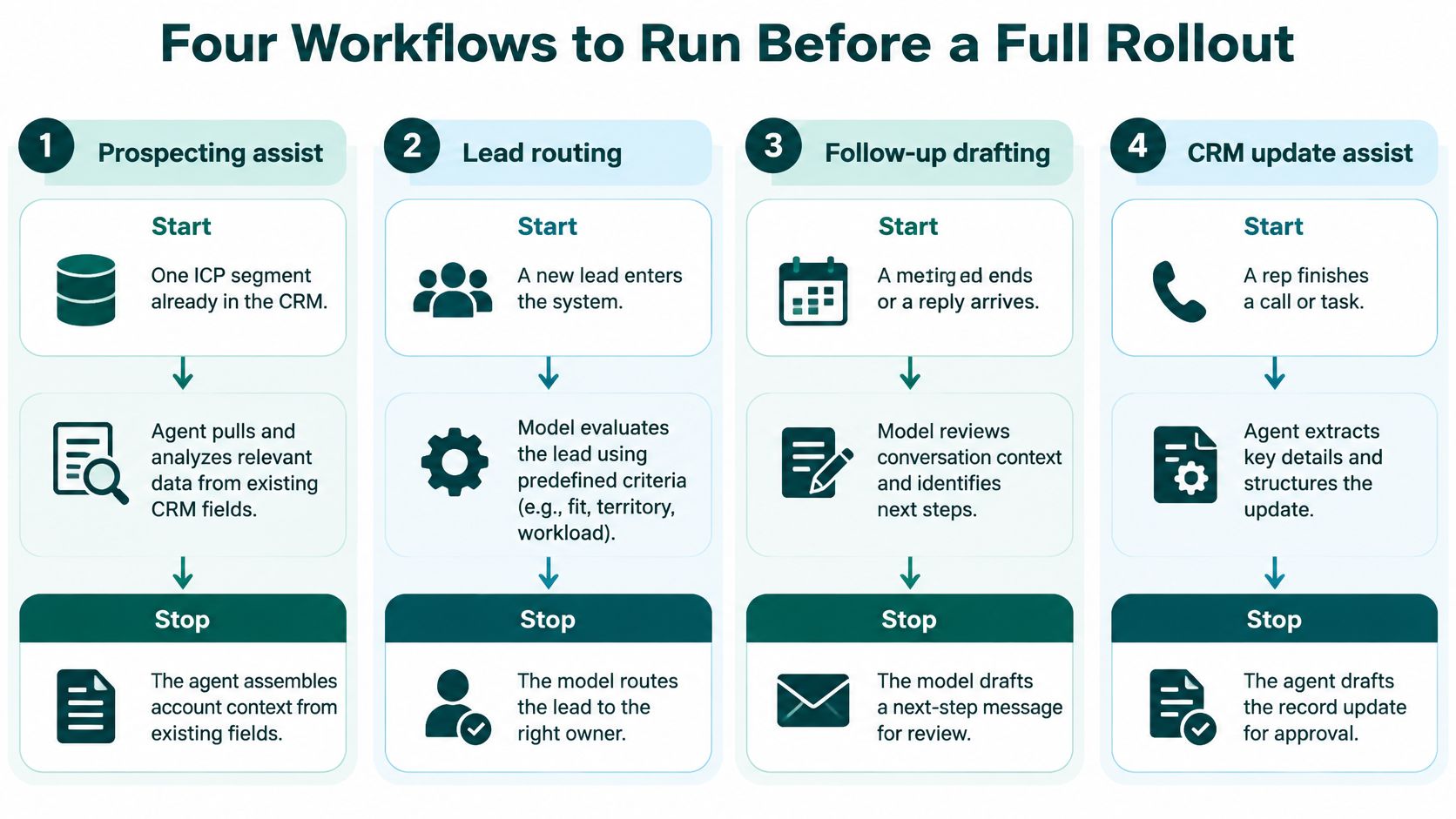
Start with an ICP segment already represented in the CRM. Ask the agent to assemble account context from approved fields and identify missing information, not invent a reason to buy.
A seller rewrites the opening line and the ask. That forces the seller to connect the account context with a defensible commercial point of view.
Stop at a reviewed draft. Log meetings sourced by the prospecting motion separately from meetings where AI merely helped prepare the seller.
Give the assistant approved positioning and a defensible proof point. Have it draft a specific asset, such as a nurture email addressing an implementation objection.
Reject output that adds unsupported capabilities, makes comparisons you can't substantiate, or changes the buyer problem to make the copy sound stronger. Better prose isn't permission to broaden the promise.
The stop condition is editorial and product approval, not a completed draft. If reviewers repeatedly reconstruct the argument, fix the input message before generating more variations.
HubSpot's Customer Agent setup guide describes answers grounded in synchronized knowledge-base articles, website pages, landing pages, blogs, uploaded files, and URLs, with optional CRM personalization and configured actions. It also documents non-live reply recommendations and human transfer when confidence is low or escalation conditions apply.
Begin in non-live help-desk recommendations. Review answer correctness, source relevance, tone, and whether the proposed response should have been escalated.
Only then permit bounded customer-facing answers. Limit actions to low-risk tasks such as booking a meeting, and force human transfer for pricing exceptions, security, procurement, and account-specific commitments.
Audit transcripts for unsupported statements and missed handoffs. A fluent answer isn't an acceptable substitute for a supported answer.
HubSpot's content-source documentation allows knowledge generation from resolved tickets from the previous 90 days or a selected ticket segment, with drafted question-and-answer pairs that users can edit, accept, skip, or decline before activation.
Segment tickets by product, customer tier, market, and issue type before generating candidate answers. Otherwise, a workaround for a legacy enterprise contract can become the default answer for everyone.
Make approval the boundary:
A disciplined B2B marketing-automation approach starts with these bounded responsibilities, not an ambition to remove people from every step.
A pre-revenue team without ticket history or a stable message shouldn't start with autonomous customer service. Use direct conversations to learn what buyers need before encoding answers into an agent.
Customer Agent needs a usage budget, not just a software approval. HubSpot's credits announcement introduced activation for eligible Pro and Enterprise customers from June 2, 2025, with 3,000 monthly credits per Pro subscription using seats, 5,000 per Enterprise subscription, and additional capacity starting at $10 per 1,000 credits; existing Pro and Enterprise Service Hub customers were scheduled to migrate on August 4, 2025.
Treat those as announced commercial terms, not a substitute for checking your current order form. Don't assume a credit equals a conversation or a successful resolution.
| Plan | Included credits | Extra credits | Billing start |
|---|---|---|---|
| Pro, seats in use | 3,000 per month | Starting at $10 per 1,000 | June 2, 2025 for eligible hubs |
| Enterprise, seats in use | 5,000 per month | Starting at $10 per 1,000 | June 2, 2025 for eligible hubs |
| Existing Service Hub Pro and Enterprise | Moves onto the same credit meter | Starting at $10 per 1,000 above the allowance | Scheduled for August 4, 2025 |
Seat software costs money whether the employee uses it or not. A usage meter introduces exposure as eligible customer interactions consume capacity.
That changes what finance needs from the rollout owner. Headcount is an inadequate forecast input.
Build the forecast from expected conversation volume, the documented consumption rule, likely escalation patterns, and the mix of supported questions. Then reconcile the forecast against actual credit consumption and reviewed outcomes.
A busy site with unresolved pricing and security questions can generate substantial activity without useful autonomous resolution. Those interactions need early handoffs, not longer automated exchanges.
Pay for completed, trustworthy work. Don't use conversation volume as a proxy for value.
A quiet founder-led business has the opposite problem. It may have little work suitable for automation, making additional capacity unnecessary even if the demonstration looks impressive.
Keep finance involved through operational controls:
Don't overbuy Service Hub merely to access an agent your knowledge base can't support. Buy paid capacity only after non-live recommendations are accurate on your own tickets and live consumption has a defensible operating forecast.
Adopt a narrow slice when HubSpot is already your system of record, lifecycle fields are trustworthy, and a specific workflow has a measurable baseline. For a sales-led company, that may mean call summaries and reviewed follow-ups; for a support-heavy business, it may mean staged customer assistance.
If the only proven benefit is time saved, keep the deployment small. Don't use a productivity result to justify autonomous chat, expanded scoring, or additional agent spend.
Pre-PMF teams need direct learning more than automated coverage. Growth-stage teams with multiple products need agreed account and opportunity definitions before they automate handoffs.
Skip the agent spend if the company keeps changing its ICP, the CRM contains unexplained imports, or nobody can approve a consistent product answer. Those are management problems, not missing-feature problems.
HubSpot AI won't repair a weak offer, an indistinct category story, or a website that doesn't explain why the buyer should change. The useful sequence is to settle the message, define pipeline, and then delegate repeatable execution.
Use a practical AI implementation approach for B2B marketers to translate that decision into bounded ownership rather than another tool evaluation. Big Moves Marketing is one option for founders and revenue leaders who need a strategic growth partner to clarify positioning and go-to-market choices before adding volume.
HubSpot artificial intelligence is an execution layer on top of a revenue system. A layer can't substitute for the system.
Big Moves Marketing helps founders and revenue leaders clarify positioning, define qualified pipeline, and decide which growth workflows deserve investment. Before expanding Breeze, visit Big Moves Marketing to discuss the message, measurement, and go-to-market decisions your automation should serve.




%20-%20white.svg)