Most Shopify app founders treat Built for Shopify as a badge to collect once the app is "ready." That framing undersells it and oversells it at the same time. Built for Shopify status is a product standard, a ranking input, and a set of distribution perks that Shopify controls and revises every year. For some apps it accelerates growth that is already compounding. For others it absorbs a quarter of engineering time and returns a badge that few merchants in a low-traffic category ever see.
The useful question is how BFS status changes your app's position in the channels that drive installs, and what it costs to earn and keep. This guide covers the current Built for Shopify requirements, the benefits Shopify documents, the trade-offs most announcements skip, and how Built for Shopify apps fit into a wider go-to-market plan. It closes with a decision framework for founders weighing whether to build for BFS from day one or qualify an existing app.
All requirements and benefits below reflect Shopify's developer documentation as checked in November 2026. Shopify adds criteria with effective dates, so verify the requirements page before you commit a roadmap.
Key takeaways
Built for Shopify is Shopify's quality program for apps in the Shopify App Store. Shopify's documentation describes it as the highest level of recognition an app can reach. Apps that qualify earn BFS status, which shows up to merchants as a badge on the app card and a highlight at the top of the listing.
The program measures five areas of quality: safety and reliability, performance, ease of use, proven usefulness, and accurate listing information. Most criteria are evaluated automatically from real usage data. The rest are audited by Shopify's app review team when you apply. Status is also reviewed every year, so BFS describes an app's current state rather than a past achievement.
For merchants, the badge works as a shortlist filter. Shopify's Help Center tells merchants to look for the badge, use the Built for Shopify filter on search and category pages, and ask Sidekick to recommend BFS apps for their store. That merchant-facing guidance is the reason BFS shopify status carries commercial weight: Shopify itself teaches buyers to prefer it.
The two phrases sound alike and point to different things. "Built for Shopify" refers to the app quality program described here. "Built with Shopify" usually describes a storefront that runs on the Shopify platform, and it is the phrase people search when they want to know which websites use Shopify or which tool detects a store's tech stack.
The distinction matters for your marketing. If your website copy says your app is "built with Shopify," merchants read it as a platform statement, which every app can make. "Built for Shopify" is a verified status that only qualifying apps can claim, and Shopify provides official badge assets for it. Use the exact program name, and only after the status appears on your listing.
Shopify does not publish an official count. Independent trackers converge on a similar figure. AppstorePulse data cited by AdsX counted roughly 1,500 BFS apps in mid-2026, about 7% of live apps, and RevenueHunt's June 2026 snapshot counted 1,502. Treat these as approximations, because trackers disagree on the total number of live apps.
Roughly one app in fourteen holds BFS Shopify status. In crowded categories the share among the apps that win page-one positions is much higher, which shifts the badge from a differentiator toward an expectation for category leaders.
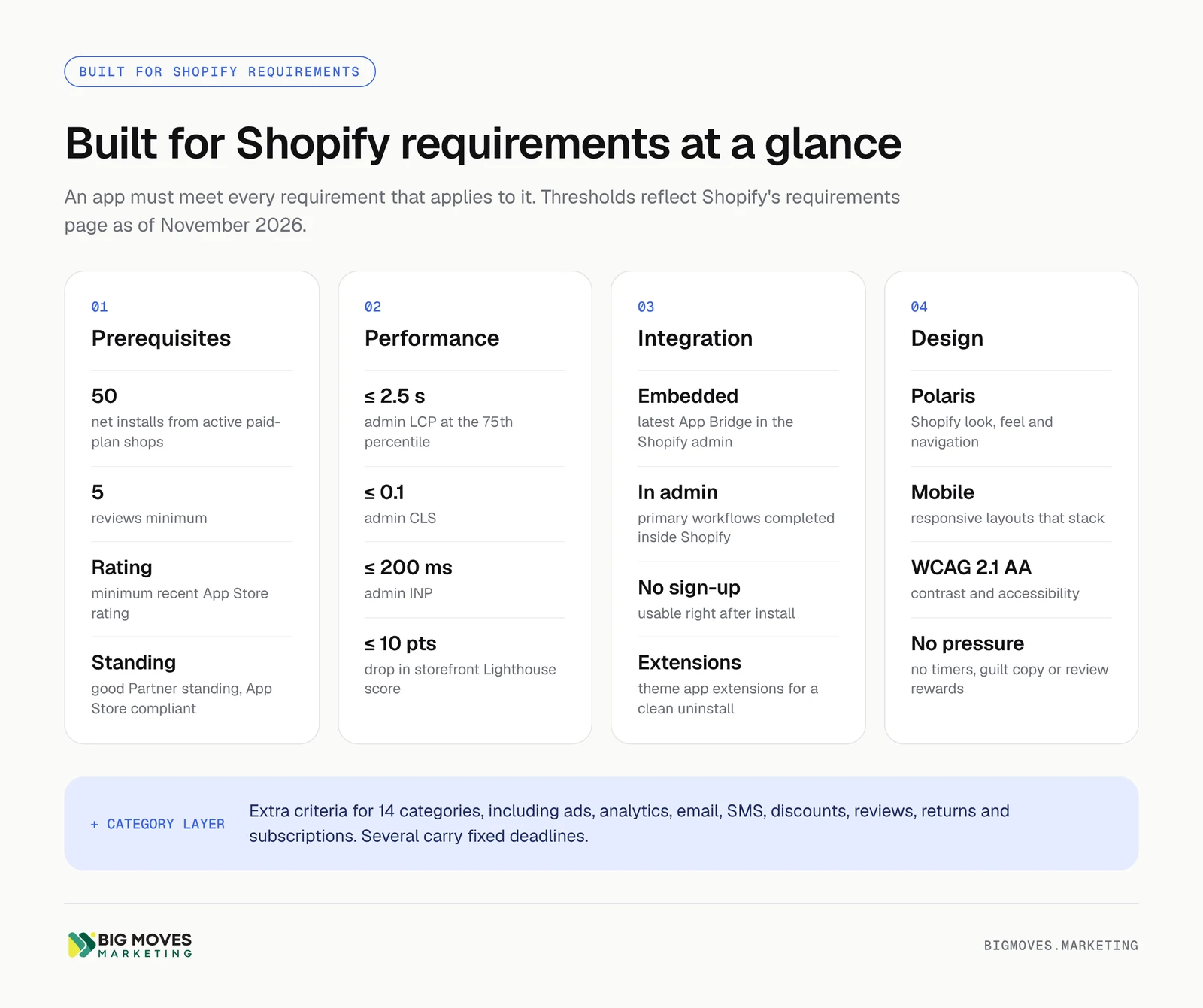
The Built for Shopify requirements fall into four general groups plus category-specific criteria. An app has to meet every requirement that applies to it. The summary below is a planning reference; the official page carries the full rejection criteria for each item.
Before you can apply, the app must meet the App Store requirements, hold good Partner standing with no outstanding Partner Program Agreement or API terms infractions, and prove merchant utility. Utility means at least 50 net installs from active shops on paid Shopify plans, at least five reviews, and a minimum recent App Store rating. Shopify does not publish the rating threshold as a number on the requirements page.
Two details catch new apps. First, installs from development stores and trial stores do not count toward the 50, because the requirement specifies active paid-plan shops. Second, since December 2024 merchants on a trial plan cannot leave reviews, so a review request sent during a free trial yields nothing. Plan review requests for merchants who have converted and reached first value.
Shopify measures admin performance with Web Vitals at the 75th percentile of page loads, using data collected through the latest App Bridge. Each metric needs at least 100 measured calls in the last 28 days before it can be evaluated, which is another reason low-traffic apps wait longer for status.
SurfaceMetricThresholdApplies toShopify adminLargest Contentful Paint (LCP)2.5 seconds or lessAll embedded appsShopify adminCumulative Layout Shift (CLS)0.1 or lessAll embedded appsShopify adminInteraction to Next Paint (INP)200 milliseconds or lessAll embedded appsStorefrontLighthouse performance score impactReduction of 10 points or fewerApps that touch the storefrontCheckoutRequest latency and failure ratep95 of 500 ms or less; 0.1% failure-rate ceilingApps with 1,000+ checkout requests in 28 days
LCP is the metric founders mention most often as the hardest to hold. A heavy React bundle, slow API calls on the app home page, or a third-party script loaded before content can push the 75th percentile over the line even when the app feels fast on a developer's machine.
BFS apps must be embedded in the Shopify admin with the latest App Bridge, and merchants must complete primary workflows inside the admin. Shopify allows exceptions for apps that need a standalone surface, such as messaging tools. Merchants must be able to use the app right after install without a separate sign-up, key metrics must appear on the app home page, and connections to third-party systems must be manageable inside the embedded app.
Storefront elements must use theme app extensions so they disappear cleanly on uninstall. Apps must not create, modify, or delete theme files through the Asset API, with narrow exceptions for page builders, backup tools, and apps focused on SEO, content locking, or developer tooling.
The design criteria ask the app to look and behave like part of Shopify. That means Polaris components and spacing, content in cards, the native app navigation, the Contextual Save Bar for forms, standard modals, WCAG 2.1 AA contrast, and a layout that stacks cleanly on mobile. The app home page must show whether the app is set up and working.
A separate group of rules governs merchant-facing persuasion. BFS apps cannot guarantee outcomes, show countdown timers, use guilt-based copy, reward five-star reviews, open modals automatically, or show promotional content that returns after dismissal. Plan-gated features must be visibly disabled and clearly labeled with the required tier.
Shopify layers additional criteria on 14 categories, including ads, analytics, email and SMS marketing, forms, discounts, fulfillment services, product bundles, product reviews, returns and exchanges, and subscriptions. These criteria usually require adopting a specific Shopify extension or API, such as Web Pixel extensions for marketing and analytics apps or Customer Account UI extensions for subscription management.
Category criteria arrive with deadlines. Returns and exchanges apps and subscription apps with buyer-facing self-service must use the Customer Account API for customer authentication by December 1, 2026. Fulfillment services criteria were revised in August 2026. If your app sits in one of these categories, the BFS roadmap is partly set by Shopify's changelog.
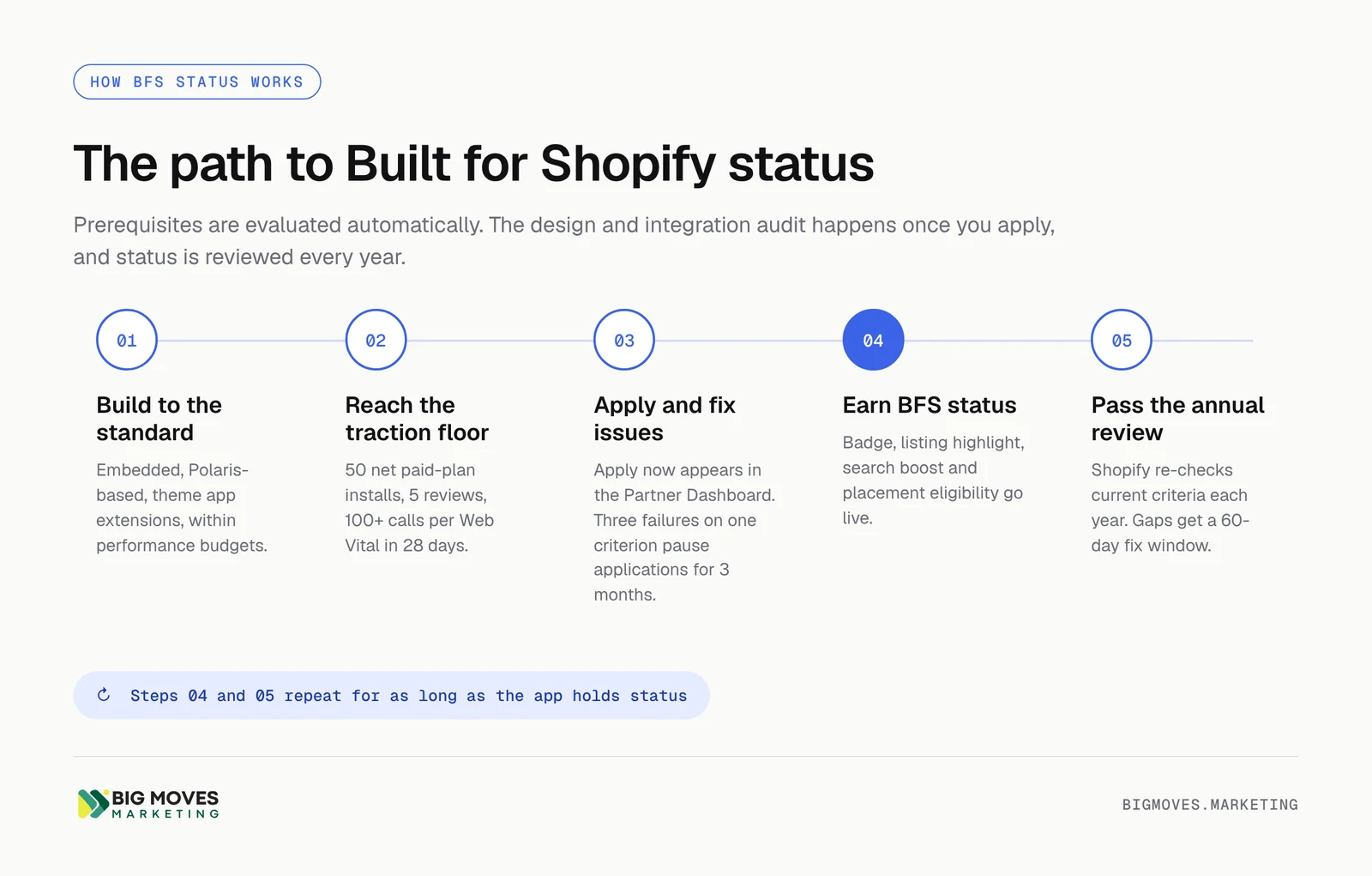
Prerequisites are evaluated automatically. Once the app meets them, an Apply now option appears in the Partner Dashboard under the app's Distribution page, and a team member with the Manage apps permission submits the application. The review team then raises issues one by one, and you fix each as it arrives. Failing the same criterion three times in a row suspends the application for three months.
After approval, Shopify reviews BFS apps at least once a year. Apps that fall short receive an email and a 60-day window to fix the failures before they lose status.
Shopify documents a specific list of benefits on its Built for Shopify overview. Several of them come with a qualifier that matters for planning: eligibility does not guarantee placement, and some boosts are available to non-BFS apps that meet narrower criteria.
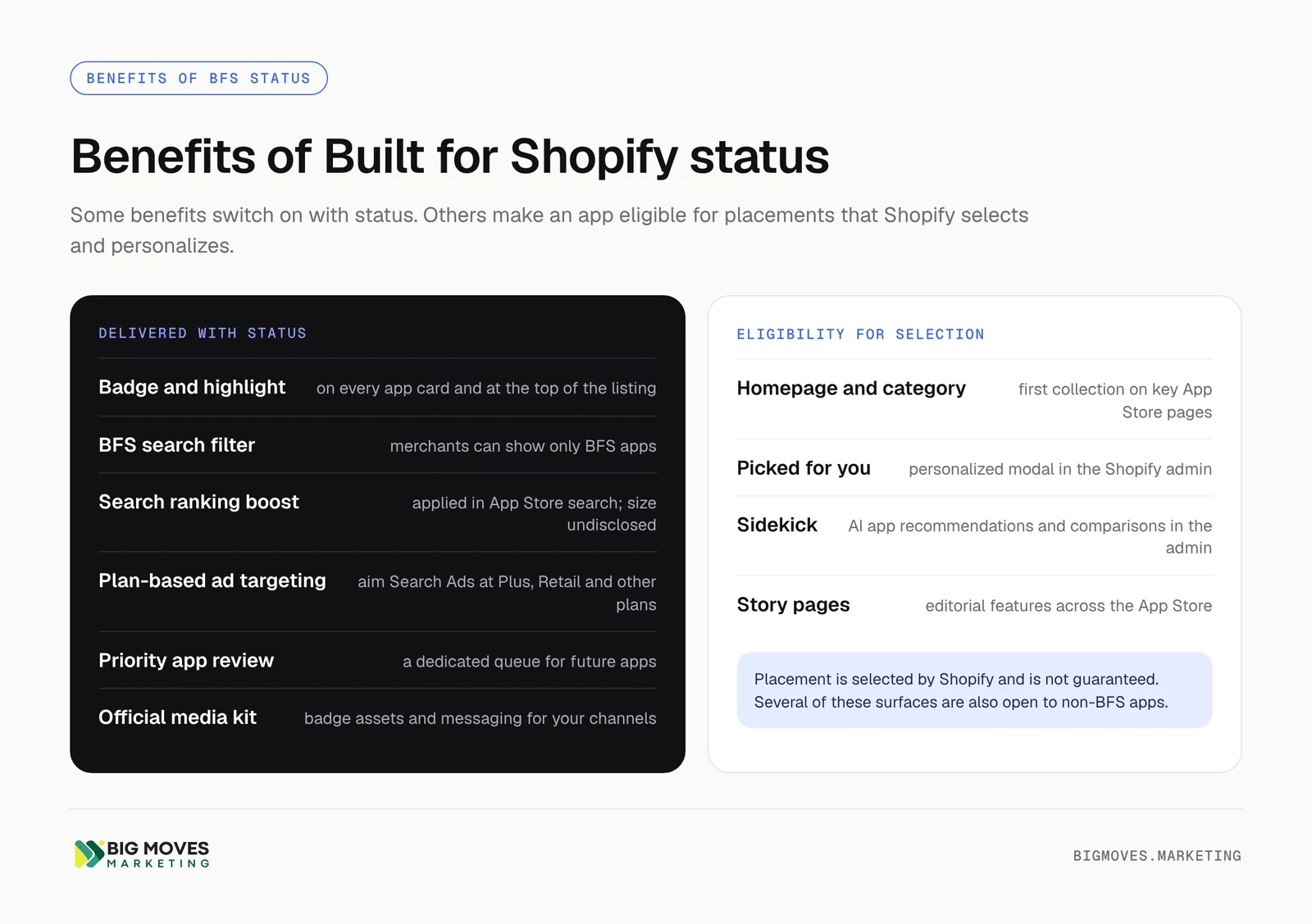
BenefitWhat it doesGuaranteed?Exclusive to BFS?Badge and listing highlightBadge on every app card; highlight at the top of the listingYesYesBFS search filterMerchants can filter search and category results to BFS apps onlyYesYesSearch ranking boostBFS apps rank higher in App Store searchApplied, size undisclosedNoHomepage and category placementEligibility for the first collection on homepage and category pagesNoNoAdmin and Sidekick visibilityEligibility for the "Picked for you" modal; badge shown in Sidekick app comparisonsNoNoPlan-based ad targetingTarget search, category, and homepage ads to specific merchant plansYesYesPriority app reviewFuture apps enter a review queue reserved for BFS developersYesYesMedia kitOfficial badge assets and messaging for your own channelsYesYes
Shopify states plainly that BFS apps rank higher in App Store search. It does not disclose the size of the boost, and it notes the boost is not exclusive to BFS apps, which means it stacks with other ranking signals rather than overriding them. Keyword relevance in the listing, review volume and recency, and post-install engagement still decide most positions.
The practical effect is a tiebreaker in your favor. When two apps match a query equally well, the BFS app tends to win the higher slot. That matters most on mid-volume, high-intent keywords where the top three positions capture most installs.
The badge appears in search results, category pages, and the listing itself. Because Shopify's merchant documentation tells store owners to prefer badged apps when comparing similar options, the badge lifts listing conversion as well as visibility. A merchant comparing three review apps with similar ratings has a clear reason to open the BFS one first.
The BFS filter strengthens this effect. Merchants who apply it never see non-BFS apps at all, so status secures a seat in a smaller, more qualified result set.
BFS apps become eligible for the first collection on the App Store homepage and category pages, the personalized "Picked for you" modal inside the Shopify admin, story pages, and app recommendations in Sidekick. Shopify's October 2025 Partners update also describes priority placement in "Recommended for you" sections on category pages.
Sidekick deserves attention in any forward-looking plan. As merchants ask Shopify's AI assistant which app to install, the admin becomes a discovery channel that bypasses App Store search entirely. Shopify has said the BFS badge appears in Sidekick's comparison tool, which positions status as an input to AI-assisted app selection inside the merchant's own workspace.
BFS developers can target App Store search, category, and homepage ads to specific merchant plans, such as Shopify Plus or Retail. For an app whose best customers sit on Plus, this concentrates ad spend on the segment with the highest lifetime value and reduces installs from stores that are unlikely to convert. Because Shopify's algorithm rewards retained, active installs over raw volume, better-qualified paid installs also support organic rank.
Developers with BFS status get a dedicated review queue for future app submissions. For a studio that plans a portfolio of apps, shorter review cycles shorten time to market for every launch that follows.
The media kit gives you official badge assets and approved messaging for your website, sales decks, partner pages, and email. Agencies and Shopify Experts who recommend apps to clients use the badge as a screening criterion, so status also supports partnership and referral channels.
The requirements encode what Shopify has learned about merchant behavior: fast admin pages, familiar navigation, no separate sign-up, a home page that confirms the app is working. Building to that standard tends to reduce early churn. Teams behind several Built for Shopify apps report that committing to Polaris and the performance budgets early simplified design decisions and pushed performance conversations into planning rather than post-launch firefighting.
Shopify reports that apps with BFS status see an average 49% increase in new installs within 14 days of achieving status. Treat that figure as directional. Shopify has not published the methodology, sample, or baseline, and apps that qualify are already growing, which inflates any before-and-after comparison.
Practitioner accounts are more mixed. One developer who earned BFS for two apps in a niche bulk-editing category reported no measurable change in tracked keyword rankings and only four installs from category pages in 90 days. The same developer saw better Google rankings for the listings, which he attributed to internal links from the BFS collection pages. The honest summary: the badge rewards apps in categories with real merchant traffic and adds little where demand is thin.
The costs of Built for Shopify are real and mostly front-loaded. Founders who account for them in advance make better sequencing decisions than those who discover them during the review.
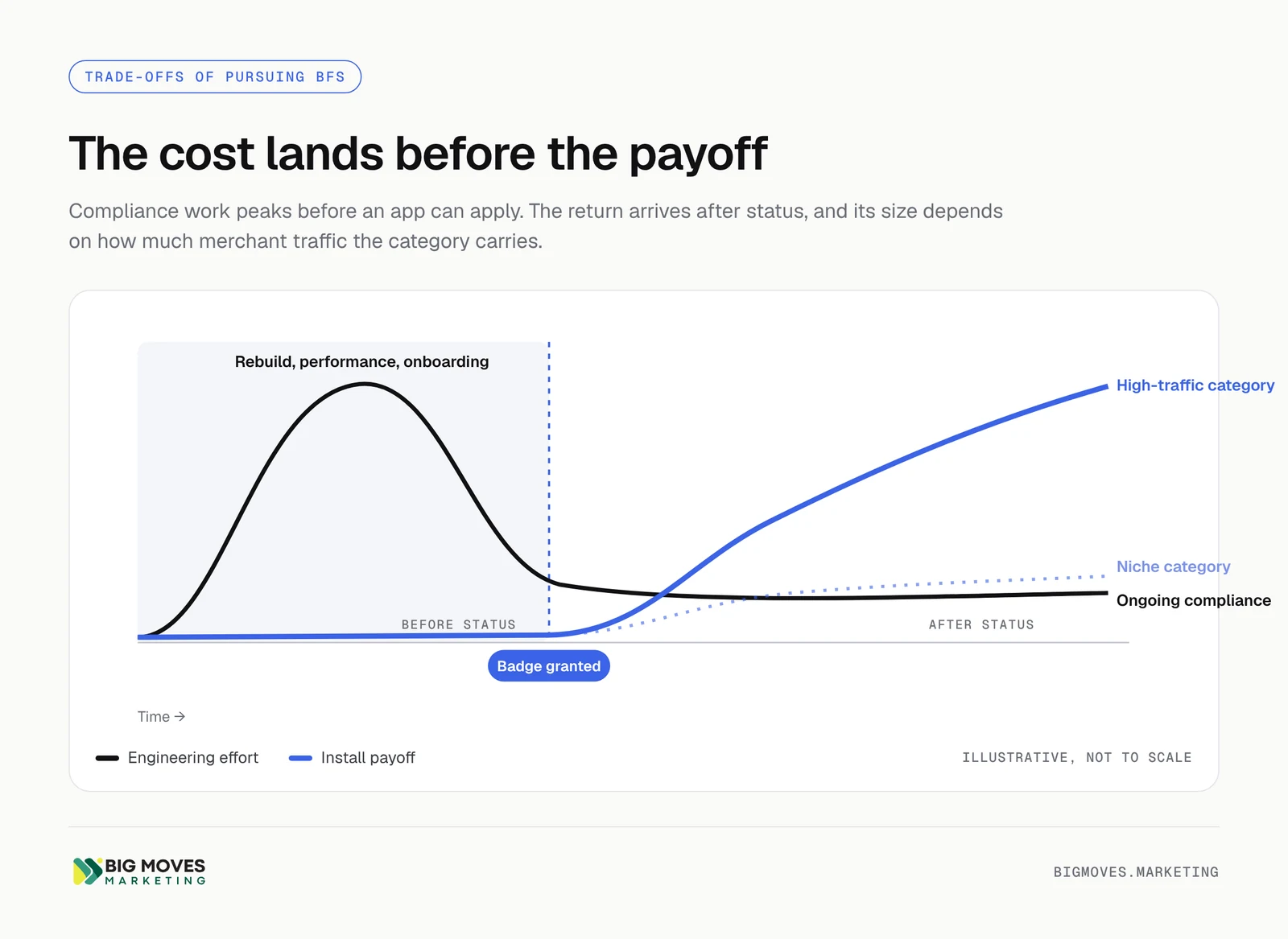
For an app built outside Polaris or without App Bridge, qualifying often means a front-end rebuild. Developers who have gone through the process describe rewrites measured in months of evening and weekend work for small teams. Performance remediation, theme app extension migration, and onboarding redesign add to that. Every week spent on BFS compliance is a week not spent on features, positioning, or acquisition.
BFS expects primary workflows inside the Shopify admin. That suits apps built only for Shopify. It creates friction for multi-platform SaaS products that run their core experience in a standalone web app and treat Shopify as one integration among several. Such teams either build and maintain a parallel embedded experience or accept that BFS sits outside their reach.
The requirement that merchants use the app immediately after install, without a separate account, removes the sign-up form many SaaS teams rely on for lead capture, CRM enrichment, and sales qualification. You can still collect information during onboarding, but Shopify requires you to justify each data request. Marketing teams need to move lead capture into in-app onboarding and lifecycle email rather than a gated registration step.
The no-pressure rules prohibit countdown timers, guilt-based upgrade prompts, auto-appearing modals, and rewards for five-star reviews. Promotional banners must stay dismissed once closed. These rules protect merchants, and most of the prohibited tactics damage trust anyway. Still, apps that currently depend on aggressive in-app upsell patterns should expect conversion experiments to change.
BFS is a recurring commitment. The annual review, the 60-day remediation window, and category criteria with fixed deadlines mean someone on the team must own compliance as an ongoing responsibility. A new feature that adds a heavy dashboard can push LCP over the threshold. A Shopify API deprecation can create a new requirement. Founders describe the risk of losing status as a constant background pressure on product flexibility.
The badge amplifies traffic that already exists. In a high-volume category such as reviews, upsells, or email marketing, a small lift in rank and conversion translates into meaningful installs. In a niche category with low search volume, the same lift produces a handful of installs. BFS does not create demand for a category merchants rarely search.
Fifty net installs from paid-plan shops, five reviews, and 100 measured calls per Web Vital mean a new app cannot qualify at launch, however well it is built. The first months of growth must come from other channels. Founders who plan their launch around BFS benefits they cannot yet access will stall.
Every BFS investment ties the app more closely to Shopify's surfaces, APIs, and rules. For most Shopify apps that dependence already exists. For teams that want to expand to BigCommerce, WooCommerce, or Amazon, a Shopify-native architecture and admin experience may need rebuilding for each new platform.
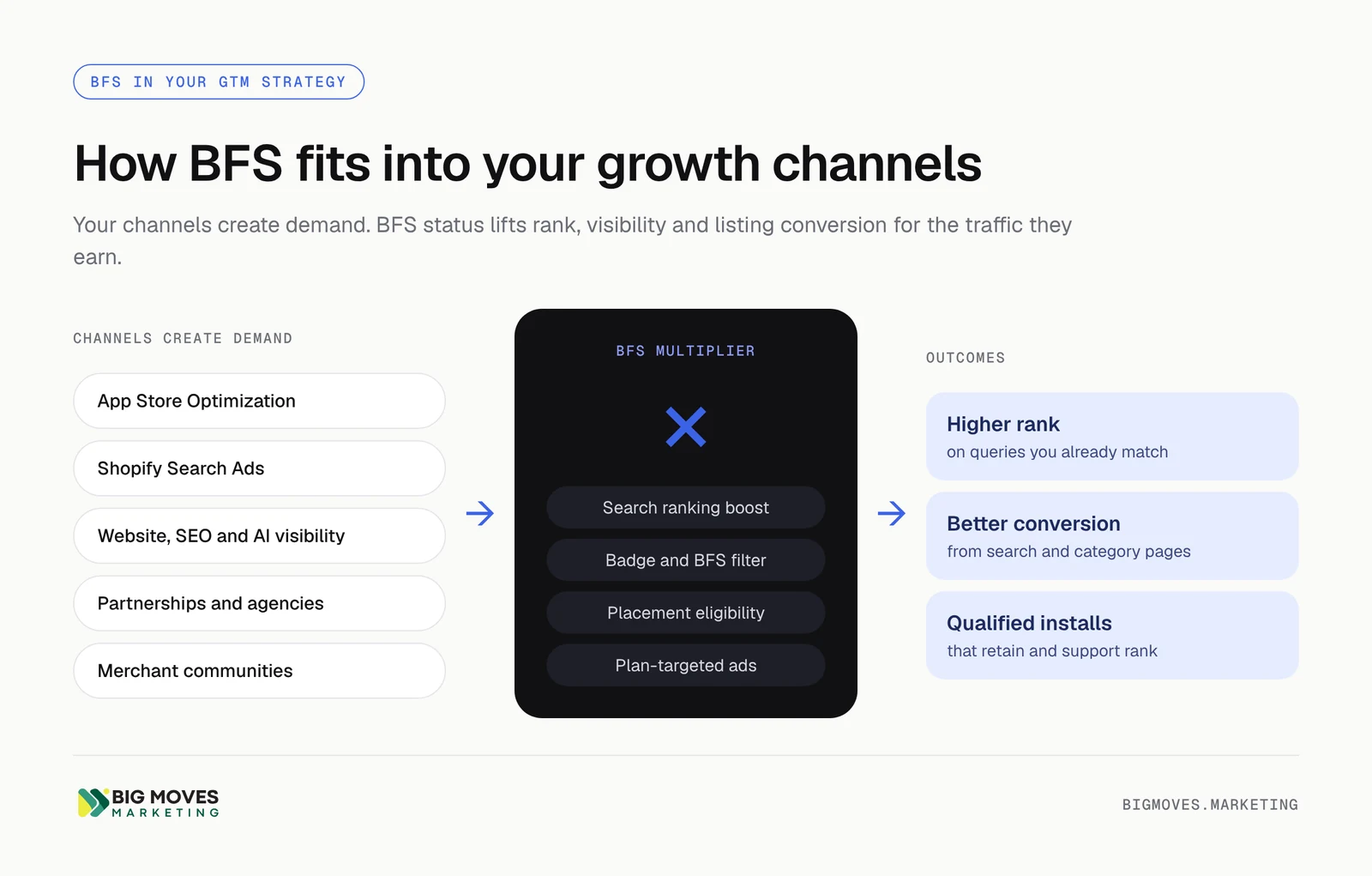
BFS works best as a multiplier on a growth system that already runs. It lifts conversion on traffic you earn through App Store Optimization, Shopify Search Ads, your website, partnerships, and merchant communities. It does not replace any of those channels. The role BFS plays changes with the app's stage.
StageRole of BFSPrimary growth prioritiesPre-launchArchitecture standard: build embedded, Polaris-based, and within performance budgetsPositioning, listing copy, keyword research, early design partnersLaunch to 50 paid installsQualification target; track prerequisites weeklyExact-match Search Ads, communities, founder-led outreach to design partners, review requests after first valuePost-badge growthConversion and visibility multiplierExpand keyword coverage, plan-targeted ads, website content and AI visibility, agency partnershipsEstablished category leaderDefensive requirement; protect rank and placementsWebsite and external channels as primary acquisition, App Store as a defended position
Retrofitting BFS into a finished app costs far more than building to the standard from the first commit. New apps should start embedded with the latest App Bridge, use Polaris components, use theme app extensions for any storefront element, and set performance budgets that match the LCP, CLS, and INP thresholds. Shopify's own app templates make this the default path, so the incremental cost at this stage is small.
The prerequisites turn into a concrete launch goal. Reach 50 net installs from paid-plan shops and five reviews from merchants who have seen value. For apps with no reviews, exact-match Shopify Search Ads keep spend on high-intent queries while social proof accumulates. Merchant communities, such as the Shopify Community and relevant subreddits, produce early users who give detailed feedback. Ask for reviews after a merchant reaches a clear outcome and has left the trial, because trial-plan merchants cannot leave reviews.
Review timing matters beyond the BFS threshold. Shopify's rating calculation weights recent reviews more heavily, so steady review velocity supports both the rating prerequisite and organic rank.
Once status lands, the growth plan should exploit the benefits directly. Refresh the listing so the highlight sits alongside a sharp value proposition. Use plan-based targeting to concentrate Search Ads on the merchant segments with the best retention. Add the official badge to your website, comparison pages, and partner materials. Pitch agencies and Shopify Experts, who use the badge as a screening criterion. Expand keyword coverage, because the ranking boost compounds across every query where the app is relevant.
In competitive categories where most page-one apps carry the badge, BFS stops being a differentiator and becomes the price of staying visible. For apps at this stage, the stronger growth lever often sits outside the App Store: a website that ranks and converts, content that earns citations in ChatGPT and other AI assistants, and partnerships that send pre-qualified merchants. BFS protects App Store rank and placements while those external channels carry acquisition.
The decision depends on four variables: how much merchant traffic your category carries, how far your current app sits from the standard, whether your product model fits an embedded-first experience, and whether you already have a working acquisition engine.
A simple scoring pass helps teams make the call on evidence. Rate each factor from 1 to 5, then weigh the total against the estimated engineering weeks. The weights below are a planning assumption, not a benchmark; adjust them to your situation.
FactorScore 1 whenScore 5 whenSuggested weightCategory demandFew relevant searches; category pages send little trafficHigh-volume keywords; crowded page one30%Competitor badge coverageNo top competitors hold BFSMost top-five apps hold BFS20%Compliance gapFull front-end rebuild requiredAlready embedded, Polaris-based, within budgets25%Product model fitCore experience lives outside ShopifyShopify-only, admin-native workflow15%Prerequisite readinessFar from 50 paid installs and five reviewsPrerequisites already met10%
A weighted score above roughly 3.5 usually justifies starting the work this quarter. A score below 2.5 points to investing in acquisition and retention first, while building new features to the BFS standard so the eventual gap stays small.
Teams that pass review quickly tend to follow the same sequence.
Built for Shopify apps hold a structural advantage in categories with real merchant demand. For Shopify-only apps in those categories, BFS status is worth earning, and the cheapest path is to build to the standard from the start. The badge, the ranking boost, the BFS filter, and access to Shopify's premium placements compound on top of a healthy acquisition engine. As Sidekick and the admin become discovery surfaces, BFS status is likely to matter more over time.
BFS rewards apps that already deserve to win. It sharpens a strong listing, lifts conversion on traffic you already earn, and protects rank in a crowded category. Founders get the most from it when they treat it as one component of a growth system that includes App Store Optimization, Search Ads, a converting website, partnerships, and merchant communities.
BFS stands for Built for Shopify, Shopify's quality program for apps. An app with BFS status has passed automated checks and a manual review covering performance, admin integration, design, safety, and proven merchant usefulness. Merchants see a Built for Shopify badge on the app card and a highlight at the top of the listing, and they can filter App Store search and category results to show only BFS apps. Shopify reviews status at least once a year, so the badge reflects the app's current quality rather than a one-time certification. Roughly 7% of live apps held BFS status in mid-2026, according to independent trackers, though the share among top-ranking apps in competitive categories is much higher. Shopify's merchant Help Center explicitly encourages store owners to prefer badged apps when comparing similar options.
An app must meet the App Store requirements, hold good Partner standing, and reach at least 50 net installs from active shops on paid plans, five reviews, and a minimum recent rating. It must also meet the performance thresholds for admin Web Vitals: LCP of 2.5 seconds or less, CLS of 0.1 or less, and INP of 200 milliseconds or less, each measured at the 75th percentile with at least 100 calls in 28 days. Storefront apps must not reduce Lighthouse scores by more than 10 points. Beyond these, the review covers embedded workflows, seamless sign-up, theme app extensions, Polaris-aligned design, and any category-specific criteria. The Apply option appears in the Partner Dashboard once the automated prerequisites are met.
Timelines vary with the starting point. An app built embedded and on Polaris from day one may qualify within weeks of reaching the install and review prerequisites. An app that needs a front-end rebuild, theme extension migration, and performance work can take several months of engineering time before applying. The review itself is usually faster than the preparation; developers report first decisions within days to two weeks, depending on how many issues the reviewer raises and how quickly the team fixes them. Reaching 50 paid-plan installs and five reviews is often the slowest step for new apps, which is why the first months of growth must come from Search Ads, communities, and direct outreach rather than BFS perks.
Yes, according to Shopify's documentation, which states that BFS apps rank higher in App Store search. Shopify does not disclose the size of the boost and notes that it is not exclusive to BFS apps. In practice, keyword relevance, review volume and recency, and post-install engagement still decide most positions, and the BFS boost acts as an advantage when competing apps are otherwise close. Developer experience varies: some report clear visibility gains after earning status, while others in niche categories saw little change in tracked rankings. The badge also lifts conversion from search results and supports eligibility for homepage, category, admin, and Sidekick placements, which can matter as much as the ranking boost itself.
Yes. Shopify reviews Built for Shopify apps at least once a year against the current criteria, which change as Shopify adds category requirements and updates its platform. An app that no longer meets a requirement receives an email and has 60 days to fix the failure before losing status. Common causes include performance regressions after a feature release, new category requirements with fixed deadlines, a falling recent rating, and Partner Program infractions. Teams protect status by assigning a compliance owner, adding Web Vitals checks to the release process, and watching the Built for Shopify changelog. Treating BFS as an ongoing product standard, rather than a project with an end date, keeps the annual review routine.
For a new Shopify-only app, building to the BFS standard from the start is almost always worth it, because the incremental cost is small and retrofitting later is expensive. Applying for status has to wait until the app reaches 50 paid-plan installs and five reviews, so a new app's launch plan should rely on other channels first. Exact-match Search Ads, merchant communities, design partners, and a clear listing produce the early installs. Once the prerequisites are met, status lifts visibility and conversion for the traffic those channels generate. The exception is a multi-platform product whose core experience lives outside Shopify; that team should weigh the cost of a dedicated embedded experience against the size of its Shopify opportunity.
Built for Shopify is a verified status for apps in the Shopify App Store, granted only to apps that meet Shopify's quality requirements and shown as a badge on qualifying listings. Built with Shopify is a general description of a website or store that runs on the Shopify platform, and people often search it when they want to identify which sites use Shopify. Any app can say it works with Shopify, but only apps holding BFS status can display the Built for Shopify badge and use Shopify's official media kit assets. App teams should use the exact program name in marketing only after the status appears on their listing, and avoid phrasing that could imply certification before it is granted.
Big Moves Marketing helps Shopify app teams build the growth system that Built for Shopify status amplifies, from App Store Optimization and Shopify Search Ads to onboarding, content, and partnerships. If you are deciding whether BFS belongs on this quarter's roadmap, visit Big Moves Marketing to discuss where it fits in your app's growth plan.