%20png%20copy.avif)
For most marketing teams, Livestorm is the best webinar platform because it joins in a browser, syncs natively with major CRMs, and skips the download friction that kills attendance. If you need enterprise scale and airtight security, ON24 is the stronger pick. If browser-based simplicity matters most, Livestorm wins there too. For evergreen and automated webinars, eWebinar leads the field.
This guide compares 26 platforms on the variables that actually decide a purchase: price shape, attendee ceiling, browser access, CRM integration, and automation support.
Browser-based platforms report 40 to 60 percent higher show-up rates than tools requiring a download. That single number should shape how you weight every other feature on your shortlist.
Browser-based, CRM-integrated webinar platforms consistently outperform download-required tools on attendance, making that combination the single highest-weight factor in a 2026 platform decision.
| Point | Details |
|---|---|
| Browser access drives show rate | Browser-based platforms report 40 to 60 percent higher attendance than download-required tools. |
| Match platform to use case | ON24 fits enterprise scale, Livestorm fits low-friction lead gen, eWebinar fits evergreen funnels. |
| Test the CRM flow, not just the sync | Confirm poll answers and CTA clicks arrive as CRM timeline events, not just contact records. |
| Watch effective pricing, not headline price | Platforms like Zoom and GoTo Webinar often require bundled licenses that raise real cost. |
| Software alone won’t fix a weak funnel | Bigmoves builds the registration, speaker coaching, and nurture layer around whichever platform you pick. |
Reading this table takes ten seconds if you know what the numbers mean. “Starting price indicator” reflects the entry-level paid tier, not enterprise custom quotes. “Max attendees” reflects the ceiling on the standard paid plans, not add-on capacity some vendors sell separately.
A few notes worth carrying into your own evaluation:
Here’s the procurement-level rundown on the 12 platforms marketing teams evaluate most often.
Demio runs entirely in the browser and centers its pitch on engagement analytics rather than raw scale. It’s built for teams running weekly or biweekly lead-gen webinars who want clean registration pages without hiring a designer. The trade-off: its automation is partial, meaning true evergreen funnels require workarounds. Native CRM integration covers the major platforms (HubSpot, Salesforce, Marketo) through direct connections.
Livestorm’s whole model rests on removing friction: no downloads, no app, just a link. That design choice is why it posts stronger attendance numbers than download-required competitors. The trade-off is ceiling. At 1,000 attendees on standard plans, it’s not built for stadium-scale broadcasts. CRM sync is native and bidirectional, pushing engagement data back into HubSpot or Salesforce as usable lead signals.
Zoom wins on familiarity. Nobody needs a tutorial to join a Zoom call, and that recognition alone can lift registration-to-attendance conversion for cold audiences. It scales to 10,000 attendees on higher tiers. The catch is cost structure: Zoom’s webinar add-on requires an existing Zoom Workplace license, so the effective starting price is higher than the headline number suggests. CRM integration exists but often needs a third-party connector like Zapier to get engagement data flowing cleanly.
BigMarker positions itself as a marketing platform first and a webinar tool second. It gives teams branded event hubs, built-in automation sequences, and enough customization to make a webinar look like a mini conference. The trade-off is a steeper learning curve than Demio or Livestorm. Native CRM integrations are solid, and its automation supports both live and recorded formats.
GoTo Webinar has been the safe, IT-approved choice for over a decade, and enterprise buyers still default to it for that reason. It supports 3,000 attendees and carries the compliance credentials larger organizations require. It is not browser-based, which introduces the download friction Livestorm avoids. CRM integrations exist for major platforms but often need middleware for deeper engagement tracking.
Livestream serves a different job entirely: broadcast-style events meant to reach audiences on YouTube, Facebook, and owned properties simultaneously. It’s not built for interactive lead-gen webinars with polls and breakout rooms. Marketing teams running product launches or all-hands broadcasts use it; teams running weekly demand-gen webinars generally don’t. It has no meaningful native CRM integration, since it’s not designed as a lead-capture tool.
ON24 is the platform enterprise marketing teams reach for when a webinar needs to double as a data engine. Its AI-driven engagement scoring tracks attention in ways smaller platforms don’t attempt, and its analytics suite is built for teams managing dozens of programs across regions. The trade-off is cost and complexity. Pricing is custom, onboarding takes longer, and smaller teams will find it overbuilt. CRM integration is deep, with engagement data flowing as scored leads rather than raw attendance logs.
WebinarJam is built for one thing: high-volume sales webinars with an offer at the end. It handles large registration lists at a lower price point than most enterprise tools, which is why launch-heavy sales teams favor it. Automation is strong for replay sequences, but the interface feels dated next to Livestorm or Demio. CRM integration is partial, often requiring Zapier to complete the loop.
WebinarNinja keeps things simple: schedule a webinar, add a checkout page, done. Small teams and solo marketers use it because there’s no learning curve and monetization is built in. It caps out around 100 attendees on entry plans, so it’s not a platform to outgrow into. CRM sync is partial, generally covering basic contact export rather than live engagement data.
eWebinar exists for one purpose: turning a single recorded session into an always-on funnel. Its simulive engagement triggers let a prerecorded webinar behave like a live one, complete with scheduled chat messages and CTAs. That makes it the clear pick for teams that want a webinar to run without a presenter every time. The trade-off is scale. It’s not designed for one-time flagship live events with thousands of attendees. CRM integration is partial but automation depth here beats every other platform on this list.
ClickMeeting leans into monetization and funnel flexibility, letting teams charge for access, run paid tiers, and control attendee permissions granularly. It’s a reasonable middle ground between WebinarNinja’s simplicity and BigMarker’s complexity. CRM integration is partial, and automation supports both scheduled and on-demand formats.
Zoho Meeting is the budget pick, particularly for teams already running Zoho CRM, Zoho Campaigns, or Zoho Books. At $16 a month it undercuts nearly everyone on this list, and native integration with the rest of the Zoho suite is seamless if you’re already in that ecosystem. The trade-off: automation is essentially absent, so evergreen or simulive functionality isn’t an option here.
We compared these 26 platforms on ten axes: video and audio quality, registration and landing page design, live engagement tools (polls, Q&A, chat), analytics depth, CRM and marketing integrations, pricing model, attendee scale, browser friction, automation or evergreen support, and security or compliance credentials.

Evaluation combined hands-on trials where access allowed, a review of vendor documentation, third-party ratings from platforms like G2 and Capterra, and direct price checks on official vendor pages current as of 2026.
Two limitations are worth naming. Webinar products update fast, so a feature gap noted here could close within a quarter. And several platforms, ON24 and Livestream among them, quote custom enterprise pricing that isn’t public, which makes apples-to-apples cost comparison harder than it looks in a table.
Pro Tip: Before you trust any vendor’s “starting price,” ask what a 500-person webinar with CRM sync actually costs on their pricing page. The headline tier rarely includes it.
Run through this checklist before you sign anything:
When you get vendors on a call, ask about trial limits, real attendee caps (not marketing copy), whether engagement data exports as CRM timeline events, whether attendees need a download, and exactly how their “evergreen” feature works, since simulive automation varies enormously between vendors.
Pro Tip: Watch for demos that avoid showing the registration-to-CRM flow live. If a rep can’t demonstrate it in real time, assume it needs custom development on your end.
For most B2B marketing teams, Livestorm is the strongest default. Enterprise teams running high-production programs should look at ON24. Teams building always-on lead funnels should start with eWebinar.
Before you commit, run three tests: hold a trial webinar with a real guest speaker, confirm registration data syncs cleanly into your CRM, and compare show rates for a browser-based session against a download-required one.
Picking Livestorm over Zoom won’t fix a webinar with the wrong topic, a flat speaker, or no follow-up sequence. That’s where most webinar programs actually fail.
Hiring an agency makes sense when you need funnel design, speaker coaching, or content repurposing at scale, not just a better tool. A single 45-minute webinar can become a dozen social clips, a nurture email sequence, and a sales enablement asset. Doing that well requires production skill most internal teams don’t have time to build.
Ask yourself: do we have bandwidth to design the funnel, coach the speaker, and repurpose the recording within a week of the event? If the honest answer is no, that’s your signal to bring in outside help rather than keep testing new software.
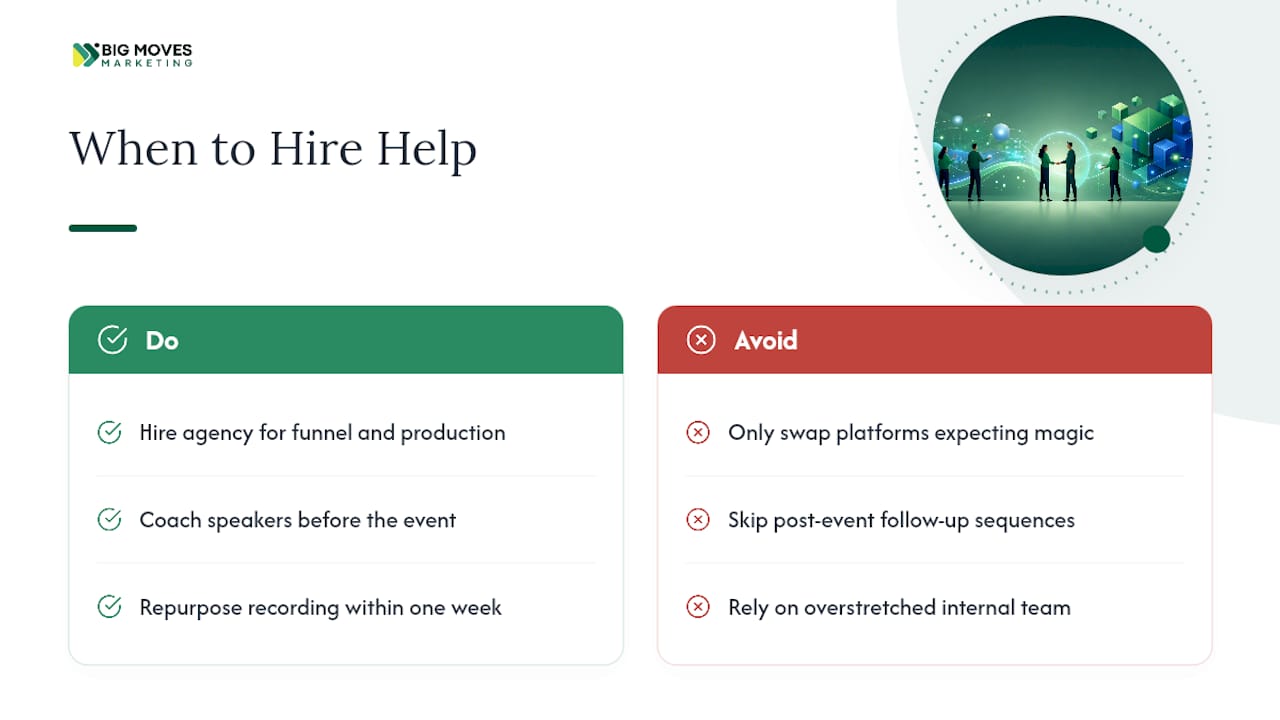
Picking the right software gets you a working room. It doesn’t get you a funnel that converts attendees into pipeline. Bigmoves builds the parts most teams skip: registration pages that actually convert, speaker prep that keeps attendees on the call, and post-event nurture sequences that turn a one-time viewer into a sales conversation.
That combination matters most when your team is stretched thin, the event carries real revenue stakes, or leadership wants pipeline numbers tied to the webinar, not just attendance counts. Swapping from GoTo Webinar to Livestorm won’t solve any of those problems on its own. Bigmoves works alongside whichever platform you choose, building the website and funnel infrastructure around it so the webinar actually earns its budget. If your last webinar generated attendees but not conversations with sales, book a discovery call and walk through what a full-funnel version would look like for your next event.
Livestorm is the strongest overall pick for marketing teams because of its browser-based access and native CRM sync. Enterprise teams running large, high-production programs are better served by ON24.
Yes. Webinars remain one of the highest-converting B2B lead-generation formats when paired with strong CRM integration and a follow-up nurture sequence, which is why platforms keep investing in engagement analytics and automation.
Zoom’s webinar add-on typically requires an existing Zoom Workplace license underneath it, which raises the effective starting price well above the headline webinar-only rate.
Most platforms on this list offer limited free trials rather than permanent free tiers, since running a webinar requires bandwidth and features that are costly to give away. Zoho Meeting comes closest to an affordable ongoing option at $16 a month for teams already using Zoho apps.
If your team lacks time for funnel design, speaker coaching, or content repurposing, an agency like Bigmoves typically delivers more pipeline impact than switching software alone.


%20-%20white.svg)