%20png%20copy.avif)
For cloud-safe outreach, run Expandi. For data extraction and list building, run PhantomBuster. For visual drip sequences with A/B testing, run Dripify. For agencies managing multiple sender accounts, run HeyReach. For budget browser-based outreach, run Dux-Soup. Each earns the pick through account safety, data depth, or sequencing power, not brand size.
TL;DR:
- Cloud-based tools like Expandi and HeyReach offer safer outreach at scale through dedicated IPs and warm-up periods, making account restrictions less likely.
- Data extraction platforms such as PhantomBuster excel at scraping LinkedIn data without manual browser sessions, ideal for building clean prospect lists.
- Sequential and multichannel tools like Dripify and Waalaxy enable testing messaging variants and combining LinkedIn with email outreach for better response rates.
- Evaluation criteria should focus on safety models, integration support for Sales Navigator and CRMs, and transparency around trial access to avoid wasted effort.
- Successful automation requires ownership, regular list refreshment, and strategic messaging; software alone cannot overcome fundamental operational or positioning issues.
Nobody needs 34 LinkedIn tools. They need one or two that do a specific job well without getting their account flagged. That’s the real filter behind every “best linkedin automation tools” list you’ll find, and it’s the one most roundups skip in favor of ranking everything on the same scale.
The table below sorts the field by what each tool is actually built to do, not by feature count. Vendors split roughly into four lanes: cloud-based outreach sequencers, browser-extension automators, data enrichment platforms, and multichannel sequencing tools that blend LinkedIn with email. Recent category breakdowns recommend picking one primary tool per lane rather than stacking five tools that all try to do the same thing.
| Tool | Best For | Primary Use Case | Safety Model | Key Integrations | Starting Price / Trial | Standout Feature |
|---|---|---|---|---|---|---|
| Expandi | Cloud-safe outreach at scale | Multi-sender LinkedIn campaigns | Cloud, dedicated IP, warm-up | Sales Navigator, Zapier, CRMs | Paid plans, free trial | Warm-up flows built into onboarding |
| PhantomBuster | Data extraction and list building | Cloud “Phantoms” for scraping and automation | Cloud, no persistent browser needed | Sales Navigator, Google Sheets, CRMs | Free tier, paid plans | Phantoms that run without an open browser |
| Dripify | Visual drip campaigns | Sequence building with analytics | Cloud | LinkedIn, CRMs via Zapier | Paid plans, trial available | Step-by-step analytics and A/B variants |
| HeyReach | Agencies running multiple accounts | Multi-sender outreach at agency scale | Cloud | CRMs, Sales Navigator | Paid plans, demo available | Sender rotation with a unified inbox |
| Dux-Soup | Budget CRM-synced outreach | Profile visits, tagging, follow-up | Hybrid browser/cloud | CRMs, Zapier | Free tier, low-cost paid plans | Simple UI with direct CRM sync |
| Waalaxy | Small teams needing LinkedIn + email | Combined channel sequencing | Extension-based | Email providers, CRMs | Free tier, affordable paid plans | Multichannel sequencing at low entry cost |
| Linked Helper | Feature-heavy budget teams | Broad action set: messaging, endorsements, groups | Extension-based | CRMs | Low-cost paid plans | Deep feature set for the price |
| Octopus CRM | Bulk outreach management | Campaign management with CSV workflows | Extension-based | CSV import/export | Paid plans, trial available | Bulk operations built for volume |
| Meet Alfred | Teams sharing templates | Multichannel sequences with team tools | Cloud | CRMs, email | Paid plans | Shared templates across a sales team |
| Apollo.io | Prospecting plus sequencing | Contact database with outbound automation | Cloud | CRMs, Sales Navigator | Free tier, paid plans | Large contact database with technographic filters |
Three signals separate a tool worth trialing from one that will waste your week:
Reading feature lists tells you what a tool claims. Running a real 50 contact sequence tells you what it delivers. Here’s what to expect from each before you get there.
PhantomBuster runs cloud based “Phantoms,” small automation scripts that extract LinkedIn data and execute tasks without a browser tab staying open. It’s the strongest pick for data extraction and list building, pairing well with Sales Navigator searches you want turned into clean spreadsheets. Safety-wise, running extraction in the cloud reduces the exposure of doing it manually through your own browser session. Pricing starts with a free tier, and the practical test is simple: point a Phantom at a 100-profile Sales Navigator search and see how clean the export lands in your CRM.
Expandi is built cloud-first, with warm-up flows and IP handling baked into onboarding rather than bolted on as an afterthought. It’s the go-to for teams that want scalable outreach without babysitting account risk, and it supports multi-sender campaigns for growing teams. Trial it by connecting one sender account, running a short warm-up cycle, and watching how the platform paces your first week of connection requests.
Dripify gives you a drag-and-drop sequence builder with step-level analytics, which makes it the pick for teams that want to A/B test messaging without exporting data into a spreadsheet to compare open rates. Pricing sits in standard subscription territory with a trial window. Test it by building two variant sequences targeting the same list and comparing acceptance rates after a week.
Waalaxy combines LinkedIn actions with email steps in one sequence, aimed at small teams that don’t want to run two separate tools for two channels. It’s an extension-based tool, so account exposure runs slightly higher than cloud platforms, but the entry price is low enough to make it a fair starting point. Run a five-step sequence mixing a connection request, a LinkedIn message, and a follow-up email to see how the handoff between channels actually feels.
Dux-Soup is a hybrid browser and cloud tool built around profile visiting, tagging, and CRM syncing. It’s the budget pick when you need automation that talks to your CRM without a steep learning curve. The interface is simple enough that a new hire can be running campaigns inside a day. Test the CRM sync first, since that’s the feature most buyers actually rely on long term.
Linked Helper packs in a wide action set: endorsements, group messaging, and campaign sequencing, all at a lower price point than most cloud competitors. It runs as an extension, so treat daily action limits seriously. It suits teams that want maximum feature depth on a tight budget, provided someone owns the safety settings.
Octopus CRM focuses on bulk outreach with straightforward CSV import and export, which makes it a fit for teams running large batch campaigns rather than highly personalized one-to-one sequences. The interface trades sophistication for speed. If your workflow depends on moving lists in and out of the tool quickly, this is worth a trial run.
HeyReach was built for agencies juggling multiple client sender accounts. Automatic sender rotation and a unified reply inbox mean one operator can run several campaigns without losing track of who replied where. It’s a cloud platform, so account safety is handled server-side. Trial it by connecting two sender accounts and checking how cleanly replies route into the shared inbox.
Meet Alfred leans into team collaboration, with shared templates and multichannel sequences that a sales team can reuse without rebuilding messaging from scratch each time. It runs in the cloud and supports CRM connections. Good for teams standardizing outreach voice across multiple reps.
Lemlist adds visual personalization, images and GIFs dropped into sequences, across email and LinkedIn touches. It’s less a pure LinkedIn automation tool and more a personalization layer for multichannel campaigns. Worth testing if your current sequences read as generic and you want higher reply rates through visual hooks.
Apollo.io pairs a large B2B contact database with outbound sequencing, so it works as much as a prospecting tool as an outreach tool. Teams that need account intelligence, technographic filters, and sequencing in one platform get more value here than from a pure outreach tool paired separately with a data provider. A free tier makes it easy to test the database quality before committing to a paid plan.
Beyond this shortlist, the wider market includes tools like Scalelist, LeadFuze, NetNut, TexAu, AeroLeads, Evaboot, UpLead, Wiza, Crystal, Botdog, LiProspect, Linked Radar, Skylead, SaleeAI, Salesflow (formerly GrowthLead), Salesloft, Salestools.io (formerly Demand, formerly Saleshub), LinkedFusion, LeadConnect, We-Connect, La Growth Machine, Reply, and Cirrus Insight. Most fall into the same four lanes above: data enrichment tools like Wiza, Evaboot, and UpLead pull verified emails and firmographic data; cloud sequencers like Skylead, SaleeAI, and Salesflow compete directly with Expandi and Dripify on warm-up and campaign features; and multichannel platforms like La Growth Machine and Reply extend LinkedIn sequences into email and calling. Crystal focuses narrowly on personality-based messaging suggestions rather than automation itself. If your shortlist tool doesn’t cover a gap, one of these fills it, but test against the same safety and integration criteria before adding a sixth subscription to your stack.
Picking a tool by feature list alone is how teams end up locked into a 12-month contract for software that gets their account restricted in month two. Run the selection through six criteria instead.
Watch for these red flags before you sign anything longer than a monthly plan: no mention of warm-up periods anywhere in the documentation, no Sales Navigator support when your list building depends on it, unclear routing for where replies land, and vague claims about email-finding accuracy with no verification method disclosed.
Before committing budget, run three tasks in a free trial. This trial format surfaces most operational mismatches in under a week:
Pro Tip: Run the trial with a real, low-stakes segment of your list, not a throwaway test batch. A trial against a small real prospect list tells you far more about reply quality than a random profile check.
Stack patterns differ by team size. A solo founder typically runs one cloud outreach tool (Expandi or Dripify) paired with a lightweight CRM. A team of three to eight reps usually adds a data enrichment layer (Apollo.io or a dedicated tool like Wiza) on top of the outreach platform to keep lists fresh. An agency managing multiple client accounts almost always needs a sender-rotation platform like HeyReach to keep campaigns organized without mixing up client identities.
Veb has spent 17 years building go-to-market systems for more than 75 startups and scaling SaaS companies, and the pattern with LinkedIn tools repeats: the tool matters less than the stack around it. Three stack blueprints repeatedly show up in client work.
Lead-gen stack: Sales Navigator plus a cloud outreach tool (Expandi or Dripify) plus a CRM sync. Setup checklist: build the saved search, connect the sender account, run the warm-up period, then launch a 50-contact test sequence.
ABM stack: Apollo.io for account intelligence layered with PhantomBuster for targeted extraction on named accounts, feeding a personalized sequence in Dripify. Setup checklist: define the account list, extract decision-maker profiles, segment by role, then build role-specific messaging.
Content-led outreach stack: A content tool feeding thought-leadership posts, paired with an outreach tool that follows up with engagers rather than cold profiles. Setup checklist: publish consistently for two to three weeks, extract engagers, then sequence warm outreach.
Track acceptance rate, reply rate, and pipeline conversion weekly at minimum, not monthly. A tool that looks fine on a 30-day view can hide a slow account restriction building in week two.
Cloud tools like Expandi, HeyReach, and PhantomBuster share a structural advantage: automation runs on remote servers, so the safety burden shifts away from your own browser session. The tradeoff is usually price. Cloud platforms tend to sit above extension-based tools like Dux-Soup, Linked Helper, and Octopus CRM on monthly cost.
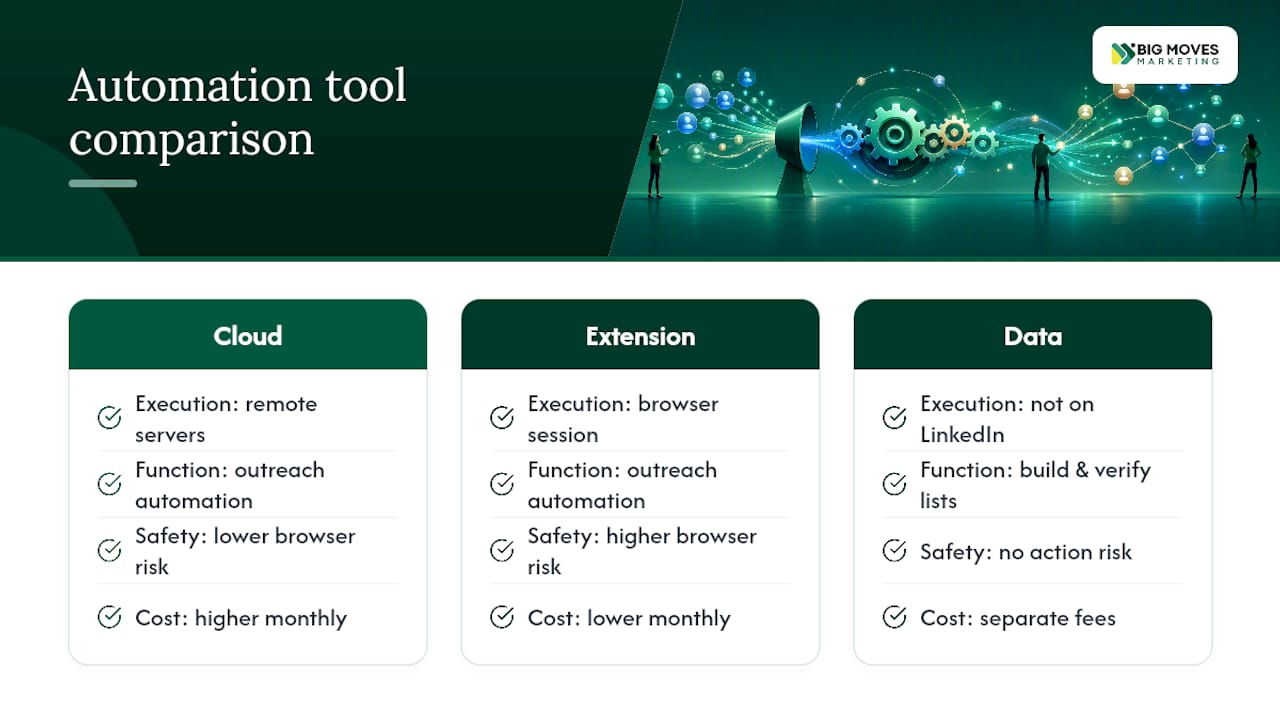
Extension-based tools win on affordability and simplicity but carry more operational risk since the tool operates through your actual LinkedIn session in your browser. Extension tools can be cheaper but require more hands-on safety management than their cloud counterparts.
Data platforms like Apollo.io, UpLead, and Wiza solve a different problem entirely. They don’t automate LinkedIn actions. They build and verify contact lists that feed into whichever sequencing tool you run. Treat these as complementary, not competitive, with outreach platforms.
The real limitation across nearly every tool on this list isn’t the software. It’s operational discipline. A tool with excellent safety architecture still gets an account flagged if a user manually overrides the daily limits because a campaign felt slow.
Most cloud tools take under an hour to get a first campaign live: connect the sender account, complete the warm-up flow, import a list, and write the first message step. Extension-based tools add a few extra minutes for browser installation but otherwise move at a similar pace.
The real learning curve isn’t the software interface. It’s writing sequences that don’t read as automated. Expect the first two campaigns to underperform while your team calibrates message length, personalization fields, and follow-up timing. Teams that treat the first month as a calibration period, not a results period, get better long-term numbers than teams that judge the tool by week one.
CRM integration setup varies more widely. A direct native sync (common with Dux-Soup and HeyReach) takes minutes. A Zapier-based connection adds a setup step but still runs in under a day for most teams.
Week one is warm-up and calibration, not results. Most cloud tools stagger action volume during this period specifically to protect the account, so expect low outreach volume by design.
Weeks two through four typically show the first meaningful signal: acceptance rates stabilizing and early replies coming in. This is when most teams should start comparing message variants rather than judging the whole campaign.
By week six to eight, a well-run stack should show a repeatable reply rate and the first pipeline conversions. If nothing has converted by then, the issue is almost always messaging or targeting, not the tool.
Expect diminishing returns if you don’t refresh your list regularly. A saved Sales Navigator search run against the same segment for three months starts hitting profiles you’ve already contacted, which drags down every downstream metric even if the tool itself is working exactly as designed.
LinkedIn’s terms of service govern what the platform allows. That’s a separate question from what’s ethical or legally sound for your business, and both deserve attention.
Data privacy law is the bigger practical risk for most B2B teams. If you’re extracting and storing contact data on individuals in the EU or UK, GDPR applies regardless of where your company is based, and that includes data pulled through scraping tools like PhantomBuster. Storing enriched contact data without a clear lawful basis for outreach creates real exposure, not just a policy violation.
Ethically, the line most teams cross without noticing is volume over relevance. Automated connection requests sent to thousands of irrelevant profiles don’t just risk your account. They erode trust in cold outreach as a channel for everyone, making every future campaign harder to land. Treat automation as a way to reach more of the right people faster, not as a way to reach everyone.
Automation is a multiplier, not a replacement for judgment. Give it a bad list or a generic message and it multiplies mediocrity at scale. Give it a well-defined ICP and a tested message and it multiplies results. The tool never decides which outcome you get. The team running it does.
Every stack I’d recommend runs on three governance rules: a reply SLA (someone responds within 24 hours, every time), blacklist hygiene (bounced or unqualified contacts get removed weekly, not quarterly), and a weekly review of acceptance and reply rates by campaign, not by tool.
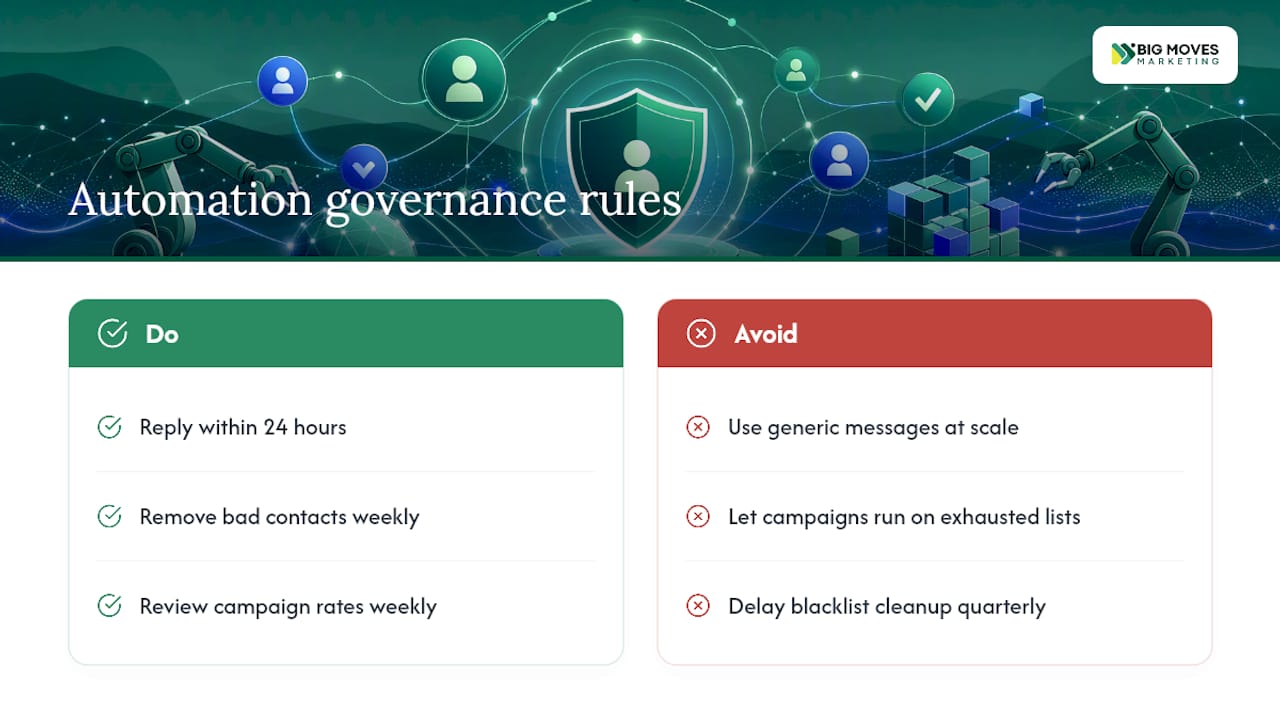
An agency client running HeyReach across a dozen client accounts learned this the hard way. The tool performed exactly as advertised. Reply rates cratered anyway, because nobody owned the weekly review, and three campaigns kept running against the same exhausted list for six weeks. The fix wasn’t a new tool. It was assigning one person to own the Monday morning number check.
That’s the pattern behind every strong result I’ve seen: fewer tools, more ownership.
— Veb
Buying another subscription doesn’t fix a messaging gap. If your outreach sequences aren’t converting because your positioning is fuzzy, no tool on this list will fix that for you.
A specialized marketing consultancy is the alternative to another software trial when the real problem is strategy, not automation. Rather than sell you a tool, Bigmoves designs the stack: auditing your current LinkedIn approach, building the messaging that makes automation actually convert, and running a pilot program to prove it works before you scale spend.
That’s the right call when your GTM is genuinely complex (multiple buyer personas, a technical product, a crowded category) or when you’ve already tried two or three tools from this list and reply rates still haven’t moved. The consultancy brings extensive hands-on B2B SaaS marketing experience to the audit, stack design, and pilot execution, so you’re not guessing which combination of tools and messaging actually fits your market.
If that sounds closer to your situation than “which tool should I trial next,” start with a go-to-market website and stack consult and get a pilot plan built around your actual positioning, not a generic playbook.
There isn’t one universal winner. Expandi leads for cloud-safe outreach at scale, PhantomBuster leads for data extraction, Dripify leads for sequence testing, and HeyReach leads for agencies managing multiple accounts.
LinkedIn automation tools handle repetitive prospecting tasks (connection requests, follow-up messages, profile visits, and data extraction) either through cloud-based servers or browser extensions, so sales and marketing teams can run outreach at a volume manual work can’t match.
LinkedIn’s own terms restrict third-party automation, and using any tool carries some inherent account risk regardless of vendor safety claims. Cloud tools with warm-up flows and daily limits reduce that risk but don’t eliminate it.
Not always, but most serious outreach tools integrate with Sales Navigator to pull targeted lists, and skipping it usually means weaker targeting and lower reply rates.
Pricing shapes vary: some tools charge per-user monthly subscriptions, others use credit or pay-per-verified-email models, and agency-focused platforms often price per sender account or seat.





%20-%20white.svg)