%20png%20copy.avif)

The Shopify App Store hosts over 13,000 applications competing for merchant attention. Your app's visibility in search results and category listings directly determines how many merchants discover, evaluate, and ultimately install it. For most early-stage Shopify apps, App Store Optimization (ASO) represents the highest-leverage growth channel available—yet it remains poorly understood and inconsistently executed.
This guide presents a systematic, data-backed approach to Shopify ASO. You won't find ranking hacks or algorithmic speculation here. Instead, you'll learn how the App Store actually works, which optimization levers matter most, and how to build a repeatable framework that scales with your app.
Shopify App Store Optimization is the discipline of improving your app's discoverability and conversion rate within the Shopify App Store. It operates at the intersection of search relevance, listing persuasion, and trust signals.
While ASO shares DNA with search engine optimization, the environments differ substantially:
ASO optimizes for a closed ecosystem with proprietary ranking algorithms, limited discovery surfaces, and high-intent searches. You're competing within a defined catalog where Shopify controls distribution entirely.
SEO targets open web search engines with broader query diversity, lower intent variance, and external link equity as a ranking factor. The competitive landscape is effectively infinite.
Paid acquisition (including Shopify Search Ads) buys visibility directly but requires continuous spend. ASO builds compounding organic visibility that doesn't disappear when you stop paying.
The strategic implication: for apps with limited marketing budgets, ASO delivers disproportionate returns. A well-optimized listing continues generating installs months after implementation, while paid campaigns require ongoing investment to maintain volume.

Three factors make ASO especially valuable for apps below 1,000 installs:
The Shopify App Store doesn't operate like Amazon's marketplace or Apple's App Store. Several widely circulated tactics either don't work or carry substantial risks:
Keyword stuffing in app names triggers editorial review delays and potential rejections. Shopify's listing guidelines explicitly prohibit excessive keyword usage in titles and subtitles.
Review manipulation schemes violate Shopify Partner Program policies. Apps caught soliciting reviews through incentives or purchasing fake reviews face delisting. The reputational damage far exceeds any temporary ranking benefit.
Frequent category switching to game "new in category" visibility resets your ranking history and confuses merchant expectations about your app's purpose. The disruption typically outweighs any discovery advantage.
Position ASO as a system, not a checklist. Effective optimization requires understanding how discovery surfaces, ranking inputs, and conversion dynamics interact. One-time implementation delivers minimal results; systematic iteration compounds returns.
Understanding the App Store's mechanics prevents wasted optimization effort. While Shopify doesn't publish its ranking algorithm details, the discovery architecture and observable ranking patterns reveal what matters.
Merchants find apps through three primary surfaces:
The dominant discovery path. Merchants enter short, intent-laden queries like "inventory sync" or "email marketing." The search results page displays apps ranked by a combination of relevance matching, engagement quality, and trust signals.
Search queries in the Shopify App Store skew toward functional job descriptions rather than brand names. Merchants search for what they need accomplished, not which app accomplishes it. This creates opportunity for well-positioned new entrants.
Merchants exploring a category (e.g., "Marketing" or "Orders and shipping") see apps sorted by a mix of relevance to that category, overall popularity, and recent performance. Categories serve dual purposes: they establish topical relevance for search ranking and provide browsing entry points for merchants without specific app names in mind.
Category rankings update continuously based on install velocity, review activity, and engagement metrics. An app can rank in the top 20 overall while appearing on page three of its primary category if competitive density is high.
Shopify occasionally features apps in curated collections or homepage placements. These editorial selections provide temporary traffic spikes but aren't reliably predictable or controllable. Built App relationships and exceptional app quality improve selection odds, but featured placement shouldn't factor into core ASO strategy.
Focus optimization efforts on search and category discovery—the 90% of visibility you can systematically influence.
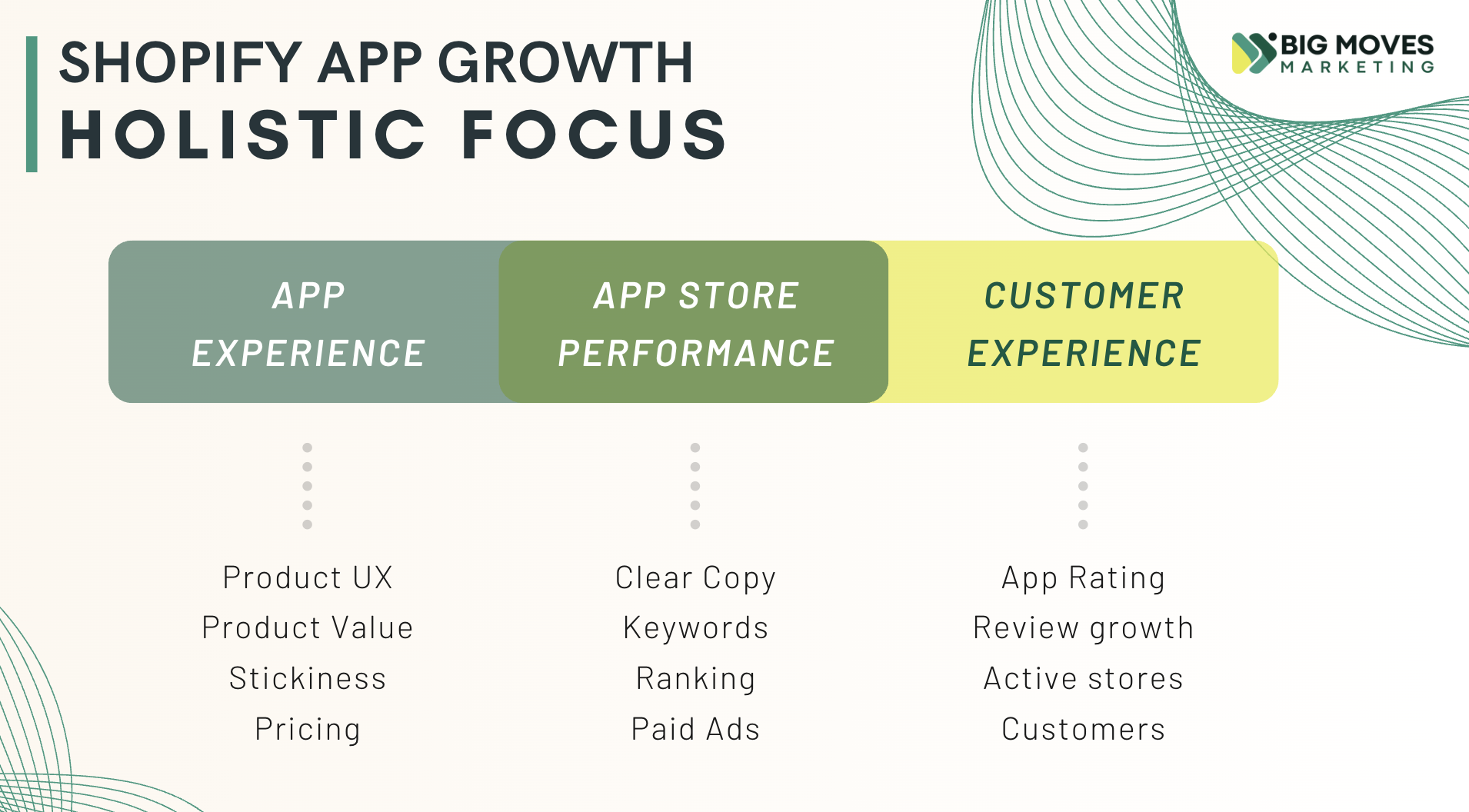
Observable ranking patterns and Shopify's public documentation point to three dominant ranking inputs:
1. Relevance (keywords + category)
Does your listing match what the merchant searched for? Relevance derives from keyword presence in your app name, subtitle, and description, combined with your category assignment. Apps with precise keyword-query alignment rank higher than tangentially related alternatives.
2. Conversion (listing performance)
How many merchants who view your listing actually install? High conversion rates signal valuable, well-presented solutions. Low conversion suggests poor product-market fit or weak listing execution. This metric likely influences ranking more than developers realize—Shopify benefits when merchants find and install useful apps quickly.
3. Trust (reviews & reputation)
Review count, average rating, review velocity, and developer responsiveness all contribute to perceived app quality. These trust signals affect both direct conversion (merchants read reviews before installing) and likely influence ranking algorithms (apps with strong trust metrics generate better user experiences).
Effective ASO requires coordinated optimization across three pillars. Improving one while neglecting others caps your overall performance.
Ensuring your app appears in search results for every relevant merchant query. This involves identifying high-value keywords, understanding search intent, and mapping keywords to specific listing components without sacrificing readability.
Core activities: Competitor keyword analysis, merchant language research, strategic keyword placement in name/subtitle/description.
Transforming impressions into installs by clearly communicating value, building trust, and reducing friction. Your listing must answer "What does this do?" and "Why should I trust it?" within seconds of arrival.
Core activities: Value proposition clarity, screenshot sequencing, social proof integration, description scannability.
Generating consistent positive reviews and managing your reputation actively. Review velocity (reviews per time period) matters more than total review count for both conversion and ranking.
Core activities: Ethical in-app review prompts, review response protocols, negative review mitigation.
These pillars reinforce each other: better keyword coverage drives more impressions, higher conversion rates improve ranking signals, and strong reviews boost both conversion and relevance scoring.

Keyword optimization determines which searches your app appears in. Get this wrong and you're invisible to your ideal merchants, regardless of how good your product is.
The Shopify App Store search environment has distinct characteristics that shape keyword strategy:
Shorter queries: Merchants rarely search beyond 2-4 words. "Email marketing automation" is common; "email marketing automation tool for abandoned cart recovery with SMS integration" doesn't exist in search logs. Target concise functional phrases.
Higher intent: App Store searches happen when merchants have active problems requiring solutions. Unlike informational Google searches, App Store queries carry installation intent. The merchant searching "inventory management" is likely installing an inventory app within the session.
Less forgiving relevance matching: Google's natural language processing and semantic understanding far exceed the App Store's. If a merchant searches "sync products" and your listing only contains "product synchronization," you may not appear. Keyword matching is more literal, requiring you to cover lexical variations.
Effective keyword research identifies the language merchants actually use, not the language founders prefer.
Examine the top 10 apps in your category and analyze their:
Use App Store search to identify competitors, then document keyword patterns systematically. Create a spreadsheet tracking which keywords appear in which listing sections across your competitive set.
Each category has dominant keyword themes. Browse category top-charts and note:
Apps ranking well in your target category have optimized for these patterns. Your listing must cover the same semantic territory while differentiating positioning.
Founders often describe features using technical terminology ("API-based product catalog synchronization") while merchants search using job language ("sync products between stores").
To surface merchant language:
Prioritize merchant language in customer-facing listing copy. Technical accuracy matters less than search match rates.
Strategic keyword placement balances search visibility with human readability.
Your app name carries maximum ranking weight. It must include your primary keyword while remaining memorable and brandable.
Strong patterns:
Weak patterns:
Shopify limits app names to 30 characters. Use them strategically.
The subtitle appears directly below your app name in search results and category listings. It's premium real estate for secondary keywords and value proposition clarity.
Effective subtitle formulas:
Avoid vague subtitles like "Grow your business" or "The complete solution." Be specific about what your app actually does.
Your description serves both algorithmic relevance and human persuasion. Structure it with keyword coverage and scannability in mind:
Use your primary keyword 3-5 times in the description. Use secondary keywords 1-2 times each. Natural language takes priority—keyword density formulas don't apply here.
Don't repeat keywords unnaturally: "Our inventory app provides inventory management for inventory sync across inventory channels" triggers editorial review flags and repels merchants.
Don't hide keywords in irrelevant sections: Adding "POS integration" to a pure email marketing app because it's a high-volume search term will hurt conversion when non-relevant merchants install then immediately uninstall.
Don't keyword-load meta elements merchants never see: Unlike web SEO, the App Store has no meta descriptions or alt text. Visible copy is the only optimization surface.

Category selection shapes both algorithmic visibility and merchant expectations. Most developers choose categories casually during initial submission, then never reconsider the decision.
Categories affect your app's performance through three mechanisms:
Some categories contain 500+ apps; others have fewer than 50. Your ranking ceiling depends partly on how many apps you're competing against for category visibility.
The "Marketing" category contains highly sophisticated competitors with thousands of reviews. The "Store design" category has fewer entrenched players. An app that solves a "Store design" problem but categorizes itself as "Marketing" handicaps its category ranking potential.
Category rankings update based on performance within that category. An app with 500 installs per month might rank #5 in a specialized category but #45 in a broad category, despite identical absolute performance.
Higher category rankings drive more browse traffic, creating a compounding advantage. Category selection directly impacts your growth trajectory.
Merchants browsing a category expect apps to solve specific types of problems. An app in the wrong category confuses merchant expectations, reducing conversion even if you rank well.
If a merchant browses "Orders and shipping" and finds your email marketing app (because you forced it into that category for competitive reasons), they'll ignore it. Category mismatch creates relevance friction.
Category selection requires balancing search demand against competitive dynamics.
High-demand categories like "Marketing" and "Sales and conversion" attract the most merchant search volume but contain the most competition. Lower-demand categories like "Reports" or "Store design" offer easier ranking but smaller addressable audiences.
Decision framework:
Consider an accounting integration app. It could categorize as:
If the app's core value is accounting specifically, "Finances" is the correct choice despite competitive intensity. Merchants searching for accounting solutions browse "Finances," not other categories.
But if the competitive landscape in "Finances" is dominated by 10+ apps with 1,000+ reviews each, a strategic alternative is finding a neighboring category where:
Sometimes category specificity beats category volume.
Category changes are permitted but carry risks.
Changing categories may reset certain ranking signals. Your app's performance history in the previous category doesn't fully transfer to the new category. You're effectively starting fresh in the category ranking calculation, though your overall review count and global metrics remain intact.
When to change:
When not to change:
If you decide to change categories, optimize timing:

Your listing's conversion rate—the percentage of page visitors who install your app—determines how efficiently you convert visibility into users. A listing converting at 15% extracts twice the value from organic rankings as one converting at 7.5%.
Merchants spend 3-5 seconds evaluating whether to explore your listing further. Your app name and subtitle must communicate clear value instantly.
The most effective listings make a single, concrete promise:
Specificity beats comprehensiveness. Merchants install apps to solve specific problems, not to explore vague capabilities. A listing that tries to appeal to everyone appeals to no one.
Weak listings list features: "Includes automation, analytics, reporting, and integrations!"
Strong listings describe outcomes: "Automate reorder points so you never oversell or overstock."
Features describe what the app has; outcomes describe what the merchant gets. In conversion optimization, outcomes win.
Screenshots are your primary visual persuasion tool. Most merchants scroll through screenshots before reading descriptions.
Your first screenshot must justify continued engagement. It should either:
Never waste screenshot #1 on your logo, generic welcome screens, or feature lists. That real estate is too valuable.
An effective screenshot sequence follows a narrative:
This structure mirrors how merchants evaluate tools: they confirm you understand their problem, assess whether your solution fits, then look for validation that it works.
Many merchants browse the App Store on mobile devices. Ensure:
Test your screenshots on a phone before publishing. If text is hard to read or interfaces look cluttered, simplify.
Your description serves two audiences: Shopify's relevance algorithm and actual merchants. Balance keyword coverage with persuasive clarity.
Few merchants read descriptions word-for-word. They scan for relevance signals. Optimize for scanning with:
Structure your description as a series of scannable chunks, each delivering one core message.
Weave trust indicators throughout the description:
Place trust signals early (first 2-3 paragraphs) to establish credibility before merchants evaluate features.
Include abbreviated customer testimonials in your description:
"Since implementing [App Name], our inventory errors dropped 94% and we recovered 8 hours per week in manual reconciliation." — Sarah M., Operations Manager
Keep testimonials specific and outcome-focused. Generic praise ("Great app!") adds minimal persuasive value.
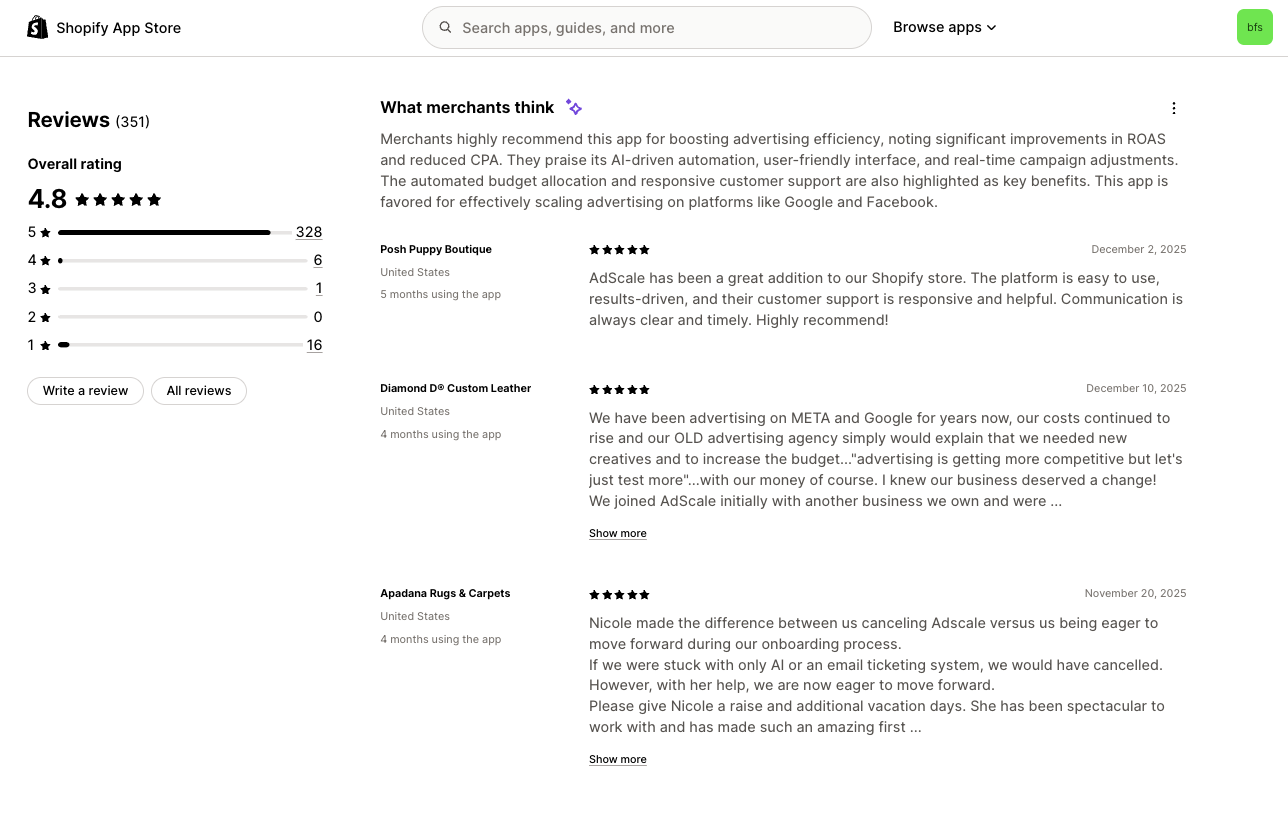
Reviews affect both conversion (merchants read reviews before installing) and likely influence ranking algorithms. Review management is optimization, not just reputation defense.
An app with 50 reviews in the past 30 days often ranks higher than an app with 500 total reviews accumulated over three years. Shopify's algorithm appears to weight recent review activity heavily.
Review velocity signals active usage and ongoing merchant satisfaction. A listing with consistent new reviews suggests the app remains relevant and well-maintained. Long gaps between reviews imply stagnation or declining quality.
Merchants also notice review recency. Reviews from 2023 matter less than reviews from this month when evaluating whether to install in 2026.
While Shopify doesn't publish ranking algorithm details, observable patterns suggest review velocity influences search rankings. Apps that suddenly increase review generation often see corresponding ranking improvements within 2-3 weeks.
Causation is difficult to isolate—apps generating more reviews may also be improving in other ways—but the correlation is consistent enough to warrant strategic review generation focus.
Shopify's Partner Program policies explicitly prohibit incentivized reviews, review purchasing, and review manipulation. Violating these policies risks app delisting.
Ethical review generation focuses on timing and friction reduction, not incentives or pressure.
Trigger review requests when merchants experience success with your app:
Don't prompt:
Optimal review request timing balances recency (capturing positive sentiment while fresh) with value validation (ensuring the merchant has experienced sufficient value to form an opinion).
The Shopify App Store review guidelines recommend waiting until merchants have actively used your app. A reasonable implementation:
Actions that trigger penalties or app removal:
Focus on earning reviews through exceptional product value and frictionless request timing, not manipulation.
Review responses serve dual purposes: they help the reviewer and signal attentiveness to prospective installers reading your listing.
Negative reviews are optimization opportunities, not disasters. How you respond affects both the original reviewer's sentiment and how prospects perceive your support quality.
Effective negative review response pattern:
Never argue with reviewers, blame Shopify/other integrations, or dismiss concerns as user error—even if factually correct. Prospects evaluate your professionalism under pressure.
Apps with 100% positive reviews often trigger skepticism ("Are these fake?"). Apps with some negative reviews but thoughtful, solution-oriented responses build trust.
Consistent review responses demonstrate:
Treat review responses as public support documentation that influences conversion.
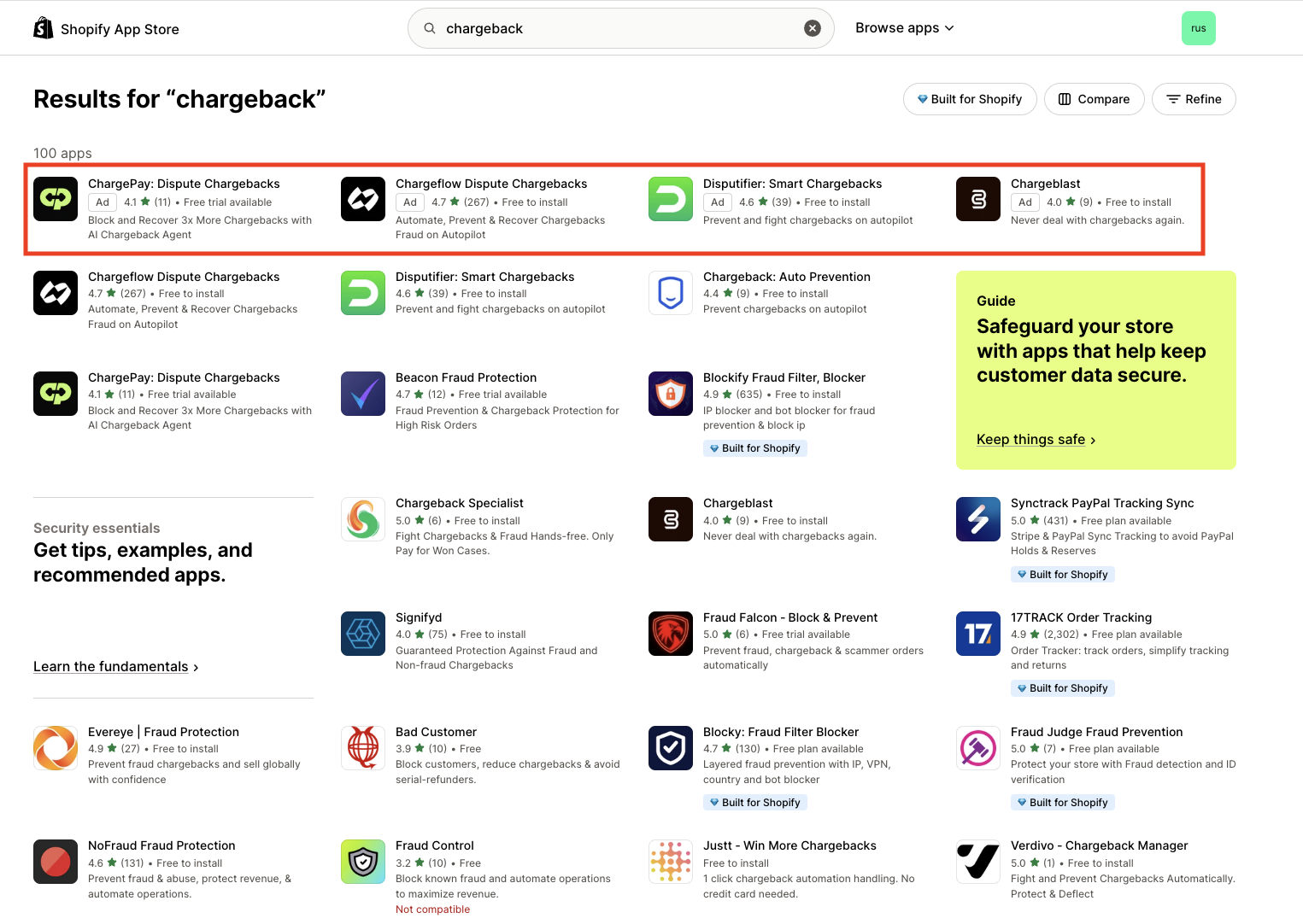
Shopify Search Ads allow apps to buy top placement in search results. While distinct from organic ASO, paid and organic strategies interact productively.
Paid ads don't directly improve organic rankings—Shopify keeps paid and organic algorithms separate. But strategic ad usage creates indirect ASO benefits:
Organic ASO excels at capturing existing demand. Merchants searching for "abandoned cart email" discover your app because you optimized for that keyword.
Search Ads can capture demand for keywords where you don't rank organically yet, allowing you to generate installs while your organic ranking builds.
Combined, ads provide immediate visibility while ASO builds long-term positioning.
Paid ads driving installs create indirect organic benefits:
Think of ads as a catalyst for ASO momentum, not a replacement for organic optimization.
Two tactical uses of Search Ads improve ASO execution:
Before investing effort optimizing for a keyword, run a small ad campaign targeting it. If the keyword generates high-volume, low-quality installs (users who install then immediately uninstall), it's not a good organic target either.
Ad data reveals:
Use ads as market research before optimizing listings.
Run ads to your listing, then A/B test listing variations by changing screenshots, descriptions, or value propositions while keeping ad traffic constant.
Measure how conversion rate changes with each listing iteration. This gives you rapid feedback on which messaging resonates before committing to organic optimization.
Process:
This approach compresses learning cycles from months to weeks.
Track metrics that predict business outcomes, not vanity metrics.
MetricWhat It MeasuresWhy It MattersTarget BenchmarkKeyword ImpressionsHow often your app appears in search results for tracked keywordsVisibility reach; indicates keyword coverage effectivenessIncreasing month-over-month for priority keywordsListing Conversion Rate(Installs / Listing Views) × 100Listing persuasiveness and product-market fit8-15% (varies by category)Review VelocityReviews received per 30-day periodTrust signal strength and user satisfaction trend2-5% of monthly installs leaving reviewsInstall Quality% of installs that activate (complete onboarding and use core feature)Product-market fit and keyword targeting accuracy40-60% activation within 7 daysUninstall Rate(Uninstalls / Total Installs) × 100 within 30 daysProduct value delivery and expectation alignment<20% within 30 days
Tracking implementation: Shopify Partner Dashboard provides install counts. Use your app's analytics (e.g., Mixpanel, Amplitude) to track activation and usage. Monitor review count manually or via scripts scraping your App Store listing.
Focus on improving conversion rate before scaling impression volume. A listing converting at 5% wastes 95% of its traffic. Optimize conversion first, then pursue broader keyword coverage.
Avoid these frequent optimization errors:
The mistake: Targeting high-volume generic keywords ("email marketing") when your app solves a specific problem ("SMS cart recovery for fashion brands").
Why it hurts: You rank for irrelevant traffic, waste impressions on unqualified merchants, and dilute conversion rate with poor-fit installs.
The fix: Target keywords matching your actual value proposition, even if search volume is lower. Better to own a specific keyword than rank poorly for a broad one.
The mistake: Choosing categories based on where you want to be positioned rather than where you can actually compete.
Why it hurts: You're buried on page five of a saturated category, receiving minimal browse traffic despite solid search optimization.
The fix: Evaluate category competitive intensity before selecting. Sometimes a less obvious category with better ranking potential delivers more installs than the "right" category where you can't break through.
The mistake: Spending heavily on Search Ads while your listing converts at 4%, then wondering why CAC is unsustainable.
Why it hurts: Paid traffic amplifies whatever conversion rate your listing achieves. If conversion is weak, ads just drive expensive installs that don't activate.
The fix: Optimize listing conversion to ≥10% before scaling ad spend. Use small ad tests for learning, not volume generation, until conversion works.
The mistake: Optimizing once during app launch, then never revisiting keyword strategy or listing messaging.
Why it hurts: The competitive landscape shifts, new keywords emerge, merchant language evolves, and your app's feature set expands. Static optimization decays in effectiveness.
The fix: Review ASO performance quarterly. Update keyword targeting based on search trend data, refresh screenshots when you ship major features, and iterate description messaging based on review feedback themes.
Use this stage-aware checklist to guide optimization:

ASO is foundational but not comprehensive. It integrates with broader growth activities:
Pre-1,000 installs: ASO is your primary growth channel. Organic visibility is achievable, capital requirements are low, and conversion improvements compound directly into user growth.
Post-1,000 installs: ASO becomes infrastructure that supports paid acquisition, content marketing, and partnership channels. Your optimized listing converts traffic from all sources—organic search, paid ads, blog content, marketplace integrations, and referrals.
At scale, ASO's main job shifts from driving growth to maximizing ROI on traffic you're generating through other channels.
Stage 1 (0-100 installs): ASO + product validation. Optimize listing to communicate value, but focus mostly on building a product merchants actually use.
Stage 2 (100-1,000 installs): ASO + systematic review generation + basic content. Invest deeply in listing optimization and review velocity. Begin creating educational content that drives external traffic to your listing.
Stage 3 (1,000-10,000 installs): ASO + paid acquisition + content marketing + partnerships. ASO becomes the conversion foundation while you scale traffic through ads, SEO, integrations, and channel partnerships.
Stage 4 (10,000+ installs): ASO + brand + enterprise. ASO maintains baseline organic visibility while brand strength and direct sales drive growth. But listing optimization still matters—every improvement multiplies across enormous traffic volume.
Use ASO and Search Ads in combination:
Never view paid and organic as either/or. They're complementary systems that reinforce each other.
ASO doesn't end at install. High-quality ASO targets merchants who are good long-term fits:
Track install quality—activation rate, usage frequency, churn—by traffic source. If organic search traffic activates at 60% but category browse traffic activates at 30%, your category choice or listing messaging needs refinement.
Effective ASO drives installs that become long-term customers, not just vanity install counts.
ASO isn't a one-time optimization—it's an ongoing system requiring iteration, testing, and strategic adjustment as competitive dynamics shift.
At Big Moves, we treat ASO as continuous improvement, not a checklist project. Our approach:
Competitive intelligence: We analyze keyword gaps, category positioning, and listing conversion benchmarks across your competitive set, identifying specific opportunities where optimization effort delivers disproportionate returns.
Conversion testing infrastructure: We implement systematic A/B testing frameworks for listing variables—screenshots, value propositions, social proof placement—using paid traffic for rapid learning, then applying winners organically.
Review velocity systems: We design ethical in-app review prompt strategies that maximize review generation without violating Shopify policies, including timing optimization, trigger event definition, and response protocols.
Integration with full growth strategy: We coordinate ASO with paid acquisition, content marketing, and partnership channels so listing optimization multiplies the effectiveness of every traffic source.
If you're a Shopify app looking to systematically improve discoverability and conversion, explore how we approach Shopify app growth.
Explore Big Moves Marketing Shopify App Growth services:




%20-%20white.svg)